
Lumine APK
A lightweight local HTTP/SOCKS5 proxy server protects TLS connections over TCP.
Download APK v0.9.3 · 17.8 MB- Version0.9.3
- Size17.8 MB
- RequiresAndroid 7.0
- Updated10/25/2026
- LicenceGPL-3.0-only
- PriceFree

About Lumine
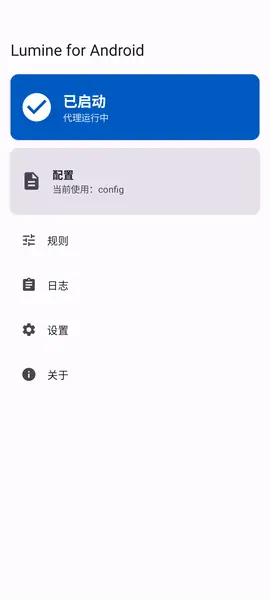
lumine-mobile is a Clash-style Android implementation built on top of enimul (formerly lumine).
It brings enimul's core to Android with a VPN/TUN pipeline and a mobile-friendly UI, offering a more Clash-like experience with smarter routing and rule management. You can also view it as a mobile-side functional extension of SniShaper.
Features
- Native Android implementation built with Kotlin and gomobile
- Proxying and routing powered by enimul core
- Clash-style configuration management UI
- Subscription URL import and rule switching
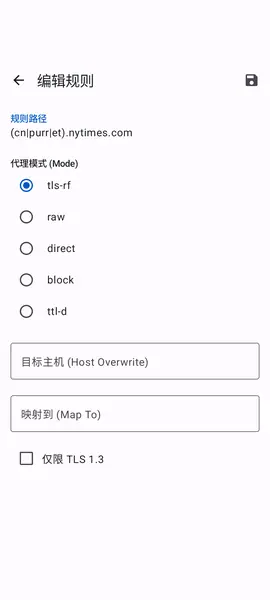
- Dedicated rule page for viewing, editing, and creating rules
- Blacklist-driven routing based on GFWlist for smarter traffic splitting
- Flexible Fake IP implementation
Upstream
- enimul (formerly lumine): https://github.com/lzpls/enimul
This project uses enimul as its core and includes a number of local modifications. Some modes may still be unstable. The configuration file syntax remains compatible with upstream. To optimize mobile performance, some original IP-range rules were removed and the routing behavior was adjusted.
Notes
This repository is not the official upstream enimul repository. It is an Android-focused implementation and adaptation layer. The project is still in an early stage, and some websites may behave unstably. Feedback is welcome.
APK file information
| Package name | com.moi.lumine |
|---|---|
| Version | 0.9.3 (code 9034) |
| Minimum Android | Android 7.0 · targets Android 16 |
| Architectures | x86_64 |
| SHA-256 | 6fc9f7aa4e5703097fbc45223be5c64b1a76b2c32a142e6c8d2d93a20f92fe5e |
| Signature | 8420d07c43a9a16a21527a66ee569c227e0c1415b59719132b8454012df6290a |
| Licence | GPL-3.0-only — copyleft free licence: the code is public and modified versions must stay free |
| Source code | github.com/SniShaper/lumine-for-android |
Permissions
- Internet access
- View network status
- Run in the background
- Start at boot
- Show notifications
- Keep the device awake
1 other technical permission(s)
REQUEST_IGNORE_BATTERY_OPTIMIZATIONS
Older versions
- Lumine 0.9.3October 25, 2026 · 17.8 MB
- Lumine 0.9.3October 25, 2026 · 16.3 MB
- Lumine 0.9.3October 25, 2026 · 16.9 MB
- Lumine 0.9.3October 25, 2026 · 16.2 MB
- Lumine 0.9.1September 9, 2026 · 18.2 MB
- Lumine 0.9.1September 9, 2026 · 16.8 MB
- Lumine 0.9.1September 9, 2026 · 17.3 MB
- Lumine 0.9.1September 9, 2026 · 16.6 MB
- Lumine 0.1.8July 10, 2026 · 16.1 MB
- Lumine 0.1.8July 10, 2026 · 14.7 MB
- Lumine 0.1.8July 10, 2026 · 15.3 MB
- Lumine 0.1.8July 10, 2026 · 14.6 MB
How to install Lumine APK
- Tap Download APK above, then open the file once the download has finished.
- If Android asks, allow your browser to install unknown apps.
- Tap Install. Lumine then appears with your other apps.
Having trouble? Read our guides how to install an APK on Android and "App not installed": how to fix it.
Frequently asked questions
Is Lumine free?
Yes. Lumine is distributed under the GPL-3.0-only licence: free, no subscription, and its source code is public.
Is this APK file safe?
The file is the one built and published by the F-Droid repository from the public source code. Its SHA-256 fingerprint is shown above, so you can compare it after downloading. How to check an APK.
Will Lumine work on my phone?
You need at least Android 7.0. The app also works without Google services, so it runs on recent Huawei phones too.