
Permission Pilot APK
Android app permission overview
Download APK v2.2.4-rc0 · 6.1 MB- Version2.2.4-rc0
- Size6.1 MB
- RequiresAndroid 6.0
- Updated9/14/2026
- LicenceGPL-3.0-only
- PriceFree
About Permission Pilot
Permission Pilot is a new kind of app to help you review apps and their permissions.
With each Android update permissions are getting more complex. Android showing permissions in various different locations, doesn't make it easier to review them:
- App Info page
- Special Access
- Permissions Manager
- and more...
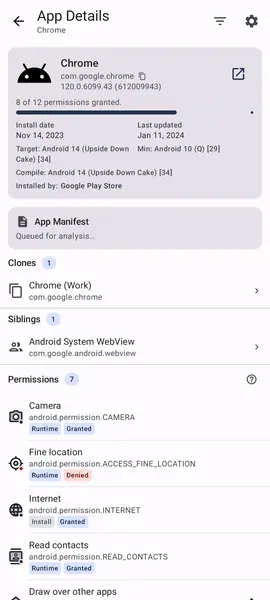
Permission Pilot lists all permissions in a single location, giving you a bird's eye view of app permissions.
Two perspectives are available: You can either view all permissions an app requests, or view all apps that request a permission.
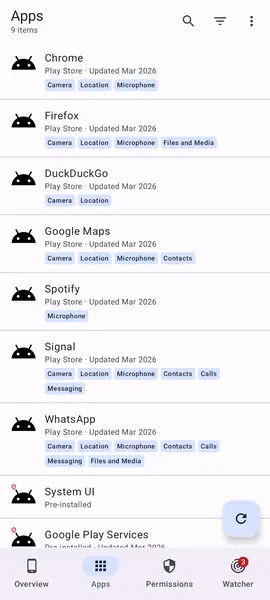
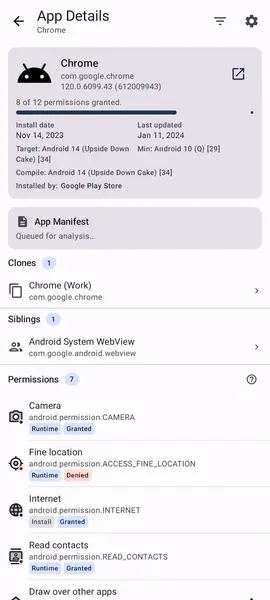
Apps tab All installed apps, including system apps and work profile apps. Clicking on any app will list all permissions that the app has requested, including those that show up under Permissions Manager and Special Access, along with their status. This will also include internet permissions, SharedUserID status!
Permissions tab All permissions that exist on your device, including those that show up under Permissions Manager and Special Access. Permissions are pre-grouped for easier navigation, e.g. Contacts, Microphone, Camera, etc. Clicking on a permission shows all the apps that request access to that permission.
Apps and permissions can be searched using free-text, sorted and filtered by different criteria.
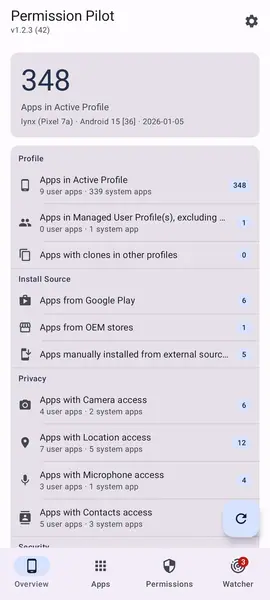
Overview A summary dashboard showing app counts by category — privacy, security, install source, and more. Each category row navigates directly to a filtered app list.
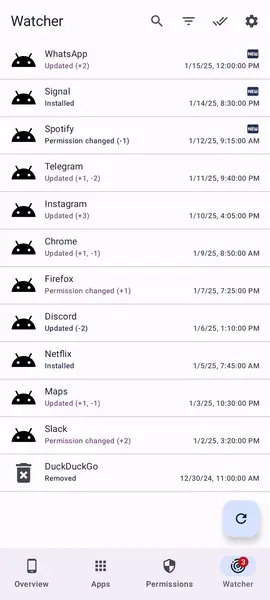
Permission Watcher Get notified when an app update adds new permissions or changes existing ones. Permission Watcher checks your apps after each update and creates a report if anything changed.
Data Export Export app or permission data in Markdown, CSV, or JSON.
Manifest Viewer Browse raw app manifests with searchable, categorized sections. See which apps can discover other installed apps.
What's new in version 2.2.4-rc0
Bug fixes and small improvements, so you can see what your apps are up to.
What changed in this version: myperm.darken.eu/changelog
Something broke or behaves oddly after updating? Tell me via Settings > Support. It's a one-person project, so replies can take a little while, but every report gets read.
APK file information
| Package name | eu.darken.myperm |
|---|---|
| Version | 2.2.4-rc0 (code 20204000) |
| Minimum Android | Android 6.0 · targets Android 16 |
| Architectures | arm64-v8a, armeabi-v7a, x86, x86_64 |
| SHA-256 | 281ade294d8ff89bd6f58906be6399d113930cf2e5b5920e655228e43c40cc10 |
| Signature | a9ad5c8855014d4bca1c3d4e60a083ae362d1977897b9ac3be2082fddf0d9c7f |
| Licence | GPL-3.0-only — copyleft free licence: the code is public and modified versions must stay free |
| Source code | github.com/d4rken-org/permission-pilot |
Permissions
- See installed apps sensitive
- Show notifications
- Run in the background
- Keep the device awake
- View network status
- Start at boot
Older versions
- Permission Pilot 2.2.4-rc0September 14, 2026 · 6.1 MB
- Permission Pilot 2.2.3-rc0September 7, 2026 · 6.1 MB
- Permission Pilot 2.2.1-rc0August 10, 2026 · 6.2 MB
How to install Permission Pilot APK
- Tap Download APK above, then open the file once the download has finished.
- If Android asks, allow your browser to install unknown apps.
- Tap Install. Permission Pilot then appears with your other apps.
Having trouble? Read our guides how to install an APK on Android and "App not installed": how to fix it.
Frequently asked questions
Is Permission Pilot free?
Yes. Permission Pilot is distributed under the GPL-3.0-only licence: free, no subscription, and its source code is public.
Is this APK file safe?
The file is the one built and published by the F-Droid repository from the public source code. Its SHA-256 fingerprint is shown above, so you can compare it after downloading. How to check an APK.
Will Permission Pilot work on my phone?
You need at least Android 6.0. The app also works without Google services, so it runs on recent Huawei phones too.





