
Raccoon APK
Unlimited social: write as much as you want and enrich posts with formatting
Download APK v1.2.1 · 20.3 MB- Version1.2.1
- Size20.3 MB
- RequiresAndroid 9
- Updated11/20/2026
- LicenceGPL-3.0-only
- PriceFree


About Raccoon
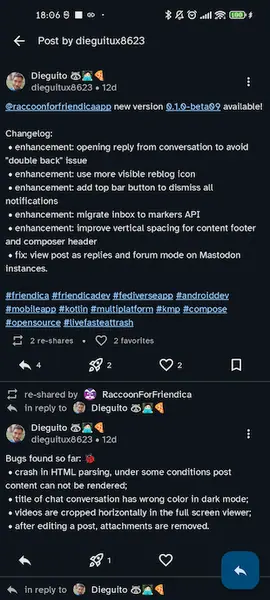
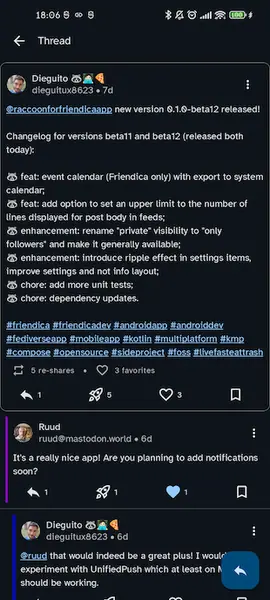
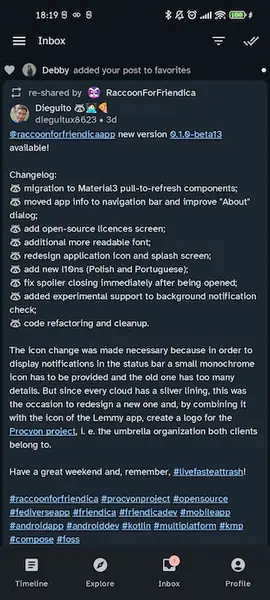
Raccoon is a social app designed to bring Friendica and Mastodon to you in a completely new way.
Main features:
- "tour" mode: explore the Fediverse without creating an account
- view multiple timelines (local, federated, followed, custom lists)
- traditional navigation (vertically scroll the message timeline)
- simplified navigation (horizontally swipe between posts)
- support for long posts, formatting, titles and spoilers
- formatting toolbar and message preview
- smart insertion of alt-text for attachments
- intuitive topic view for ActivityPub groups (Friendica, Lemmy, Gup.pe)
- view post details
- direct messages
- multimedia gallery
- circle and list management
- social view of blog RSS feeds
- integrated event calendar
- UI customization (colors, font size, post length, "distraction-free" mode, etc.)
- save drafts or schedule message publishing
- multi-account
- explore in "guest mode": view public timelines of other servers
- settings import/export
- 100% compatible with Mastodon and Mastodon Glitch-Soc version (long and formatted posts)
Friendica is a social environment integrated in the Fediverse, just like Mastodon and Pixelfed, which is also compatible with Bluesky and Tumblr.
Raccoon intends to make it easier to use Friendica and integrates the features of its web interface in an intuitive and lean view.
Additional features:
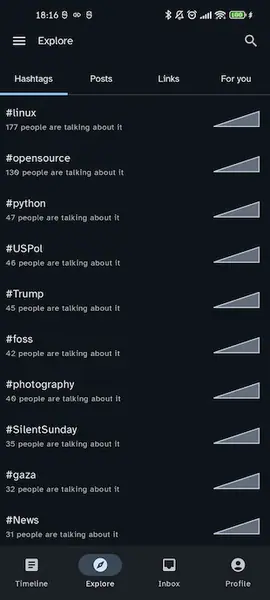
- view trending posts, hashtags and follow suggestions
- manage follow requests
- create post and user reports to moderators
- mute/block users, set custom rate limits and exclude terms from your timelines
- polls (read-only on Friendica)
- profile editing
- edit and delete your posts
- translate posts to your language
- and, of course, much more!
What's new in version 1.2.1
- fix: bottom bar and FAB nested scroll
- fix: navigation drawer transitions
- refactor: build script simplification
- chore: update dependencies
- chore: update l10n
APK file information
| Package name | com.livefast.eattrash.raccoonforfriendica |
|---|---|
| Version | 1.2.1 (code 121) |
| Minimum Android | Android 9 · targets API 37 |
| Architectures | arm64-v8a, armeabi-v7a, x86, x86_64 |
| SHA-256 | 892554cbca8e098be7ecd46af7be1586e2781efc49eaccf684401cdd9a1e5ced |
| Signature | a58deb540d4df4715c47ed4d4d70ce07d8cab92588973b0c4ae776f5d04164e5 |
| Licence | GPL-3.0-only — copyleft free licence: the code is public and modified versions must stay free |
| Source code | github.com/LiveFastEatTrashRaccoon/RaccoonForFriendica |
Permissions
- View network status
- Internet access
- Vibrate
- Show notifications
- Keep the device awake
- Start at boot
- Run in the background
Older versions
- Raccoon 1.2.1November 20, 2026 · 20.3 MB
- Raccoon 0.4.2March 8, 2025 · 34.0 MB
- Raccoon 0.4.1March 3, 2025 · 34.0 MB
How to install Raccoon APK
- Tap Download APK above, then open the file once the download has finished.
- If Android asks, allow your browser to install unknown apps.
- Tap Install. Raccoon then appears with your other apps.
Having trouble? Read our guides how to install an APK on Android and "App not installed": how to fix it.
Frequently asked questions
Is Raccoon free?
Yes. Raccoon is distributed under the GPL-3.0-only licence: free, no subscription, and its source code is public.
Is this APK file safe?
The file is the one built and published by the F-Droid repository from the public source code. Its SHA-256 fingerprint is shown above, so you can compare it after downloading. How to check an APK.
Will Raccoon work on my phone?
You need at least Android 9. The app also works without Google services, so it runs on recent Huawei phones too.





