
Restoid APK
Restoid - Backup Tool
Secure, deduplicated backup for apps and files powered by the restic engine.
Download APK v0.9.0 · 54.9 MB- Version0.9.0
- Size54.9 MB
- RequiresAndroid 10
- Updated11/23/2026
- LicenceGPL-3.0-only
- PriceFree
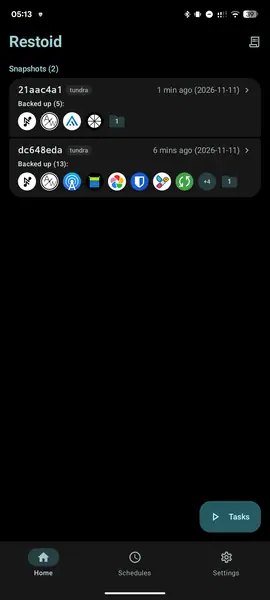
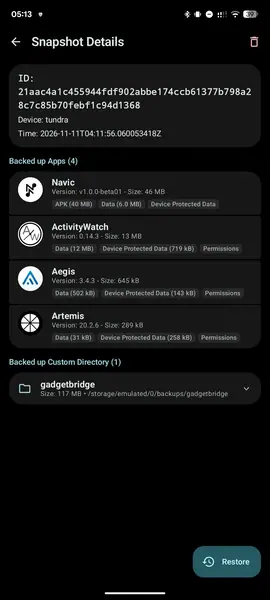
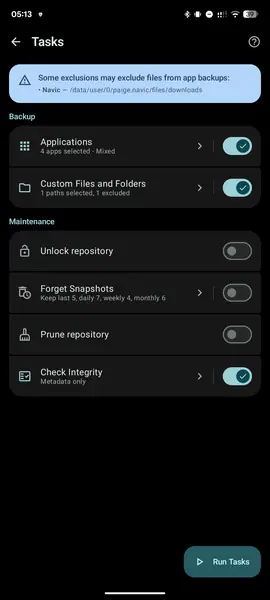
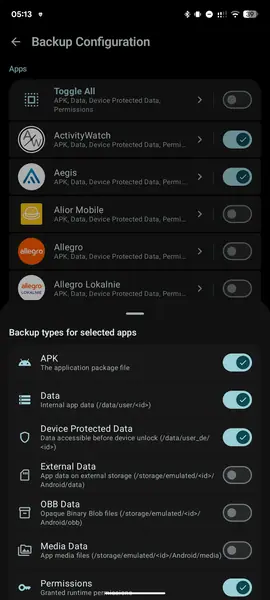
About Restoid
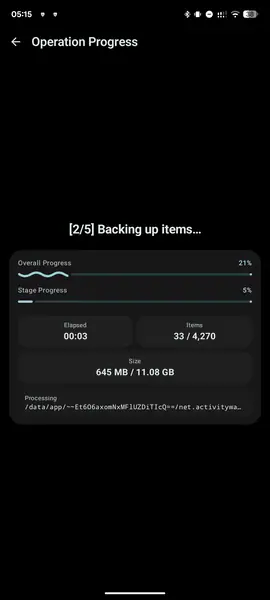
Restoid is a modern, privacy-focused backup solution for Android powered by the robust, open-source restic engine. Keep your apps, data, contacts, call logs, photos, and documents safe with enterprise-grade encryption and lightning-fast, space-saving deduplication.
Whether you want to back up photos to a home NAS, store encrypted snapshots in the cloud, or preserve full app data on a rooted device, Restoid gives you complete control without trackers, ads, or proprietary lock-in.
Root access is completely optional: back up custom folders, photos, documents, contacts, and call logs without root; root access is only needed to back up private app data.
Key Features:
Blazing Fast & Deduplicated
- Content-Defined Deduplication: Only unique changed blocks are uploaded, making subsequent backups blazingly fast and drastically more efficient than traditional tar.gz archives.
- Space-Saving: Multiple snapshots share common data, keeping storage footprints minimal.
Zero-Knowledge Encryption
- Enterprise security: All snapshots are encrypted with restic using state-of-the-art cryptography.
- Your passwords and encryption keys remain entirely under your control.
Flexible Storage Backends
- Local Storage: Save to internal memory, SD card, or USB OTG drives.
- Native Network Backends: Direct support for SFTP (SSH key & password), REST server, and Amazon S3-compatible object storage (Garage, MinIO, Wasabi, Cloudflare R2, Backblaze B2).
- Cloud & Extra Backends via Rclone: Connect to dozens of storage providers and protocols (such as Google Drive, OneDrive, Dropbox, WebDAV, Nextcloud, pCloud, and more) with built-in rclone support by importing or pasting an rclone.conf.
Full App & Data Backup (Root Required)
- Selectively back up installed user applications.
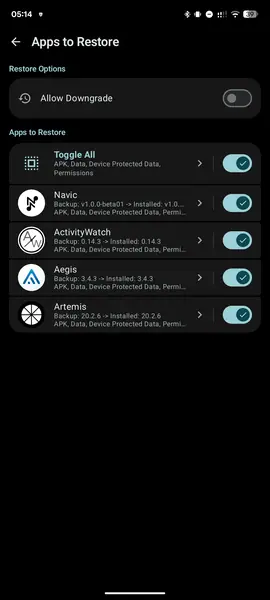
- Granular control: Choose whether to include APKs, app data, device-protected data, external files, or OBB caches.
Custom Files & Media
- Back up personal folders: DCIM, Documents, Downloads, or any directory on your device.
Contacts & Call Logs
- Back up and restore your contacts (including groups and photos) and call logs without requiring root; backups can run manually or on automated schedules.
Automated Background Schedules
- Configure recurring schedules (daily, weekly, or custom intervals).
- Smart trigger constraints: Run only while charging, on unmetered Wi-Fi, or when battery conditions are met.
Surgical & Safe Restore
- Restore entire apps or specific parts (e.g. restore data without overwriting the installed APK), custom directories, contacts, and call logs.
- Downgrade protection prevents accidental restoration of older versions over newer ones.
Zero Vendor Lock-in
- Standard restic format: Repositories use the native, open-source restic format. You can always access, inspect, mount, or restore your data on any PC (Linux, macOS, Windows) using the official restic CLI—even without your phone.
Maintenance & Repository Health
- Keep your repository compact with automated snapshot retention policies (prune old backups by day, week, month).
- Run repository integrity checks and clear stale locks with one tap.
Modern Material 3 Expressive UI
- Built with modern Jetpack Compose and Material 3 Expressive design, featuring dynamic theming, smooth animations, and edge-to-edge layout.
- 100% Free and Open Source (GPLv3), with zero analytics, telemetry, or third-party tracking.
What's new in version 0.9.0
- Built-in Rclone support with rclone.conf import for cloud backends
- Back up and restore contacts (with groups & photos) and call logs
- Back up and restore app special access and accessibility services
- Select target hosts in Forget Snapshots policies and schedules
- Expressive tab switch animations and navigation bar motion
- Adaptive snapshot header layout for narrow screens
- Stability, schedule state isolation, and build improvements
APK file information
| Package name | io.github.hddq.restoid |
|---|---|
| Version | 0.9.0 (code 312) |
| Minimum Android | Android 10 · targets API 37 |
| Architectures | x86_64 |
| SHA-256 | c4441513da770dd82e042ec9c10361333ca82177a4eb668b1236992e1044b956 |
| Signature | f15f66103ee8daaf23c3913025500f08ef360849a69c427bed7db7016c3b14d3 |
| Licence | GPL-3.0-only — copyleft free licence: the code is public and modified versions must stay free |
| Source code | github.com/hddq/restoid |
Permissions
- Internet access
- Keep the device awake
- View network status
- View Wi-Fi status
- Show notifications
- Run in the background
- See installed apps sensitive
- Access all files sensitive
- Read storage
- Write to storage
- Read contacts sensitive
- Edit contacts sensitive
- Call log sensitive
- Fingerprint / biometrics
- Fingerprint
- Start at boot
4 other technical permission(s)
ACCESS_LOCAL_NETWORK POST_PROMOTED_NOTIFICATIONS REQUEST_IGNORE_BATTERY_OPTIMIZATIONS WRITE_CALL_LOG
Older versions
- Restoid 0.9.0November 23, 2026 · 54.9 MB
- Restoid 0.9.0November 23, 2026 · 43.5 MB
- Restoid 0.9.0-beta.2November 20, 2026 · 54.7 MB
- Restoid 0.9.0-beta.2November 20, 2026 · 43.4 MB
- Restoid 0.8.0November 13, 2026 · 19.5 MB
- Restoid 0.8.0November 13, 2026 · 18.1 MB
How to install Restoid APK
- Tap Download APK above, then open the file once the download has finished.
- If Android asks, allow your browser to install unknown apps.
- Tap Install. Restoid then appears with your other apps.
Having trouble? Read our guides how to install an APK on Android and "App not installed": how to fix it.
Frequently asked questions
Is Restoid free?
Yes. Restoid is distributed under the GPL-3.0-only licence: free, no subscription, and its source code is public.
Is this APK file safe?
The file is the one built and published by the F-Droid repository from the public source code. Its SHA-256 fingerprint is shown above, so you can compare it after downloading. How to check an APK.
Will Restoid work on my phone?
You need at least Android 10. The app also works without Google services, so it runs on recent Huawei phones too.





