
Wake Me APK
Alarm clock for alternating weeks, timetables and rules like every 1st Tuesday
Download APK v1.6 · 1.7 MB- Version1.6
- Size1.7 MB
- RequiresAndroid 8.0
- Updated10/22/2026
- LicenceGPL-3.0-only
- PriceFree
About Wake Me
An alarm clock that follows your rhythm – even when it changes from week to week.
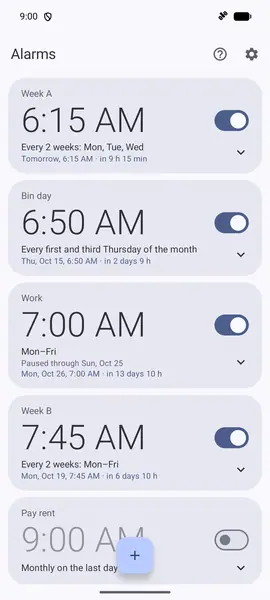
Alternating A/B weeks at school, early and late shifts, a uni timetable that differs every other week: with Wake Me you set each alarm once with a flexible rule and it simply goes off on the right days. No more switching alarms on and off every Sunday evening.
Rules the built-in clock app can't do
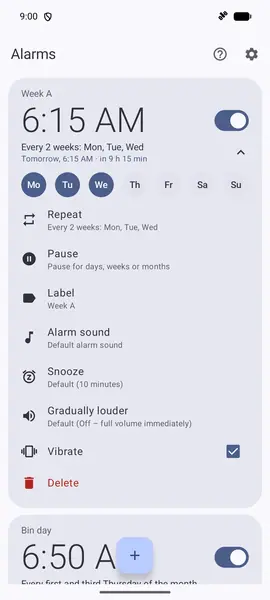
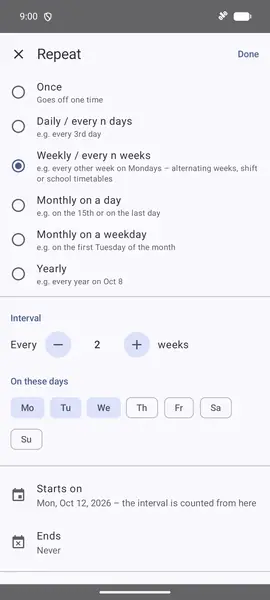
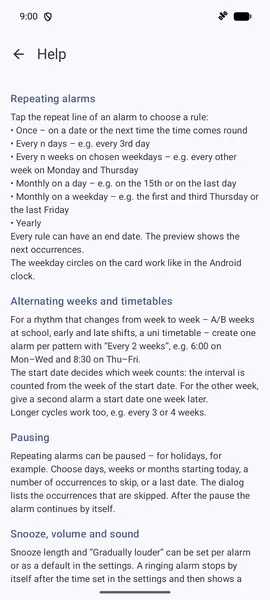
- Every n weeks on chosen weekdays – e.g. every other week on Monday and Thursday; the start date decides which week counts
- Monthly on a weekday – e.g. the 1st Tuesday, the 1st and 3rd Thursday or the last Friday of the month
- Monthly on a day – e.g. on the 15th or on the last day of the month
- Every n days, yearly or once – each with a start date and an optional end date
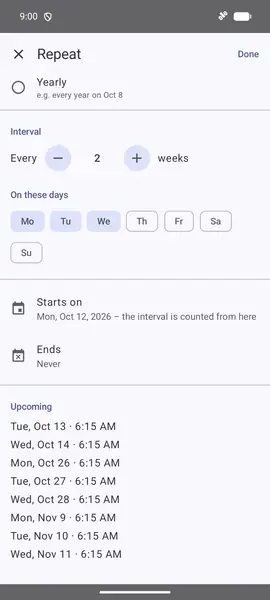
A preview shows the next occurrences, so you can see at a glance whether the rule is right.
Pause instead of deleting
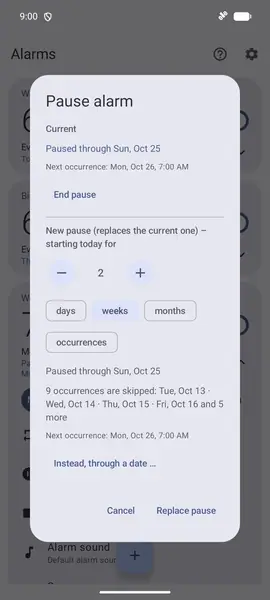
Going on holiday? Pause repeating alarms for days, weeks or months, for a number of occurrences or up to a date. The app lists which occurrences are skipped and resumes by itself afterwards.
Waking up
- Turn the phone face down to snooze
- Snooze length and gradually increasing volume per alarm or as a default
- Device alarm sounds, ringtones or your own audio file
- Rings reliably in Doze, battery saver and Do Not Disturb, and after a restart even before the first unlock
- Checks permissions, alarm volume and Do Not Disturb and warns you about anything that would stop the alarm
- “Missed alarm” notice if the device was off or the alarm stopped without a response
- Test alarm in 1 minute
Privacy
No internet permission, no ads, no tracking. Your alarms stay on your device.
Available in English, German, French, Spanish, Italian, Portuguese and Dutch; the app follows the system language.
What's new in version 1.6
First F-Droid release: available in English, German, French, Spanish, Italian, Portuguese and Dutch (follows the system language), new help page, turn the phone over to snooze, times follow the 12/24-hour setting.
APK file information
| Package name | io.github.anka1981.weckmich |
|---|---|
| Version | 1.6 (code 8) |
| Minimum Android | Android 8.0 · targets API 37 |
| Architectures | arm64-v8a, armeabi-v7a, x86, x86_64 |
| SHA-256 | fc8980e76bc5feefbfa1f319f6399707c59525fe4855cba6fcafeaa7ddb8fd7f |
| Signature | c886864a577b34477bbfc7c28f81f7dfb972ac8a5c9cc9045c84baace3fec6d8 |
| Licence | GPL-3.0-only — copyleft free licence: the code is public and modified versions must stay free |
| Source code | github.com/anka1981/WeckMich |
Permissions
- Start at boot
- Show notifications
- Run in the background
- Vibrate
- Keep the device awake
4 other technical permission(s)
USE_EXACT_ALARM SCHEDULE_EXACT_ALARM USE_FULL_SCREEN_INTENT REQUEST_IGNORE_BATTERY_OPTIMIZATIONS
How to install Wake Me APK
- Tap Download APK above, then open the file once the download has finished.
- If Android asks, allow your browser to install unknown apps.
- Tap Install. Wake Me then appears with your other apps.
Having trouble? Read our guides how to install an APK on Android and "App not installed": how to fix it.
Frequently asked questions
Is Wake Me free?
Yes. Wake Me is distributed under the GPL-3.0-only licence: free, no subscription, and its source code is public.
Is this APK file safe?
The file is the one built and published by the F-Droid repository from the public source code. Its SHA-256 fingerprint is shown above, so you can compare it after downloading. How to check an APK.
Will Wake Me work on my phone?
You need at least Android 8.0. The app also works without Google services, so it runs on recent Huawei phones too.




