Warpinator for Android (unofficial) APK
Share files across local network
Download APK v1.9 · 8.6 MB- Version1.9
- Size8.6 MB
- RequiresAndroid 5.0
- Updated12/28/2025
- LicenceGPL-3.0-only
- PriceFree
About Warpinator for Android (unofficial)
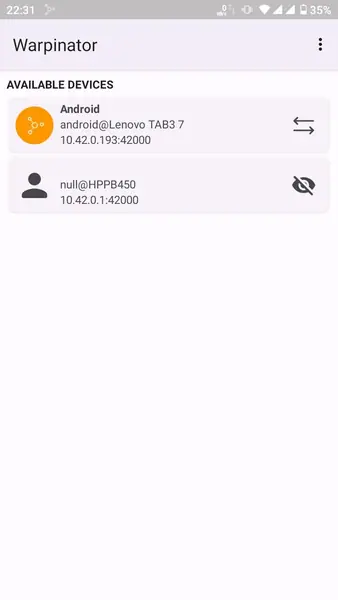
Warpinator for Android is an unofficial port of Linux Mint's file sharing tool of the same name. It is fully compatible with the original protocol and allows for easy transfer of files between Android and Linux devices.
Features:
- Automatic discovery of compatible services on local network
- Works on WiFi or hotspot, no internet connection needed
- Transfer any type of files quickly and easily
- Receive entire directories
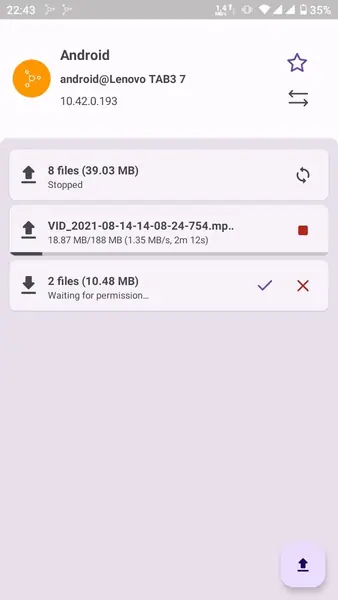
- Run multiple transfers in parallel
- Share files from other applications
- Limit who can connect using a group code
- Option to start on boot
- Does not require your location or any other unnecessary permissions
This application is free software licensed under GNU General Public License v3. You can obtain the source code at https://github.com/slowscript/warpinator-android
What's new in version 1.9
- Ability to send and receive text messages
- Send non-file shared content from other apps as text
- Option to connect manually, rescan and reannounce also from Share activity
- Use a temp file for safer overwriting
- Updated legacy launcher icon bitmaps
- Fixed missing spacing between remote cards
APK file information
| Package name | slowscript.warpinator |
|---|---|
| Version | 1.9 (code 1090) |
| Minimum Android | Android 5.0 · targets Android 15 |
| Architectures | arm64-v8a, armeabi-v7a, x86, x86_64 |
| SHA-256 | 0554b69a01dd325180003261772ae7e97e378409b98bb8242534a064ce79e4e4 |
| Signature | eb8c955a2a5c557d618d7924dc0ddfc3815881eb93a6facddda833c0dd49c237 |
| Licence | GPL-3.0-only — copyleft free licence: the code is public and modified versions must stay free |
| Source code | github.com/slowscript/warpinator-android |
Permissions
- Internet access
- Run in the background
- View network status
- View Wi-Fi status
- Start at boot
- Show notifications
- Keep the device awake
- Read storage
- Write to storage
1 other technical permission(s)
CHANGE_WIFI_MULTICAST_STATE
Older versions
- Warpinator for Android (unofficial) 1.9December 28, 2025 · 8.6 MB
- Warpinator for Android (unofficial) 1.8.5October 20, 2025 · 8.5 MB
- Warpinator for Android (unofficial) 1.8.4October 10, 2025 · 8.4 MB
How to install Warpinator for Android (unofficial) APK
- Tap Download APK above, then open the file once the download has finished.
- If Android asks, allow your browser to install unknown apps.
- Tap Install. Warpinator for Android (unofficial) then appears with your other apps.
Having trouble? Read our guides how to install an APK on Android and "App not installed": how to fix it.
Frequently asked questions
Is Warpinator for Android (unofficial) free?
Yes. Warpinator for Android (unofficial) is distributed under the GPL-3.0-only licence: free, no subscription, and its source code is public.
Is this APK file safe?
The file is the one built and published by the F-Droid repository from the public source code. Its SHA-256 fingerprint is shown above, so you can compare it after downloading. How to check an APK.
Will Warpinator for Android (unofficial) work on my phone?
You need at least Android 5.0. The app also works without Google services, so it runs on recent Huawei phones too.