
Webby Images Downloader APK
Pick images from a web page and download them all at once
Descargar APK v0.1.1 · 1,6 MB- Versión0.1.1
- Tamaño1,6 MB
- RequiereAndroid 8.0
- Actualizada7/10/2026
- LicenciaMIT
- PrecioGratis


Acerca de Webby Images Downloader
Descripción del desarrollador (en inglés).
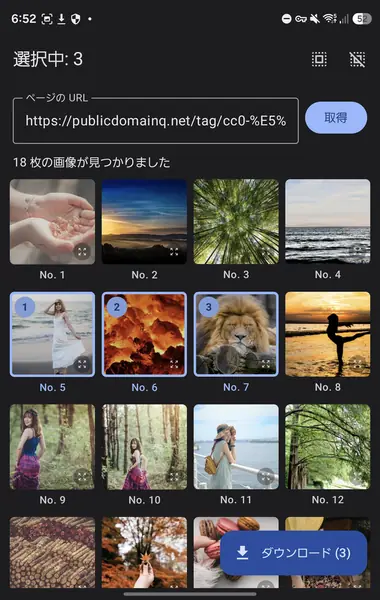
Webby Images Downloader lists the images on a web page, lets you pick the ones you want by tapping, and downloads them all at once.
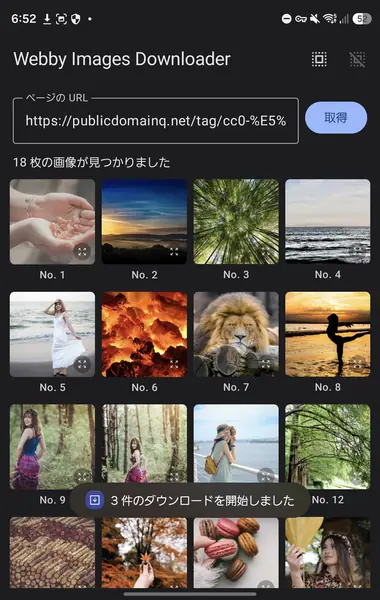
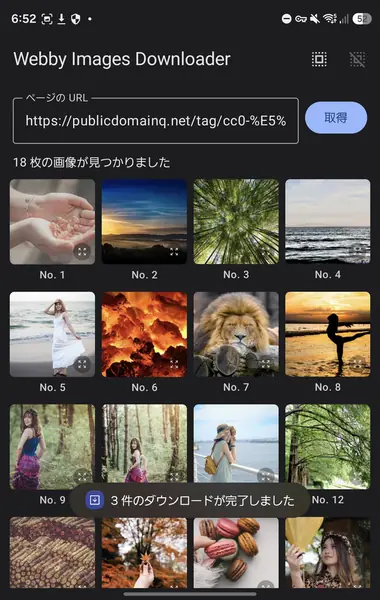
Share a page URL to the app from your browser, or paste it into the URL field. The app collects every image on the page and shows them in a grid, numbered in the order they appear on the page. Tap the images you want, tap Download, and they are saved to Download/WebbyImagesDownloader/ with their original file names.
Features:
- Receives a URL via the Android share sheet, or takes one pasted into the URL field
- Collects images from img tags (including lazy-load attributes), srcset, picture sources, and og:image / twitter:image meta tags
- Numbered grid with select-all and clear-selection buttons
- Downloads selected images in one batch through Android's download manager, so they keep going after you leave the app
- Notifies you when the batch finishes, including how many failed
- Built-in full-screen viewer with swipe, pinch to zoom, double-tap, and quick-scale gestures
- Light and dark theme
The app has no trackers and no analytics. The only network access is to the page URL you enter and to the images on it. Like a browser, it tells image hosts on other sites only which site the page is on, not the full page URL.
Plain http:// pages are allowed too, so pages on a server in your local network can be opened.
The UI is available in English and Japanese.
Novedades de la versión 0.1.1
- The UI is now in English, with Japanese for Japanese systems
- Image hosts on other sites receive only the origin of the page as Referer, not the full page URL
- Plain http:// pages can be opened, e.g. a server in your local network
- The viewer shows the pixel resolution of the current image
Información del archivo APK
| Nombre del paquete | io.github.aiya000.webbyimagesdownloader |
|---|---|
| Versión | 0.1.1 (código 2) |
| Android mínimo | Android 8.0 · diseñada para Android 16 |
| Arquitecturas | arm64-v8a, armeabi-v7a, x86, x86_64 |
| SHA-256 | e92dbc906cb6d93e84fee1525d14c88264b2b0d37a4a7b11e13f525160bc9b4a |
| Firma | 046dc800d81cb3d7769e860af3281c055d24869958a851bd18873ec3c239ab32 |
| Licencia | MIT — licencia libre permisiva: el código fuente es público y reutilizable |
| Código fuente | github.com/aiya000/Webby-Images-Downloader |
Permisos solicitados
- Acceso a Internet
- Escribir en el almacenamiento
- Mostrar notificaciones
- Leer el almacenamiento
Cómo instalar Webby Images Downloader APK
- Pulsa Descargar APK arriba y abre el archivo cuando termine la descarga.
- Si Android lo pide, permite que tu navegador instale apps desconocidas.
- Pulsa Instalar. Webby Images Downloader aparecerá junto a tus otras apps.
→ Cómo instalar un archivo APK en Android (paso a paso)
→ «La aplicación no está instalada»: causas y soluciones
Preguntas frecuentes
¿Webby Images Downloader es gratis?
Sí. Webby Images Downloader se distribuye con licencia MIT: gratis, sin suscripción y con el código fuente público.
¿Es seguro este archivo APK?
El archivo es el que compila y publica el repositorio F-Droid a partir del código fuente público. Su huella SHA-256 aparece arriba para que puedas compararla tras la descarga. ¿Un APK es peligroso? Cómo verificar un archivo antes de instalarlo
¿Funciona Webby Images Downloader en mi teléfono?
Necesitas como mínimo Android 8.0. La app también funciona sin los servicios de Google, así que funciona en los teléfonos Huawei recientes.