
GeoShare APK
GeoShare: Jump Between Maps
Open map links in other map apps and copy coordinates
Scarica l'APK v6.12.2 · 3,9 MB- Versione6.12.2
- Dimensione3,9 MB
- RichiedeAndroid 7.1
- Aggiornata20/11/2026
- LicenzaGPL-3.0-or-later
- PrezzoGratis
Informazioni su GeoShare
Descrizione fornita dallo sviluppatore (in inglese).
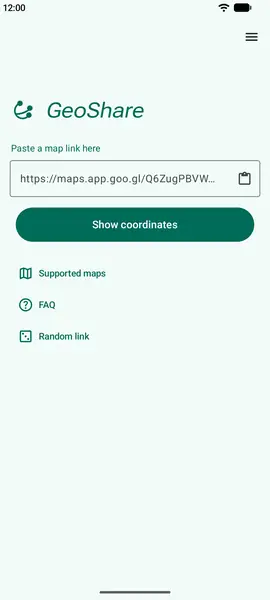
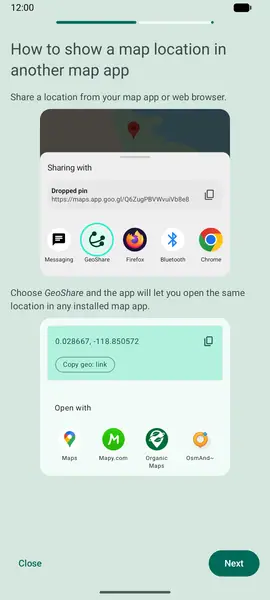
Share a map link with GeoShare and the app will open it in another installed map app.
Supported map links
- Google Maps
- Apple Maps
- 2GIS
- Amap (AutoNavi)
- Baidu Map (beta)
- Cartes IGN
- CoMaps
- HERE WeGo
- Kagi Maps
- Magic Earth
- MapQuest
- Maps.me
- Mapy.com
- OpenStreetMap
- Organic Maps
- OsmAnd
- Plus Codes (global only)
- Urbi
- Waze
- Yahoo! Maps
- Yandex Maps
- coordinates
GeoShare is not affiliated with or endorsed by any of the services mentioned.
Example use cases
When someone sends you a Google Maps link, but you prefer using OpenStreetMap, you can quickly open the same location in OsmAnd or Organic Maps.
When you like Google Maps for finding places, but you prefer a different app for navigation, you can easily switch from Google Maps to your favorite navigation app.
Other features
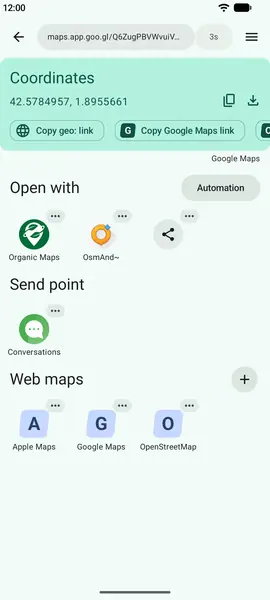
- Shows the geographic coordinates of a map link and allows copying them to clipboard in various formats, for example as a geo: link.
- Shows all points of a place list link.
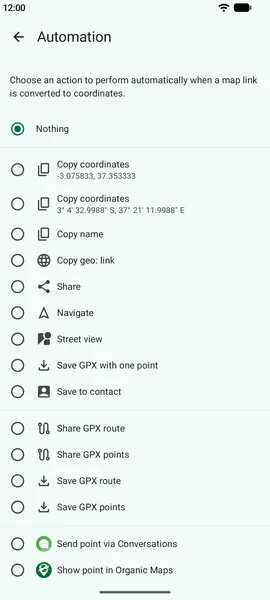
- Allows performing an action automatically when a map link is processed. (Pro feature)
- Allows launching navigation in all apps that support it, including TomTom.
- Allows opening a location in web maps, pre-installed ones or your own. (Pro feature)
- Allows saving a location as a GPX file.
- Allows sending a location via a messaging app.
- Allows saving a location to a contact.
- Retries on patchy internet connection.
- Allows pasting map links directly into the app, instead of sharing them with it.
- Interface adapts to tablets.
How it works and privacy considerations
GeoShare converts map links (e.g. https://maps.app.goo.gl/...) into geo: links that can be opened by other map apps. To create a geo: link, geographic coordinates are required. GeoShare reads them from the map URL.
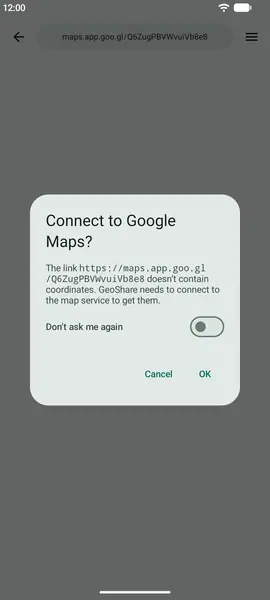
However, not all map URLs include coordinates. In such cases, GeoShare will prompt you for permission to connect to the map service (Google Maps, Apple Maps, etc.) and read the coordinates from HTTP headers, HTML document, or an API. For more detailed information, check the app’s FAQ screen.
Novità della versione 6.12.2
- Fixed support for Google Maps links with CID.
Informazioni sul file APK
| Nome del pacchetto | page.ooooo.geoshare |
|---|---|
| Versione | 6.12.2 (codice 55) |
| Android minimo | Android 7.1 · pensata per API 37 |
| Architetture | arm64-v8a, armeabi-v7a, x86, x86_64 |
| SHA-256 | 13dc58ee3f151bfdeac64d04aa244abafc5a8fb2604028e13dc126b9878a6213 |
| Firma | 1b27b17a9df05321a93a47df31ed0d6645ebe55d0e89908157d71c1032d17c10 |
| Licenza | GPL-3.0-or-later — licenza libera copyleft: il codice è pubblico e le versioni modificate devono restare libere |
| Codice sorgente | github.com/jakubvalenta/geoshare |
| Sito ufficiale | geoshare.ooooo.page/ |
Autorizzazioni richieste
- Accesso a Internet
- Posizione approssimativa sensibile
- Posizione precisa (GPS) sensibile
Versioni precedenti
- GeoShare 6.12.220 novembre 2026 · 3,9 MB
- GeoShare 6.12.113 novembre 2026 · 3,9 MB
- GeoShare 6.12.06 novembre 2026 · 3,9 MB
Come installare GeoShare APK
- Tocca Scarica l'APK qui sopra, poi apri il file al termine del download.
- Se Android lo chiede, consenti al browser di installare app sconosciute.
- Tocca Installa. GeoShare comparirà insieme alle altre app.
→ Come installare un file APK su Android (passo passo)
→ «App non installata»: cause e soluzioni
Domande frequenti
GeoShare è gratis?
Sì. GeoShare è distribuita con licenza GPL-3.0-or-later: gratuita, senza abbonamento e con codice sorgente pubblico.
Questo file APK è sicuro?
Il file è quello compilato e pubblicato dal repository F-Droid a partire dal codice sorgente pubblico. L'impronta SHA-256 è indicata qui sopra: puoi confrontarla dopo il download. Un APK è pericoloso? Come verificare un file prima di installarlo
GeoShare funziona sul mio telefono?
Serve almeno Android 7.1. L'app funziona anche senza i servizi Google, quindi anche sui telefoni Huawei recenti.





