
GeoShare APK
GeoShare: Jump Between Maps
Open map links in other map apps and copy coordinates
Download APK v6.12.2 · 3.9 MB- Version6.12.2
- Size3.9 MB
- RequiresAndroid 7.1
- Updated11/20/2026
- LicenceGPL-3.0-or-later
- PriceFree
About GeoShare
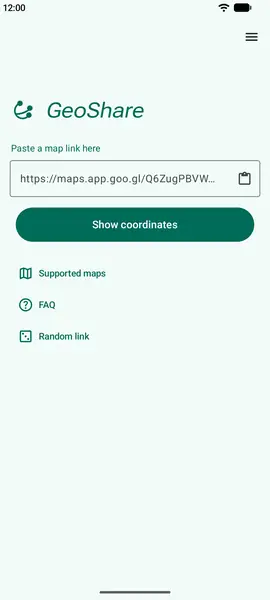
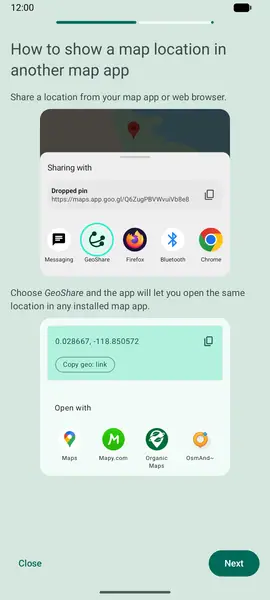
Share a map link with GeoShare and the app will open it in another installed map app.
Supported map links
- Google Maps
- Apple Maps
- 2GIS
- Amap (AutoNavi)
- Baidu Map (beta)
- Cartes IGN
- CoMaps
- HERE WeGo
- Kagi Maps
- Magic Earth
- MapQuest
- Maps.me
- Mapy.com
- OpenStreetMap
- Organic Maps
- OsmAnd
- Plus Codes (global only)
- Urbi
- Waze
- Yahoo! Maps
- Yandex Maps
- coordinates
GeoShare is not affiliated with or endorsed by any of the services mentioned.
Example use cases
When someone sends you a Google Maps link, but you prefer using OpenStreetMap, you can quickly open the same location in OsmAnd or Organic Maps.
When you like Google Maps for finding places, but you prefer a different app for navigation, you can easily switch from Google Maps to your favorite navigation app.
Other features
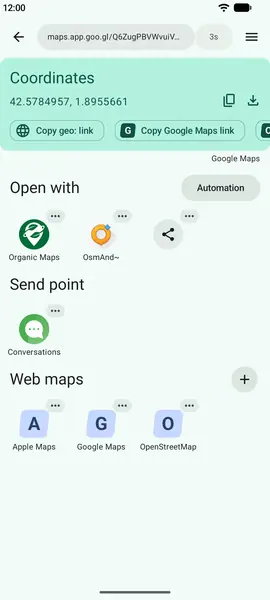
- Shows the geographic coordinates of a map link and allows copying them to clipboard in various formats, for example as a geo: link.
- Shows all points of a place list link.
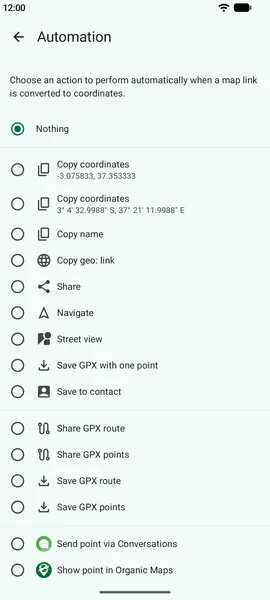
- Allows performing an action automatically when a map link is processed. (Pro feature)
- Allows launching navigation in all apps that support it, including TomTom.
- Allows opening a location in web maps, pre-installed ones or your own. (Pro feature)
- Allows saving a location as a GPX file.
- Allows sending a location via a messaging app.
- Allows saving a location to a contact.
- Retries on patchy internet connection.
- Allows pasting map links directly into the app, instead of sharing them with it.
- Interface adapts to tablets.
How it works and privacy considerations
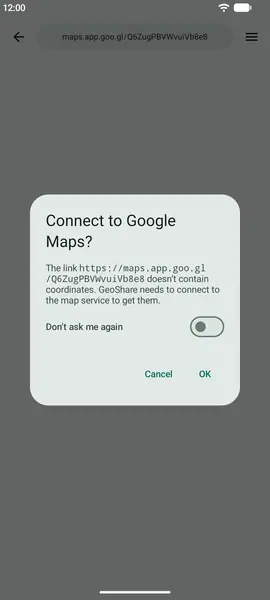
GeoShare converts map links (e.g. https://maps.app.goo.gl/...) into geo: links that can be opened by other map apps. To create a geo: link, geographic coordinates are required. GeoShare reads them from the map URL.
However, not all map URLs include coordinates. In such cases, GeoShare will prompt you for permission to connect to the map service (Google Maps, Apple Maps, etc.) and read the coordinates from HTTP headers, HTML document, or an API. For more detailed information, check the app’s FAQ screen.
What's new in version 6.12.2
- Fixed support for Google Maps links with CID.
APK file information
| Package name | page.ooooo.geoshare |
|---|---|
| Version | 6.12.2 (code 55) |
| Minimum Android | Android 7.1 · targets API 37 |
| Architectures | arm64-v8a, armeabi-v7a, x86, x86_64 |
| SHA-256 | 13dc58ee3f151bfdeac64d04aa244abafc5a8fb2604028e13dc126b9878a6213 |
| Signature | 1b27b17a9df05321a93a47df31ed0d6645ebe55d0e89908157d71c1032d17c10 |
| Licence | GPL-3.0-or-later — copyleft free licence: the code is public and modified versions must stay free |
| Source code | github.com/jakubvalenta/geoshare |
| Official website | geoshare.ooooo.page/ |
Permissions
- Internet access
- Approximate location sensitive
- Precise location (GPS) sensitive
Older versions
- GeoShare 6.12.2November 20, 2026 · 3.9 MB
- GeoShare 6.12.1November 13, 2026 · 3.9 MB
- GeoShare 6.12.0November 6, 2026 · 3.9 MB
How to install GeoShare APK
- Tap Download APK above, then open the file once the download has finished.
- If Android asks, allow your browser to install unknown apps.
- Tap Install. GeoShare then appears with your other apps.
Having trouble? Read our guides how to install an APK on Android and "App not installed": how to fix it.
Frequently asked questions
Is GeoShare free?
Yes. GeoShare is distributed under the GPL-3.0-or-later licence: free, no subscription, and its source code is public.
Is this APK file safe?
The file is the one built and published by the F-Droid repository from the public source code. Its SHA-256 fingerprint is shown above, so you can compare it after downloading. How to check an APK.
Will GeoShare work on my phone?
You need at least Android 7.1. The app also works without Google services, so it runs on recent Huawei phones too.





