
AirLyrics APK
Synced floating lyrics: online search, local imports, and word-by-word support
Baixar APK v1.2.10 · 13,5 MB- Versão1.2.10
- Tamanho13,5 MB
- RequerAndroid 8.0
- Atualizado17/11/2026
- LicençaMIT
- PreçoGrátis
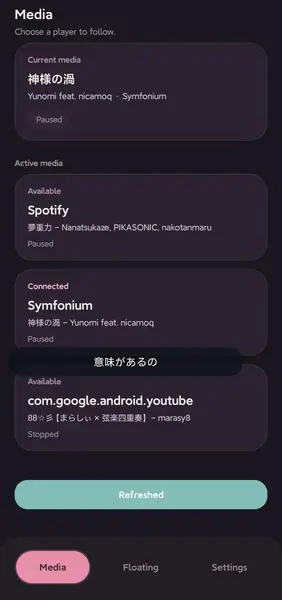
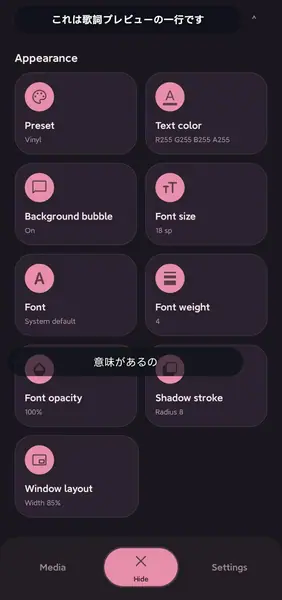
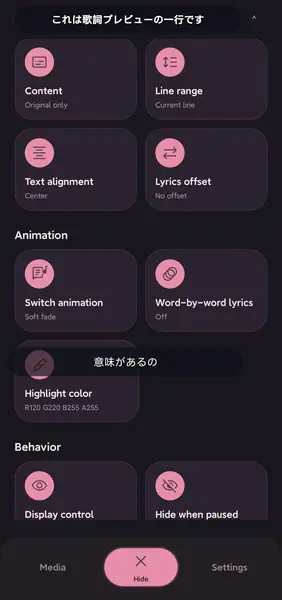
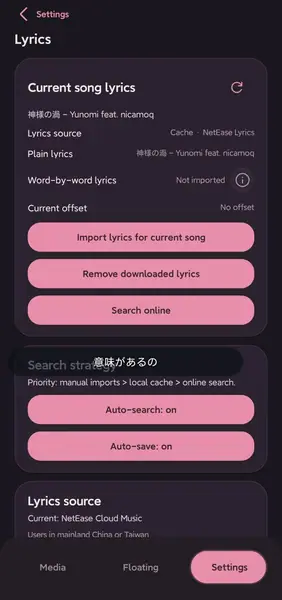
Sobre o AirLyrics
Descrição fornecida pelo desenvolvedor (em inglês).
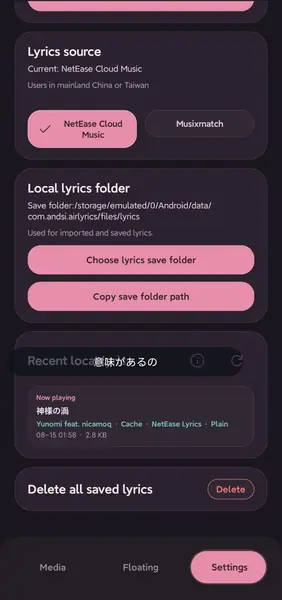
AirLyrics is a lightweight floating lyrics app.
Features:
- Detect current media and show synced floating lyrics
- Search NetEase Cloud Music, Musixmatch, LRCLIB, Spicy Lyrics, or Apple Music (sign-in required), and preview results before applying them
- Manually search word-by-word lyrics from NetEase Cloud Music, Kugou, and QQ Music
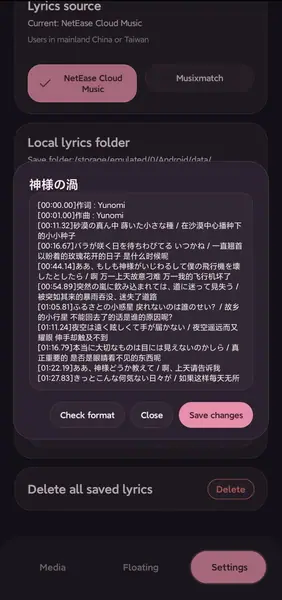
- Import local LRC, TTML, or TXT files, including LDDC word-timed LRC; display translations and adjust timing
- Edit saved lyrics, including word text and timing; export, import, or delete lyrics in batches
- Customize the floating window, lyric glow, and animations; switch between light and dark themes
AirLyrics is not a music player and does not include a complete lyrics database. If an online match is inaccurate, you can import local lyrics.
Plain text lyrics can be saved and edited but cannot be displayed in the floating window.
Privacy:
AirLyrics has no analytics or own server. Notification access is used on-device for media detection. Online searches go directly to the selected providers; optional Apple Music sign-in sends an account token to Apple.
Novidades da versão 1.2.10
v1.2.10
- Search word-by-word lyrics from NetEase Cloud Music, Kugou, and QQ Music.
- Adjust the lyrics search layout and move the source button.
- Show loading feedback in the Display scope app picker.
Informações do arquivo APK
| Nome do pacote | com.andsi.airlyrics |
|---|---|
| Versão | 1.2.10 (código 21) |
| Android mínimo | Android 8.0 · feito para Android 16 |
| Arquiteturas | arm64-v8a |
| SHA-256 | f04f7266f6be350994f2d8fabc7c3619f659cc0f42a41f1dbbadc8558ab5beac |
| Assinatura | c892efad40528eda2064c251699250a907672cbf959bc7a23a7304bbb173f18c |
| Licença | MIT — licença livre permissiva: o código-fonte é público e reutilizável |
| Código-fonte | github.com/AirLyrics/AirLyrics |
Permissões solicitadas
- Sobrepor outros apps sensível
- Funcionar em segundo plano
- Mostrar notificações
- Acesso à internet
- Ver o estado da rede
Mais 1 permissão(ões) técnica(s)
PACKAGE_USAGE_STATS
Versões anteriores
- AirLyrics 1.2.1017 de novembro de 2026 · 13,5 MB
- AirLyrics 1.2.911 de novembro de 2026 · 13,3 MB
- AirLyrics 1.2.86 de novembro de 2026 · 11,5 MB
Como instalar o AirLyrics APK
- Toque em Baixar APK acima e abra o arquivo quando o download terminar.
- Se o Android pedir, permita que o navegador instale apps desconhecidos.
- Toque em Instalar. O AirLyrics aparecerá junto aos seus outros apps.
→ Como instalar um arquivo APK no Android (passo a passo)
→ "App não instalado": causas e soluções
Perguntas frequentes
O AirLyrics é grátis?
Sim. O AirLyrics é distribuído sob a licença MIT: grátis, sem assinatura e com código-fonte público.
Este arquivo APK é seguro?
O arquivo é o compilado e publicado pelo repositório F-Droid a partir do código-fonte público. A impressão digital SHA-256 aparece acima para você comparar depois do download. APK é perigoso? Como verificar um arquivo antes de instalar
O AirLyrics funciona no meu celular?
É preciso ter pelo menos Android 8.0. O app também funciona sem os serviços do Google, inclusive em celulares Huawei recentes.