Enhanced Music Controller Lite APK
Dálkový ovladač pro zařízení Onkyo
Stáhnout APK v1.37 · 4,1 MB- Verze1.37
- Velikost4,1 MB
- VyžadujeAndroid 4.0
- Aktualizace30. 8. 2025
- LicenceGPL-3.0-or-later
- CenaZdarma
O aplikaci Enhanced Music Controller Lite
Popis od vývojáře (v angličtině).
This app allows remote control of a Network Player or a Network A/V Receiver via the local network. The app supports Onkyo/Pioneer/Integra released in April 2016 or later and Denon/Marantz with build-in HEOS technology. Some TEAC models like Teac NT-503 are also supported.
The two most popular features of the app are music playback and sound profile management.
Other benefits include:
- Maximum privacy: No ads, no trackers, no telemetry, no special permissions like GPS
- The modern Material design supports different color themes and works on smartphones and/or tablets in portrait and landscape mode
- One-click access to music playback actions
- One-click access to media items using shortcuts
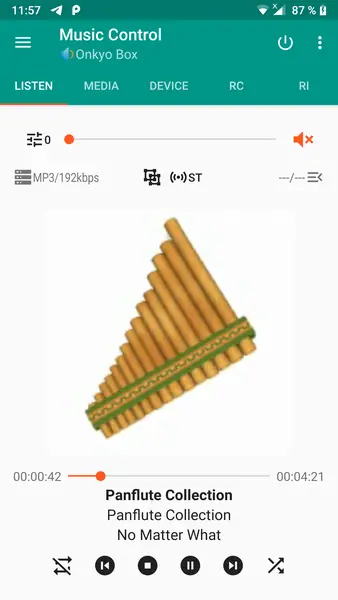
- Full music playback control (play, stop, pause, track up/down, time seek, repeat and random modes)
- Full tone control (listening modes, bass, center, treble and subwoofer levels)
- Enhanced Play Queue support (add, replace, remove, remove all, change playback order)
- TuneIn Radio, Deezer, Spotify and Tidal streaming (if supported by receiver)
- DAB / FM / AM (if supported by receiver)
- Multi-zone support (if supported by receiver)
- Multi-room support: Allows control of groups of devices attached via FlareConnect (for Onkyo/Pioneer/Integra only). Ability to control FlareConnect without WiFi
- Control of devices attached via RI (for Onkyo/Pioneer/Integra only)
- Display device details and control device settings such as dimmer level, digital filter, auto power, and sleep timer
- Allows control of receivers over an OpenVPN connection (even over a cellular connection)
- Integration with "Tasker"
Known limitations:
- Please note that the app does not support the music streaming from your phone to the network player or the receiver
- In order to login into Deezer, Tidal, or Spotify, you need the official Onkyo/Denon app additionally to this app
- Pioneer models before year 2016 are NOT supported, for example: VSX-424, VSX-529, VSX-830, VSX-920K, VSX-923, VSX-924, VSX-1021, VSX-1121, SC-95, SC-LX79, N-50, N-50a, N-70A
- Following Denon models are not supported: AVR-X1000, DNP-730AE, Heos Link 2, Denon Home 150, Marantz n40
- Following models do not support "Play Queue" feature (that is a limitation of the Onkyo firmware): CR-N765, DTR-40.5, HM76, HT-R693, HT-R695, TX-8130, TX-8150, TX-NR626, TX-NR636, TX-NR646, TX-RZ900
At the moment, the app is tested and works with following devices:
- Onkyo: TX-L20D, TX-L50, TX-NR414, TX-NR509, TX-NR525, TX-NR535, TX-NR575E, TX-NR616, TX-NR636, TX-NR646, TX-NR656, TX-NR676E, TX-NR686, TX-NR696, TX-NR818, TX-RZ50, TX-RZ70, TX-RZ810, TX-RZ830, TX-RZ900, TX-RZ1100, TX-8130, TX-8150, TX-8250, TX-8260, TX-8270, TX-8390, TX-8470, R-N855, CS-N575D, CR-N755, CR-N765, CR-N775D, HT-S7805, NS-6130, NS-6170, NCP-302
- Integra: DTM-6, DRX-5.2, DTR 30.7, DTR 40.7
- Pioneer (models after 2016): VSX-LX101, VSX-LX103, VSX-LX104, VSX-LX302, VSX-LX303, VSX-LX503, VSX-LX504, VSX-S520D, VSX-831, VSX-832, VSX-932, VSX-933, VSX-935, VSX-1131, SC-LX701, SC-LX901, SX-N30, SX-S30DAB, NC-50DAB, N-50AE, N-70AE, XC-HM86D, MRX-3, MRX-5
- Teac: NT-503, AG-D500
- Denon with build-in HEOS: DRA-800H, AVR-S750H, AVR-S760H, AVR-X1500H, AVR-X1800H, AVR-X2400H, AVR-X2600H, AVR-X2700H, AVR-X2800H, AVR-X3700H, AVR-X3800H, AVR-X4300H, AVR-X4400H, AVR-X4500H, AVR-X6300H, AVR-X6400H
- Marantz with build-in HEOS: NR1200, NR1508, NR1510, NR1711, SR5015, SR6015, SR7015, Cinema 40, Cinema 50, Cinema 60
Novinky ve verzi 1.37
- Denon: Added a possibility to create, rename, or delete a playlist
- Fixed a bug: Shortcuts with special characters cannot be handled
Informace o souboru APK
| Název balíčku | com.mkulesh.onpc |
|---|---|
| Verze | 1.37 (kód 50) |
| Minimální Android | Android 4.0 · cílová Android 15 |
| Architektury | Všechny (univerzální) |
| SHA-256 | 3b73f391a1a6f2441cffa7d8a7b347418f6a1a18a290cd2939adee611d913740 |
| Podpis | 6a7be8ee0aabea163a0f328c46013a00c00fb184cb3806ff2dbd9cae7d31a065 |
| Licence | GPL-3.0-or-later — svobodná copyleftová licence: kód je veřejný a upravené verze musí zůstat svobodné |
| Zdrojový kód | github.com/mkulesh/onpc |
Oprávnění
- Stav sítě
- Stav Wi-Fi
- Přístup k internetu
Starší verze
- Enhanced Music Controller Lite 1.3730. srpna 2025 · 4,1 MB
- Enhanced Music Controller Lite 1.3618. května 2025 · 4,1 MB
- Enhanced Music Controller Lite 1.3514. května 2025 · 4,1 MB
Jak nainstalovat Enhanced Music Controller Lite APK
- Klepněte výše na Stáhnout APK a po stažení soubor otevřete.
- Pokud se Android zeptá, povolte prohlížeči instalovat neznámé aplikace.
- Klepněte na Instalovat. Enhanced Music Controller Lite se objeví mezi ostatními aplikacemi.
→ Jak nainstalovat soubor APK na Android (krok za krokem)
→ „Aplikace nebyla nainstalována“: příčiny a řešení
Časté dotazy
Je Enhanced Music Controller Lite zdarma?
Ano. Enhanced Music Controller Lite je šířena pod licencí GPL-3.0-or-later: zdarma, bez předplatného a s veřejným zdrojovým kódem.
Je tento soubor APK bezpečný?
Soubor sestavil a zveřejnil repozitář F-Droid z veřejného zdrojového kódu. Jeho otisk SHA-256 je uveden výše — po stažení jej můžete porovnat. Je APK nebezpečné? Jak ověřit soubor před instalací
Bude Enhanced Music Controller Lite fungovat na mém telefonu?
Potřebujete alespoň Android 4.0. Aplikace funguje i bez služeb Google, takže i na nových telefonech Huawei.





