Enhanced Music Controller Lite APK
Fernsteuerung für Onkyo-Geräte
APK herunterladen v1.37 · 4,1 MB- Version1.37
- Größe4,1 MB
- BenötigtAndroid 4.0
- Aktualisiert30.8.2025
- LizenzGPL-3.0-or-later
- PreisKostenlos
Über Enhanced Music Controller Lite
Beschreibung des Entwicklers (auf Englisch).
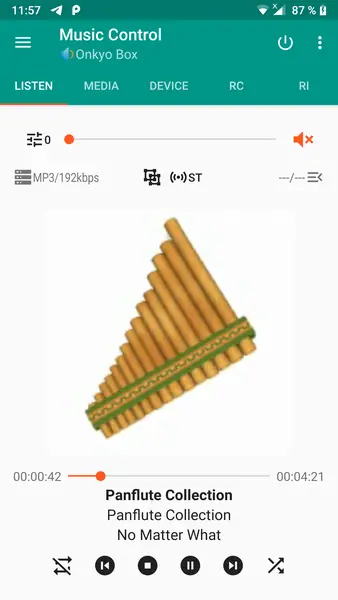
This app allows remote control of a Network Player or a Network A/V Receiver via the local network. The app supports Onkyo/Pioneer/Integra released in April 2016 or later and Denon/Marantz with build-in HEOS technology. Some TEAC models like Teac NT-503 are also supported.
The two most popular features of the app are music playback and sound profile management.
Other benefits include:
- Maximum privacy: No ads, no trackers, no telemetry, no special permissions like GPS
- The modern Material design supports different color themes and works on smartphones and/or tablets in portrait and landscape mode
- One-click access to music playback actions
- One-click access to media items using shortcuts
- Full music playback control (play, stop, pause, track up/down, time seek, repeat and random modes)
- Full tone control (listening modes, bass, center, treble and subwoofer levels)
- Enhanced Play Queue support (add, replace, remove, remove all, change playback order)
- TuneIn Radio, Deezer, Spotify and Tidal streaming (if supported by receiver)
- DAB / FM / AM (if supported by receiver)
- Multi-zone support (if supported by receiver)
- Multi-room support: Allows control of groups of devices attached via FlareConnect (for Onkyo/Pioneer/Integra only). Ability to control FlareConnect without WiFi
- Control of devices attached via RI (for Onkyo/Pioneer/Integra only)
- Display device details and control device settings such as dimmer level, digital filter, auto power, and sleep timer
- Allows control of receivers over an OpenVPN connection (even over a cellular connection)
- Integration with "Tasker"
Known limitations:
- Please note that the app does not support the music streaming from your phone to the network player or the receiver
- In order to login into Deezer, Tidal, or Spotify, you need the official Onkyo/Denon app additionally to this app
- Pioneer models before year 2016 are NOT supported, for example: VSX-424, VSX-529, VSX-830, VSX-920K, VSX-923, VSX-924, VSX-1021, VSX-1121, SC-95, SC-LX79, N-50, N-50a, N-70A
- Following Denon models are not supported: AVR-X1000, DNP-730AE, Heos Link 2, Denon Home 150, Marantz n40
- Following models do not support "Play Queue" feature (that is a limitation of the Onkyo firmware): CR-N765, DTR-40.5, HM76, HT-R693, HT-R695, TX-8130, TX-8150, TX-NR626, TX-NR636, TX-NR646, TX-RZ900
At the moment, the app is tested and works with following devices:
- Onkyo: TX-L20D, TX-L50, TX-NR414, TX-NR509, TX-NR525, TX-NR535, TX-NR575E, TX-NR616, TX-NR636, TX-NR646, TX-NR656, TX-NR676E, TX-NR686, TX-NR696, TX-NR818, TX-RZ50, TX-RZ70, TX-RZ810, TX-RZ830, TX-RZ900, TX-RZ1100, TX-8130, TX-8150, TX-8250, TX-8260, TX-8270, TX-8390, TX-8470, R-N855, CS-N575D, CR-N755, CR-N765, CR-N775D, HT-S7805, NS-6130, NS-6170, NCP-302
- Integra: DTM-6, DRX-5.2, DTR 30.7, DTR 40.7
- Pioneer (models after 2016): VSX-LX101, VSX-LX103, VSX-LX104, VSX-LX302, VSX-LX303, VSX-LX503, VSX-LX504, VSX-S520D, VSX-831, VSX-832, VSX-932, VSX-933, VSX-935, VSX-1131, SC-LX701, SC-LX901, SX-N30, SX-S30DAB, NC-50DAB, N-50AE, N-70AE, XC-HM86D, MRX-3, MRX-5
- Teac: NT-503, AG-D500
- Denon with build-in HEOS: DRA-800H, AVR-S750H, AVR-S760H, AVR-X1500H, AVR-X1800H, AVR-X2400H, AVR-X2600H, AVR-X2700H, AVR-X2800H, AVR-X3700H, AVR-X3800H, AVR-X4300H, AVR-X4400H, AVR-X4500H, AVR-X6300H, AVR-X6400H
- Marantz with build-in HEOS: NR1200, NR1508, NR1510, NR1711, SR5015, SR6015, SR7015, Cinema 40, Cinema 50, Cinema 60
Neu in Version 1.37
- Denon: Added a possibility to create, rename, or delete a playlist
- Fixed a bug: Shortcuts with special characters cannot be handled
Informationen zur APK-Datei
| Paketname | com.mkulesh.onpc |
|---|---|
| Version | 1.37 (Code 50) |
| Mindestens | Android 4.0 · ausgelegt für Android 15 |
| Architekturen | Alle (universell) |
| SHA-256 | 3b73f391a1a6f2441cffa7d8a7b347418f6a1a18a290cd2939adee611d913740 |
| Signatur | 6a7be8ee0aabea163a0f328c46013a00c00fb184cb3806ff2dbd9cae7d31a065 |
| Lizenz | GPL-3.0-or-later — freie Copyleft-Lizenz: Der Code ist öffentlich und veränderte Versionen müssen frei bleiben |
| Quellcode | github.com/mkulesh/onpc |
Berechtigungen
- Netzwerkstatus sehen
- WLAN-Status sehen
- Internetzugriff
Ältere Versionen
- Enhanced Music Controller Lite 1.3730. August 2025 · 4,1 MB
- Enhanced Music Controller Lite 1.3618. Mai 2025 · 4,1 MB
- Enhanced Music Controller Lite 1.3514. Mai 2025 · 4,1 MB
So installieren Sie Enhanced Music Controller Lite APK
- Tippen Sie oben auf APK herunterladen und öffnen Sie die Datei nach dem Download.
- Wenn Android fragt, erlauben Sie Ihrem Browser, unbekannte Apps zu installieren.
- Tippen Sie auf Installieren. Enhanced Music Controller Lite erscheint dann bei Ihren anderen Apps.
→ APK-Datei auf Android installieren (Schritt für Schritt)
→ „App nicht installiert“: Ursachen und Lösungen
Häufige Fragen
Ist Enhanced Music Controller Lite kostenlos?
Ja. Enhanced Music Controller Lite steht unter der Lizenz GPL-3.0-or-later: kostenlos, ohne Abo, und der Quellcode ist öffentlich.
Ist diese APK-Datei sicher?
Die Datei wurde vom F-Droid-Repository aus dem öffentlichen Quellcode erstellt und veröffentlicht. Ihr SHA-256-Fingerabdruck steht oben, Sie können ihn nach dem Download vergleichen. Ist eine APK gefährlich? So prüfen Sie eine Datei vor der Installation
Läuft Enhanced Music Controller Lite auf meinem Handy?
Sie benötigen mindestens Android 4.0. Die App funktioniert auch ohne Google-Dienste, also auch auf aktuellen Huawei-Handys.





