Enhanced Music Controller Lite APK
Afstandsbediening voor Onkyo apparaten
APK downloaden v1.37 · 4,1 MB- Versie1.37
- Grootte4,1 MB
- VereistAndroid 4.0
- Bijgewerkt30-8-2025
- LicentieGPL-3.0-or-later
- PrijsGratis
Over Enhanced Music Controller Lite
Beschrijving van de ontwikkelaar (in het Engels).
This app allows remote control of a Network Player or a Network A/V Receiver via the local network. The app supports Onkyo/Pioneer/Integra released in April 2016 or later and Denon/Marantz with build-in HEOS technology. Some TEAC models like Teac NT-503 are also supported.
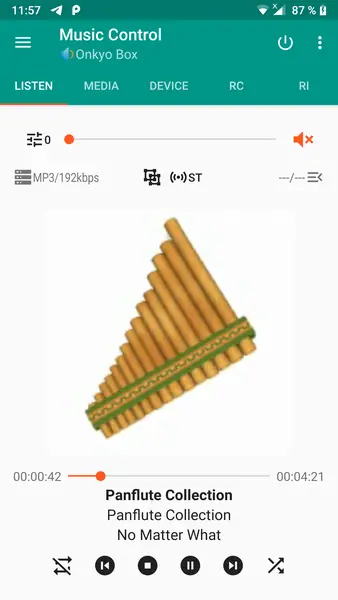
The two most popular features of the app are music playback and sound profile management.
Other benefits include:
- Maximum privacy: No ads, no trackers, no telemetry, no special permissions like GPS
- The modern Material design supports different color themes and works on smartphones and/or tablets in portrait and landscape mode
- One-click access to music playback actions
- One-click access to media items using shortcuts
- Full music playback control (play, stop, pause, track up/down, time seek, repeat and random modes)
- Full tone control (listening modes, bass, center, treble and subwoofer levels)
- Enhanced Play Queue support (add, replace, remove, remove all, change playback order)
- TuneIn Radio, Deezer, Spotify and Tidal streaming (if supported by receiver)
- DAB / FM / AM (if supported by receiver)
- Multi-zone support (if supported by receiver)
- Multi-room support: Allows control of groups of devices attached via FlareConnect (for Onkyo/Pioneer/Integra only). Ability to control FlareConnect without WiFi
- Control of devices attached via RI (for Onkyo/Pioneer/Integra only)
- Display device details and control device settings such as dimmer level, digital filter, auto power, and sleep timer
- Allows control of receivers over an OpenVPN connection (even over a cellular connection)
- Integration with "Tasker"
Known limitations:
- Please note that the app does not support the music streaming from your phone to the network player or the receiver
- In order to login into Deezer, Tidal, or Spotify, you need the official Onkyo/Denon app additionally to this app
- Pioneer models before year 2016 are NOT supported, for example: VSX-424, VSX-529, VSX-830, VSX-920K, VSX-923, VSX-924, VSX-1021, VSX-1121, SC-95, SC-LX79, N-50, N-50a, N-70A
- Following Denon models are not supported: AVR-X1000, DNP-730AE, Heos Link 2, Denon Home 150, Marantz n40
- Following models do not support "Play Queue" feature (that is a limitation of the Onkyo firmware): CR-N765, DTR-40.5, HM76, HT-R693, HT-R695, TX-8130, TX-8150, TX-NR626, TX-NR636, TX-NR646, TX-RZ900
At the moment, the app is tested and works with following devices:
- Onkyo: TX-L20D, TX-L50, TX-NR414, TX-NR509, TX-NR525, TX-NR535, TX-NR575E, TX-NR616, TX-NR636, TX-NR646, TX-NR656, TX-NR676E, TX-NR686, TX-NR696, TX-NR818, TX-RZ50, TX-RZ70, TX-RZ810, TX-RZ830, TX-RZ900, TX-RZ1100, TX-8130, TX-8150, TX-8250, TX-8260, TX-8270, TX-8390, TX-8470, R-N855, CS-N575D, CR-N755, CR-N765, CR-N775D, HT-S7805, NS-6130, NS-6170, NCP-302
- Integra: DTM-6, DRX-5.2, DTR 30.7, DTR 40.7
- Pioneer (models after 2016): VSX-LX101, VSX-LX103, VSX-LX104, VSX-LX302, VSX-LX303, VSX-LX503, VSX-LX504, VSX-S520D, VSX-831, VSX-832, VSX-932, VSX-933, VSX-935, VSX-1131, SC-LX701, SC-LX901, SX-N30, SX-S30DAB, NC-50DAB, N-50AE, N-70AE, XC-HM86D, MRX-3, MRX-5
- Teac: NT-503, AG-D500
- Denon with build-in HEOS: DRA-800H, AVR-S750H, AVR-S760H, AVR-X1500H, AVR-X1800H, AVR-X2400H, AVR-X2600H, AVR-X2700H, AVR-X2800H, AVR-X3700H, AVR-X3800H, AVR-X4300H, AVR-X4400H, AVR-X4500H, AVR-X6300H, AVR-X6400H
- Marantz with build-in HEOS: NR1200, NR1508, NR1510, NR1711, SR5015, SR6015, SR7015, Cinema 40, Cinema 50, Cinema 60
Nieuw in versie 1.37
- Denon: Added a possibility to create, rename, or delete a playlist
- Fixed a bug: Shortcuts with special characters cannot be handled
Informatie over het APK-bestand
| Pakketnaam | com.mkulesh.onpc |
|---|---|
| Versie | 1.37 (code 50) |
| Minimaal Android | Android 4.0 · bedoeld voor Android 15 |
| Architecturen | Alle (universeel) |
| SHA-256 | 3b73f391a1a6f2441cffa7d8a7b347418f6a1a18a290cd2939adee611d913740 |
| Handtekening | 6a7be8ee0aabea163a0f328c46013a00c00fb184cb3806ff2dbd9cae7d31a065 |
| Licentie | GPL-3.0-or-later — vrije copyleftlicentie: de code is openbaar en aangepaste versies moeten vrij blijven |
| Broncode | github.com/mkulesh/onpc |
Machtigingen
- Netwerkstatus bekijken
- Wifistatus bekijken
- Internettoegang
Oudere versies
- Enhanced Music Controller Lite 1.3730 augustus 2025 · 4,1 MB
- Enhanced Music Controller Lite 1.3618 mei 2025 · 4,1 MB
- Enhanced Music Controller Lite 1.3514 mei 2025 · 4,1 MB
Enhanced Music Controller Lite APK installeren
- Tik hierboven op APK downloaden en open het bestand als de download klaar is.
- Als Android erom vraagt, sta je browser toe om onbekende apps te installeren.
- Tik op Installeren. Enhanced Music Controller Lite verschijnt dan bij je andere apps.
→ Een APK-bestand installeren op Android (stap voor stap)
→ “App niet geïnstalleerd”: oorzaken en oplossingen
Veelgestelde vragen
Is Enhanced Music Controller Lite gratis?
Ja. Enhanced Music Controller Lite wordt verspreid onder de licentie GPL-3.0-or-later: gratis, zonder abonnement en met openbare broncode.
Is dit APK-bestand veilig?
Het bestand is gebouwd en gepubliceerd door de F-Droid-repository op basis van de openbare broncode. De SHA-256-vingerafdruk staat hierboven, zodat je die na het downloaden kunt vergelijken. Is een APK gevaarlijk? Zo controleer je een bestand vóór installatie
Werkt Enhanced Music Controller Lite op mijn telefoon?
Je hebt minimaal Android 4.0 nodig. De app werkt ook zonder Google-diensten, dus ook op recente Huawei-telefoons.