Enhanced Music Controller Lite APK
Controllo remoto per dispositivi Onkyo
Scarica l'APK v1.37 · 4,1 MB- Versione1.37
- Dimensione4,1 MB
- RichiedeAndroid 4.0
- Aggiornata30/08/2025
- LicenzaGPL-3.0-or-later
- PrezzoGratis
Informazioni su Enhanced Music Controller Lite
Descrizione fornita dallo sviluppatore (in inglese).
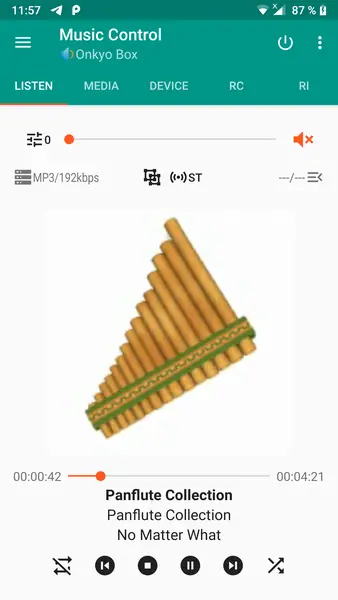
This app allows remote control of a Network Player or a Network A/V Receiver via the local network. The app supports Onkyo/Pioneer/Integra released in April 2016 or later and Denon/Marantz with build-in HEOS technology. Some TEAC models like Teac NT-503 are also supported.
The two most popular features of the app are music playback and sound profile management.
Other benefits include:
- Maximum privacy: No ads, no trackers, no telemetry, no special permissions like GPS
- The modern Material design supports different color themes and works on smartphones and/or tablets in portrait and landscape mode
- One-click access to music playback actions
- One-click access to media items using shortcuts
- Full music playback control (play, stop, pause, track up/down, time seek, repeat and random modes)
- Full tone control (listening modes, bass, center, treble and subwoofer levels)
- Enhanced Play Queue support (add, replace, remove, remove all, change playback order)
- TuneIn Radio, Deezer, Spotify and Tidal streaming (if supported by receiver)
- DAB / FM / AM (if supported by receiver)
- Multi-zone support (if supported by receiver)
- Multi-room support: Allows control of groups of devices attached via FlareConnect (for Onkyo/Pioneer/Integra only). Ability to control FlareConnect without WiFi
- Control of devices attached via RI (for Onkyo/Pioneer/Integra only)
- Display device details and control device settings such as dimmer level, digital filter, auto power, and sleep timer
- Allows control of receivers over an OpenVPN connection (even over a cellular connection)
- Integration with "Tasker"
Known limitations:
- Please note that the app does not support the music streaming from your phone to the network player or the receiver
- In order to login into Deezer, Tidal, or Spotify, you need the official Onkyo/Denon app additionally to this app
- Pioneer models before year 2016 are NOT supported, for example: VSX-424, VSX-529, VSX-830, VSX-920K, VSX-923, VSX-924, VSX-1021, VSX-1121, SC-95, SC-LX79, N-50, N-50a, N-70A
- Following Denon models are not supported: AVR-X1000, DNP-730AE, Heos Link 2, Denon Home 150, Marantz n40
- Following models do not support "Play Queue" feature (that is a limitation of the Onkyo firmware): CR-N765, DTR-40.5, HM76, HT-R693, HT-R695, TX-8130, TX-8150, TX-NR626, TX-NR636, TX-NR646, TX-RZ900
At the moment, the app is tested and works with following devices:
- Onkyo: TX-L20D, TX-L50, TX-NR414, TX-NR509, TX-NR525, TX-NR535, TX-NR575E, TX-NR616, TX-NR636, TX-NR646, TX-NR656, TX-NR676E, TX-NR686, TX-NR696, TX-NR818, TX-RZ50, TX-RZ70, TX-RZ810, TX-RZ830, TX-RZ900, TX-RZ1100, TX-8130, TX-8150, TX-8250, TX-8260, TX-8270, TX-8390, TX-8470, R-N855, CS-N575D, CR-N755, CR-N765, CR-N775D, HT-S7805, NS-6130, NS-6170, NCP-302
- Integra: DTM-6, DRX-5.2, DTR 30.7, DTR 40.7
- Pioneer (models after 2016): VSX-LX101, VSX-LX103, VSX-LX104, VSX-LX302, VSX-LX303, VSX-LX503, VSX-LX504, VSX-S520D, VSX-831, VSX-832, VSX-932, VSX-933, VSX-935, VSX-1131, SC-LX701, SC-LX901, SX-N30, SX-S30DAB, NC-50DAB, N-50AE, N-70AE, XC-HM86D, MRX-3, MRX-5
- Teac: NT-503, AG-D500
- Denon with build-in HEOS: DRA-800H, AVR-S750H, AVR-S760H, AVR-X1500H, AVR-X1800H, AVR-X2400H, AVR-X2600H, AVR-X2700H, AVR-X2800H, AVR-X3700H, AVR-X3800H, AVR-X4300H, AVR-X4400H, AVR-X4500H, AVR-X6300H, AVR-X6400H
- Marantz with build-in HEOS: NR1200, NR1508, NR1510, NR1711, SR5015, SR6015, SR7015, Cinema 40, Cinema 50, Cinema 60
Novità della versione 1.37
- Denon: Added a possibility to create, rename, or delete a playlist
- Fixed a bug: Shortcuts with special characters cannot be handled
Informazioni sul file APK
| Nome del pacchetto | com.mkulesh.onpc |
|---|---|
| Versione | 1.37 (codice 50) |
| Android minimo | Android 4.0 · pensata per Android 15 |
| Architetture | Tutte (universale) |
| SHA-256 | 3b73f391a1a6f2441cffa7d8a7b347418f6a1a18a290cd2939adee611d913740 |
| Firma | 6a7be8ee0aabea163a0f328c46013a00c00fb184cb3806ff2dbd9cae7d31a065 |
| Licenza | GPL-3.0-or-later — licenza libera copyleft: il codice è pubblico e le versioni modificate devono restare libere |
| Codice sorgente | github.com/mkulesh/onpc |
Autorizzazioni richieste
- Vedere lo stato della rete
- Vedere lo stato del Wi-Fi
- Accesso a Internet
Versioni precedenti
- Enhanced Music Controller Lite 1.3730 agosto 2025 · 4,1 MB
- Enhanced Music Controller Lite 1.3618 maggio 2025 · 4,1 MB
- Enhanced Music Controller Lite 1.3514 maggio 2025 · 4,1 MB
Come installare Enhanced Music Controller Lite APK
- Tocca Scarica l'APK qui sopra, poi apri il file al termine del download.
- Se Android lo chiede, consenti al browser di installare app sconosciute.
- Tocca Installa. Enhanced Music Controller Lite comparirà insieme alle altre app.
→ Come installare un file APK su Android (passo passo)
→ «App non installata»: cause e soluzioni
Domande frequenti
Enhanced Music Controller Lite è gratis?
Sì. Enhanced Music Controller Lite è distribuita con licenza GPL-3.0-or-later: gratuita, senza abbonamento e con codice sorgente pubblico.
Questo file APK è sicuro?
Il file è quello compilato e pubblicato dal repository F-Droid a partire dal codice sorgente pubblico. L'impronta SHA-256 è indicata qui sopra: puoi confrontarla dopo il download. Un APK è pericoloso? Come verificare un file prima di installarlo
Enhanced Music Controller Lite funziona sul mio telefono?
Serve almeno Android 4.0. L'app funziona anche senza i servizi Google, quindi anche sui telefoni Huawei recenti.





