DevSwitch APK
Toggle developer options, USB and wireless debugging, with Quick Settings tiles
APK herunterladen v1.3 · 2,1 MB- Version1.3
- Größe2,1 MB
- BenötigtAndroid 8.0
- Aktualisiert12.10.2026
- LizenzGPL-3.0-or-later
- PreisKostenlos
Über DevSwitch
Beschreibung des Entwicklers (auf Englisch).
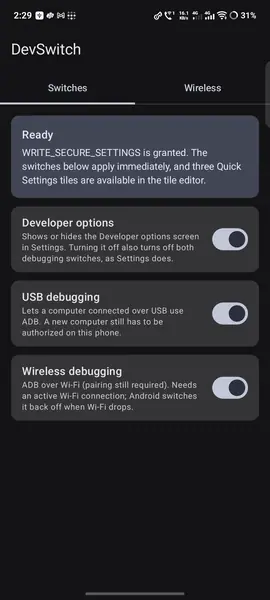
DevSwitch turns Developer options, USB debugging and Wireless debugging on and off from one screen and from three Quick Settings tiles. It writes the same system settings Android's own Settings app does, so the system reacts immediately: adbd starts or stops, and the Developer options screen appears or hides.
One-time setup
Android only lets an app change these settings if it holds WRITE_SECURE_SETTINGS, which cannot be requested with a dialog. Grant it once, in any of three ways, and it survives reboots and updates:
- From a computer: adb shell pm grant app.devswitch android.permission.WRITE_SECURE_SETTINGS
- On the phone, through Shizuku, with no computer needed
- With root
Wireless tab
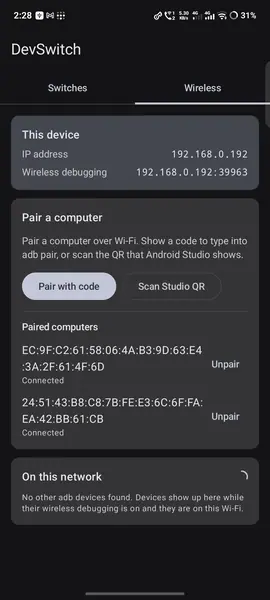
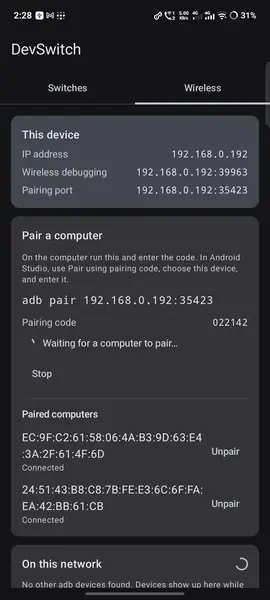
Shows this device's IP address and its live wireless debugging address, plus a scan of adb devices on the Wi-Fi. With Shizuku running it also lists paired computers and can pair a new one, either by showing a code for adb pair or by scanning the QR that Android Studio shows.
Safety
Turning a switch off, or unpairing a computer, asks first, because either can cut the connection a computer is using. The tiles refuse to toggle from the lock screen.
Privacy
No network services, no accounts, no analytics. The only network use is local discovery of adb devices on your own Wi-Fi.
Free software under the GPLv3.
Neu in Version 1.3
- Spanish and French interface
- The app language can be chosen per app in Android's settings (Android 13 and newer)
Informationen zur APK-Datei
| Paketname | app.devswitch |
|---|---|
| Version | 1.3 (Code 5) |
| Mindestens | Android 8.0 · ausgelegt für Android 16 |
| Architekturen | arm64-v8a, armeabi-v7a, x86, x86_64 |
| SHA-256 | 50e5dc1c713f5ff1e6acb0fdd39f817ae63ebc339ab79a5489baffa369c901a8 |
| Signatur | 16152867f6117a20ab8c4f3b4096842b95ba29c051cdef99e4fec3d12e218445 |
| Lizenz | GPL-3.0-or-later — freie Copyleft-Lizenz: Der Code ist öffentlich und veränderte Versionen müssen frei bleiben |
| Quellcode | github.com/retransmit/DevSwitch |
Berechtigungen
- Netzwerkstatus sehen
- Internetzugriff
- Kamera sensibel
1 weitere technische Berechtigung(en)
WRITE_SECURE_SETTINGS
Ältere Versionen
- DevSwitch 1.312. Oktober 2026 · 2,1 MB
- DevSwitch 1.28. Oktober 2026 · 2,1 MB
- DevSwitch 1.13. Oktober 2026 · 2,0 MB
So installieren Sie DevSwitch APK
- Tippen Sie oben auf APK herunterladen und öffnen Sie die Datei nach dem Download.
- Wenn Android fragt, erlauben Sie Ihrem Browser, unbekannte Apps zu installieren.
- Tippen Sie auf Installieren. DevSwitch erscheint dann bei Ihren anderen Apps.
→ APK-Datei auf Android installieren (Schritt für Schritt)
→ „App nicht installiert“: Ursachen und Lösungen
Häufige Fragen
Ist DevSwitch kostenlos?
Ja. DevSwitch steht unter der Lizenz GPL-3.0-or-later: kostenlos, ohne Abo, und der Quellcode ist öffentlich.
Ist diese APK-Datei sicher?
Die Datei wurde vom F-Droid-Repository aus dem öffentlichen Quellcode erstellt und veröffentlicht. Ihr SHA-256-Fingerabdruck steht oben, Sie können ihn nach dem Download vergleichen. Ist eine APK gefährlich? So prüfen Sie eine Datei vor der Installation
Läuft DevSwitch auf meinem Handy?
Sie benötigen mindestens Android 8.0. Die App funktioniert auch ohne Google-Dienste, also auch auf aktuellen Huawei-Handys.