DevSwitch APK
Toggle developer options, USB and wireless debugging, with Quick Settings tiles
Scarica l'APK v1.3 · 2,1 MB- Versione1.3
- Dimensione2,1 MB
- RichiedeAndroid 8.0
- Aggiornata12/10/2026
- LicenzaGPL-3.0-or-later
- PrezzoGratis
Informazioni su DevSwitch
Descrizione fornita dallo sviluppatore (in inglese).
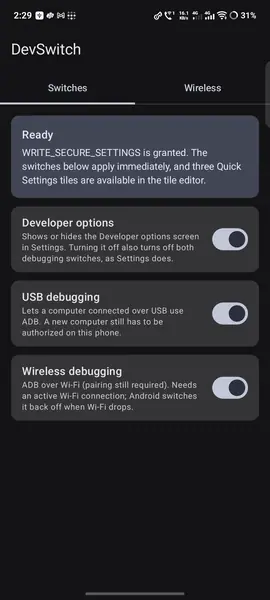
DevSwitch turns Developer options, USB debugging and Wireless debugging on and off from one screen and from three Quick Settings tiles. It writes the same system settings Android's own Settings app does, so the system reacts immediately: adbd starts or stops, and the Developer options screen appears or hides.
One-time setup
Android only lets an app change these settings if it holds WRITE_SECURE_SETTINGS, which cannot be requested with a dialog. Grant it once, in any of three ways, and it survives reboots and updates:
- From a computer: adb shell pm grant app.devswitch android.permission.WRITE_SECURE_SETTINGS
- On the phone, through Shizuku, with no computer needed
- With root
Wireless tab
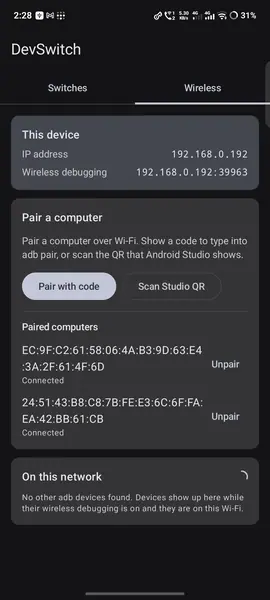
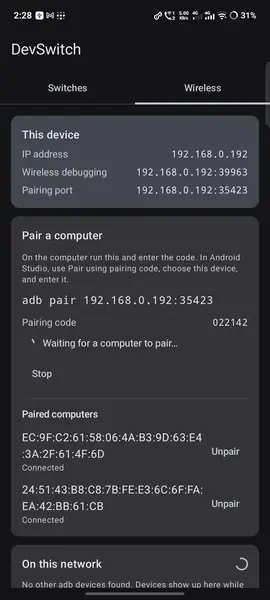
Shows this device's IP address and its live wireless debugging address, plus a scan of adb devices on the Wi-Fi. With Shizuku running it also lists paired computers and can pair a new one, either by showing a code for adb pair or by scanning the QR that Android Studio shows.
Safety
Turning a switch off, or unpairing a computer, asks first, because either can cut the connection a computer is using. The tiles refuse to toggle from the lock screen.
Privacy
No network services, no accounts, no analytics. The only network use is local discovery of adb devices on your own Wi-Fi.
Free software under the GPLv3.
Novità della versione 1.3
- Spanish and French interface
- The app language can be chosen per app in Android's settings (Android 13 and newer)
Informazioni sul file APK
| Nome del pacchetto | app.devswitch |
|---|---|
| Versione | 1.3 (codice 5) |
| Android minimo | Android 8.0 · pensata per Android 16 |
| Architetture | arm64-v8a, armeabi-v7a, x86, x86_64 |
| SHA-256 | 50e5dc1c713f5ff1e6acb0fdd39f817ae63ebc339ab79a5489baffa369c901a8 |
| Firma | 16152867f6117a20ab8c4f3b4096842b95ba29c051cdef99e4fec3d12e218445 |
| Licenza | GPL-3.0-or-later — licenza libera copyleft: il codice è pubblico e le versioni modificate devono restare libere |
| Codice sorgente | github.com/retransmit/DevSwitch |
Autorizzazioni richieste
- Vedere lo stato della rete
- Accesso a Internet
- Fotocamera sensibile
Altre 1 autorizzazioni tecniche
WRITE_SECURE_SETTINGS
Versioni precedenti
- DevSwitch 1.312 ottobre 2026 · 2,1 MB
- DevSwitch 1.28 ottobre 2026 · 2,1 MB
- DevSwitch 1.13 ottobre 2026 · 2,0 MB
Come installare DevSwitch APK
- Tocca Scarica l'APK qui sopra, poi apri il file al termine del download.
- Se Android lo chiede, consenti al browser di installare app sconosciute.
- Tocca Installa. DevSwitch comparirà insieme alle altre app.
→ Come installare un file APK su Android (passo passo)
→ «App non installata»: cause e soluzioni
Domande frequenti
DevSwitch è gratis?
Sì. DevSwitch è distribuita con licenza GPL-3.0-or-later: gratuita, senza abbonamento e con codice sorgente pubblico.
Questo file APK è sicuro?
Il file è quello compilato e pubblicato dal repository F-Droid a partire dal codice sorgente pubblico. L'impronta SHA-256 è indicata qui sopra: puoi confrontarla dopo il download. Un APK è pericoloso? Come verificare un file prima di installarlo
DevSwitch funziona sul mio telefono?
Serve almeno Android 8.0. L'app funziona anche senza i servizi Google, quindi anche sui telefoni Huawei recenti.