
DevSwitch APK
Toggle developer options, USB and wireless debugging, with Quick Settings tiles
Download APK v1.3 · 2.1 MB- Version1.3
- Size2.1 MB
- RequiresAndroid 8.0
- Updated10/12/2026
- LicenceGPL-3.0-or-later
- PriceFree
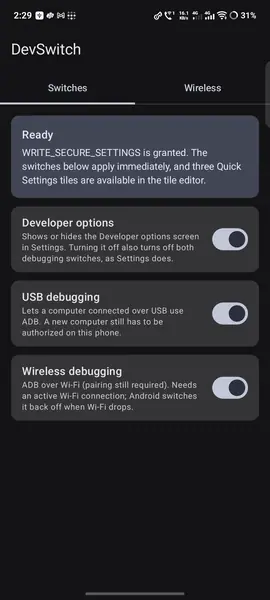
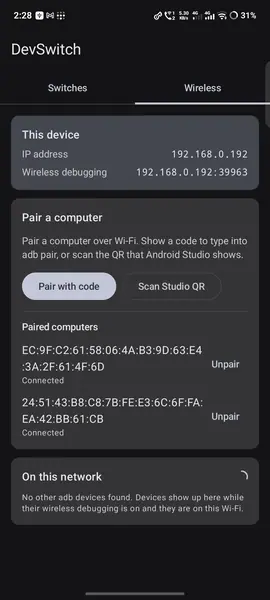
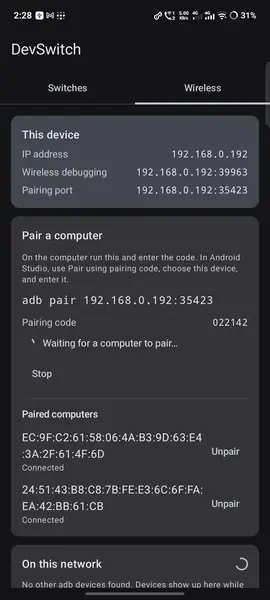
About DevSwitch
DevSwitch turns Developer options, USB debugging and Wireless debugging on and off from one screen and from three Quick Settings tiles. It writes the same system settings Android's own Settings app does, so the system reacts immediately: adbd starts or stops, and the Developer options screen appears or hides.
One-time setup
Android only lets an app change these settings if it holds WRITE_SECURE_SETTINGS, which cannot be requested with a dialog. Grant it once, in any of three ways, and it survives reboots and updates:
- From a computer: adb shell pm grant app.devswitch android.permission.WRITE_SECURE_SETTINGS
- On the phone, through Shizuku, with no computer needed
- With root
Wireless tab
Shows this device's IP address and its live wireless debugging address, plus a scan of adb devices on the Wi-Fi. With Shizuku running it also lists paired computers and can pair a new one, either by showing a code for adb pair or by scanning the QR that Android Studio shows.
Safety
Turning a switch off, or unpairing a computer, asks first, because either can cut the connection a computer is using. The tiles refuse to toggle from the lock screen.
Privacy
No network services, no accounts, no analytics. The only network use is local discovery of adb devices on your own Wi-Fi.
Free software under the GPLv3.
What's new in version 1.3
- Spanish and French interface
- The app language can be chosen per app in Android's settings (Android 13 and newer)
APK file information
| Package name | app.devswitch |
|---|---|
| Version | 1.3 (code 5) |
| Minimum Android | Android 8.0 · targets Android 16 |
| Architectures | arm64-v8a, armeabi-v7a, x86, x86_64 |
| SHA-256 | 50e5dc1c713f5ff1e6acb0fdd39f817ae63ebc339ab79a5489baffa369c901a8 |
| Signature | 16152867f6117a20ab8c4f3b4096842b95ba29c051cdef99e4fec3d12e218445 |
| Licence | GPL-3.0-or-later — copyleft free licence: the code is public and modified versions must stay free |
| Source code | github.com/retransmit/DevSwitch |
Permissions
- View network status
- Internet access
- Camera sensitive
1 other technical permission(s)
WRITE_SECURE_SETTINGS
Older versions
- DevSwitch 1.3October 12, 2026 · 2.1 MB
- DevSwitch 1.2October 8, 2026 · 2.1 MB
- DevSwitch 1.1October 3, 2026 · 2.0 MB
How to install DevSwitch APK
- Tap Download APK above, then open the file once the download has finished.
- If Android asks, allow your browser to install unknown apps.
- Tap Install. DevSwitch then appears with your other apps.
Having trouble? Read our guides how to install an APK on Android and "App not installed": how to fix it.
Frequently asked questions
Is DevSwitch free?
Yes. DevSwitch is distributed under the GPL-3.0-or-later licence: free, no subscription, and its source code is public.
Is this APK file safe?
The file is the one built and published by the F-Droid repository from the public source code. Its SHA-256 fingerprint is shown above, so you can compare it after downloading. How to check an APK.
Will DevSwitch work on my phone?
You need at least Android 8.0. The app also works without Google services, so it runs on recent Huawei phones too.





