DevSwitch APK
Toggle developer options, USB and wireless debugging, with Quick Settings tiles
Baixar APK v1.3 · 2,1 MB- Versão1.3
- Tamanho2,1 MB
- RequerAndroid 8.0
- Atualizado12/10/2026
- LicençaGPL-3.0-or-later
- PreçoGrátis
Sobre o DevSwitch
Descrição fornecida pelo desenvolvedor (em inglês).
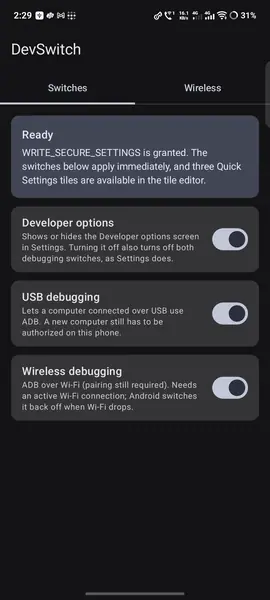
DevSwitch turns Developer options, USB debugging and Wireless debugging on and off from one screen and from three Quick Settings tiles. It writes the same system settings Android's own Settings app does, so the system reacts immediately: adbd starts or stops, and the Developer options screen appears or hides.
One-time setup
Android only lets an app change these settings if it holds WRITE_SECURE_SETTINGS, which cannot be requested with a dialog. Grant it once, in any of three ways, and it survives reboots and updates:
- From a computer: adb shell pm grant app.devswitch android.permission.WRITE_SECURE_SETTINGS
- On the phone, through Shizuku, with no computer needed
- With root
Wireless tab
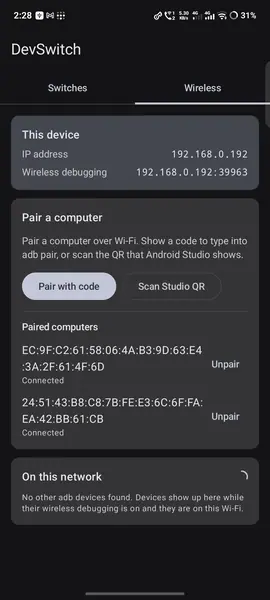
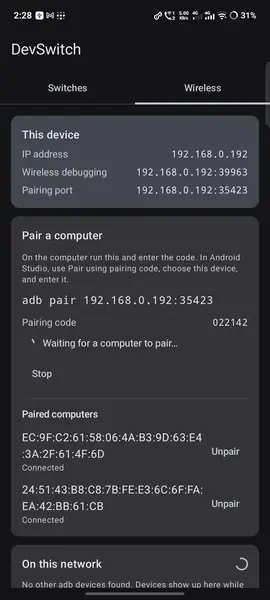
Shows this device's IP address and its live wireless debugging address, plus a scan of adb devices on the Wi-Fi. With Shizuku running it also lists paired computers and can pair a new one, either by showing a code for adb pair or by scanning the QR that Android Studio shows.
Safety
Turning a switch off, or unpairing a computer, asks first, because either can cut the connection a computer is using. The tiles refuse to toggle from the lock screen.
Privacy
No network services, no accounts, no analytics. The only network use is local discovery of adb devices on your own Wi-Fi.
Free software under the GPLv3.
Novidades da versão 1.3
- Spanish and French interface
- The app language can be chosen per app in Android's settings (Android 13 and newer)
Informações do arquivo APK
| Nome do pacote | app.devswitch |
|---|---|
| Versão | 1.3 (código 5) |
| Android mínimo | Android 8.0 · feito para Android 16 |
| Arquiteturas | arm64-v8a, armeabi-v7a, x86, x86_64 |
| SHA-256 | 50e5dc1c713f5ff1e6acb0fdd39f817ae63ebc339ab79a5489baffa369c901a8 |
| Assinatura | 16152867f6117a20ab8c4f3b4096842b95ba29c051cdef99e4fec3d12e218445 |
| Licença | GPL-3.0-or-later — licença livre copyleft: o código é público e versões modificadas devem continuar livres |
| Código-fonte | github.com/retransmit/DevSwitch |
Permissões solicitadas
- Ver o estado da rede
- Acesso à internet
- Câmera sensível
Mais 1 permissão(ões) técnica(s)
WRITE_SECURE_SETTINGS
Versões anteriores
- DevSwitch 1.312 de outubro de 2026 · 2,1 MB
- DevSwitch 1.28 de outubro de 2026 · 2,1 MB
- DevSwitch 1.13 de outubro de 2026 · 2,0 MB
Como instalar o DevSwitch APK
- Toque em Baixar APK acima e abra o arquivo quando o download terminar.
- Se o Android pedir, permita que o navegador instale apps desconhecidos.
- Toque em Instalar. O DevSwitch aparecerá junto aos seus outros apps.
→ Como instalar um arquivo APK no Android (passo a passo)
→ "App não instalado": causas e soluções
Perguntas frequentes
O DevSwitch é grátis?
Sim. O DevSwitch é distribuído sob a licença GPL-3.0-or-later: grátis, sem assinatura e com código-fonte público.
Este arquivo APK é seguro?
O arquivo é o compilado e publicado pelo repositório F-Droid a partir do código-fonte público. A impressão digital SHA-256 aparece acima para você comparar depois do download. APK é perigoso? Como verificar um arquivo antes de instalar
O DevSwitch funciona no meu celular?
É preciso ter pelo menos Android 8.0. O app também funciona sem os serviços do Google, inclusive em celulares Huawei recentes.