
Z2Term APK
Rootless Linux terminal with a GUI, SSH, automation and a Japanese IME.
APK herunterladen v1.0.173 · 30,5 MB- Version1.0.173
- Größe30,5 MB
- BenötigtAndroid 10
- Aktualisiert23.11.2026
- LizenzGPL-3.0-only
- PreisKostenlos
Über Z2Term
Beschreibung des Entwicklers (auf Englisch).
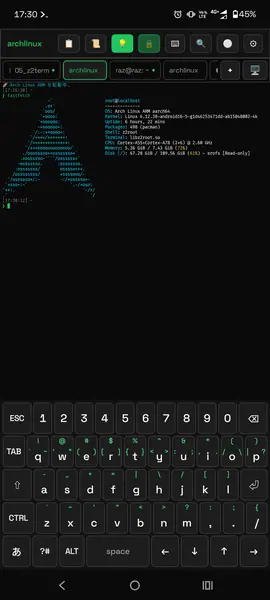
Z2Term is a terminal for Android that is also a way to drive Android.
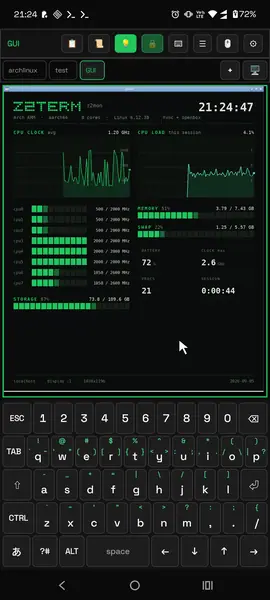
It runs Alpine, Ubuntu, Arch and Kali without root, opens a Linux desktop in a tab, and lets the shell reach the phone itself: read a notification, ask you a question in the notification shade, or run a script when the battery, the network or an incoming SMS changes.
- Linux distributions without root: z2root is a ptrace-based userspace implementation written for this app and built from source. A real chroot is optionally available on rooted devices.
- Terminal emulator: VT100/xterm, 256-colour and true colour, alternate screen, East Asian Width (CJK / emoji) rendered as 2 cells, OSC 4/7/8/10/11/12/52
- 9 built-in themes plus a custom theme editor, and custom font loading
- 5,000-line scrollback (configurable 500-50,000) with search
- Multi-tab sessions with independent emulators, drag to reorder
- Linux GUI: Xvnc + openbox with an RFB client built into the app, with audio and video. "z2gui" starts a desktop, "z2run " launches a GUI program. The same screen also connects to another machine over VNC or RDP.
- SSH client and SFTP built in (public-key auth, secrets encrypted by the Android Keystore), port forwarding in both directions that can outlive the tab, plus a built-in sshd that binds to localhost only by default
- Android bridge: around 40 "z2-*" helpers call host features from the shell (notifications, clipboard, battery, sensors, torch, intents, alarms, text-to-speech, and wireless adb to the device itself)
- It can ask you things: "z2-ask" puts a question in the notification shade and reads your reply into a shell variable
- Automation hub: "z2-when" runs scripts on device events (charging, battery level, time or cron, Wi-Fi, connectivity, boot, a share from another app, an incoming SMS, sensors, an arriving notification, a new file), narrowed by filters. Rules are plain text and survive reboots without opening the app.
- Resident servers: register any server as a start command and keep it running in the background without the app being open
- Edge panels: "z2-edge" builds a panel that floats over other apps. It holds commands, macros and app launches as buttons, plus notes and a mini terminal. Open it by swiping the bar at the screen edge; it can be edited on screen as well
- Screen actions: "z2-action" sends taps, swipes and gestures from the shell. Steps live in a plain text file with repeats, conditions and calls to other step files. They can also be edited on screen or recorded by tracing with a finger, and run from a tile, a widget or an edge panel
- QR tools: scan and create QR codes offline, with a history; "z2-qr" makes one from the terminal as well
- Screenshots of just what you want: "z2-shot" grabs the screen, you draw around the part to keep, then save or share it
- Read what you built: "z2-view" opens a page made on the terminal inside the app, with JavaScript and network loads switched off
- Japanese IME: kana-kanji conversion with prediction and learning, and a custom on-screen keyboard that can also be enabled as an OS-wide input method. Its key layout is editable on every face (kana, letters, symbols) and can be saved under a name
- Terminal log: record what a tab shows to a plain text file with one tap
- Home screen widgets: a status and macro launcher, and a live tail of any file
- Receive from other apps' share sheet (inserted into the input line, never executed)
- Backup and restore: settings, SSH connections, snippets, automation rules and macros in one file
- Built-in help ("z2help") and self-diagnosis ("z2doctor") that answers "why isn't it working?" with a next step on every NG line
- A foreground service keeps your session alive, physical keyboards work (Bluetooth, Chromebook), and there is long-press selection, copy/paste and pinch-to-zoom
100% local - no telemetry, no analytics. This build bundles no third-party prebuilts: the Linux distribution is downloaded from the official CDN on first launch and verified by S
Neu in Version 1.0.173
1.0.173
- Group tabs and show them together on one screen.
- Broadcast sends the same input to all ticked tabs.
- Long lines can stay unwrapped; swipe sideways to move.
- Import your own fonts.
- More predictive input candidates.
- z2-alarm accepts seconds, and macros can run without a time limit.
- Fixes, including SSH sessions that dropped after a while.
Informationen zur APK-Datei
| Paketname | com.zerotoship.z2term |
|---|---|
| Version | 1.0.173 (Code 871) |
| Mindestens | Android 10 · ausgelegt für Android 15 |
| Architekturen | arm64-v8a |
| SHA-256 | 3432bef2e15282f3c27951f798acd6caccef283b878f7febb1150d709211b887 |
| Signatur | e52b23cf12bde3348fbaf84c65bca6ab815cb06b0fc66d899a08ee12809ab7ff |
| Lizenz | GPL-3.0-only — freie Copyleft-Lizenz: Der Code ist öffentlich und veränderte Versionen müssen frei bleiben |
| Quellcode | github.com/orgsonai/z2term |
| Offizielle Website | orgsonai.github.io/z2term/ |
Berechtigungen
- Kamera sensibel
- Im Hintergrund laufen
- Internetzugriff
- Netzwerkstatus sehen
- Über anderen Apps anzeigen sensibel
- Mikrofon sensibel
- Benachrichtigungen anzeigen
- Ruhezustand verhindern
- WLAN-Status sehen
- Beim Start ausführen
- Vibrieren
- Fingerabdruck / Biometrie
- SMS empfangen sensibel
- Bluetooth
- Per Bluetooth verbinden
- Körperliche Aktivität sensibel
- Zugriff auf alle Dateien sensibel
- Speicher lesen
- Auf Speicher schreiben
3 weitere technische Berechtigung(en)
PACKAGE_USAGE_STATS REQUEST_IGNORE_BATTERY_OPTIMIZATIONS WRITE_SETTINGS
Ältere Versionen
- Z2Term 1.0.17323. November 2026 · 30,5 MB
- Z2Term 1.0.12620. November 2026 · 29,5 MB
- Z2Term 1.0.9417. November 2026 · 28,5 MB
So installieren Sie Z2Term APK
- Tippen Sie oben auf APK herunterladen und öffnen Sie die Datei nach dem Download.
- Wenn Android fragt, erlauben Sie Ihrem Browser, unbekannte Apps zu installieren.
- Tippen Sie auf Installieren. Z2Term erscheint dann bei Ihren anderen Apps.
→ APK-Datei auf Android installieren (Schritt für Schritt)
→ „App nicht installiert“: Ursachen und Lösungen
Häufige Fragen
Ist Z2Term kostenlos?
Ja. Z2Term steht unter der Lizenz GPL-3.0-only: kostenlos, ohne Abo, und der Quellcode ist öffentlich.
Ist diese APK-Datei sicher?
Die Datei wurde vom F-Droid-Repository aus dem öffentlichen Quellcode erstellt und veröffentlicht. Ihr SHA-256-Fingerabdruck steht oben, Sie können ihn nach dem Download vergleichen. Ist eine APK gefährlich? So prüfen Sie eine Datei vor der Installation
Läuft Z2Term auf meinem Handy?
Sie benötigen mindestens Android 10. Die App funktioniert auch ohne Google-Dienste, also auch auf aktuellen Huawei-Handys.