
Z2Term APK
Rootless Linux terminal with a GUI, SSH, automation and a Japanese IME.
Baixar APK v1.0.173 · 30,5 MB- Versão1.0.173
- Tamanho30,5 MB
- RequerAndroid 10
- Atualizado23/11/2026
- LicençaGPL-3.0-only
- PreçoGrátis
Sobre o Z2Term
Descrição fornecida pelo desenvolvedor (em inglês).
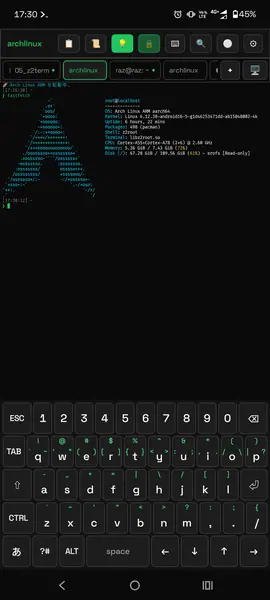
Z2Term is a terminal for Android that is also a way to drive Android.
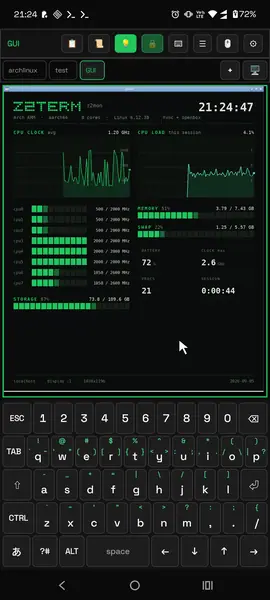
It runs Alpine, Ubuntu, Arch and Kali without root, opens a Linux desktop in a tab, and lets the shell reach the phone itself: read a notification, ask you a question in the notification shade, or run a script when the battery, the network or an incoming SMS changes.
- Linux distributions without root: z2root is a ptrace-based userspace implementation written for this app and built from source. A real chroot is optionally available on rooted devices.
- Terminal emulator: VT100/xterm, 256-colour and true colour, alternate screen, East Asian Width (CJK / emoji) rendered as 2 cells, OSC 4/7/8/10/11/12/52
- 9 built-in themes plus a custom theme editor, and custom font loading
- 5,000-line scrollback (configurable 500-50,000) with search
- Multi-tab sessions with independent emulators, drag to reorder
- Linux GUI: Xvnc + openbox with an RFB client built into the app, with audio and video. "z2gui" starts a desktop, "z2run " launches a GUI program. The same screen also connects to another machine over VNC or RDP.
- SSH client and SFTP built in (public-key auth, secrets encrypted by the Android Keystore), port forwarding in both directions that can outlive the tab, plus a built-in sshd that binds to localhost only by default
- Android bridge: around 40 "z2-*" helpers call host features from the shell (notifications, clipboard, battery, sensors, torch, intents, alarms, text-to-speech, and wireless adb to the device itself)
- It can ask you things: "z2-ask" puts a question in the notification shade and reads your reply into a shell variable
- Automation hub: "z2-when" runs scripts on device events (charging, battery level, time or cron, Wi-Fi, connectivity, boot, a share from another app, an incoming SMS, sensors, an arriving notification, a new file), narrowed by filters. Rules are plain text and survive reboots without opening the app.
- Resident servers: register any server as a start command and keep it running in the background without the app being open
- Edge panels: "z2-edge" builds a panel that floats over other apps. It holds commands, macros and app launches as buttons, plus notes and a mini terminal. Open it by swiping the bar at the screen edge; it can be edited on screen as well
- Screen actions: "z2-action" sends taps, swipes and gestures from the shell. Steps live in a plain text file with repeats, conditions and calls to other step files. They can also be edited on screen or recorded by tracing with a finger, and run from a tile, a widget or an edge panel
- QR tools: scan and create QR codes offline, with a history; "z2-qr" makes one from the terminal as well
- Screenshots of just what you want: "z2-shot" grabs the screen, you draw around the part to keep, then save or share it
- Read what you built: "z2-view" opens a page made on the terminal inside the app, with JavaScript and network loads switched off
- Japanese IME: kana-kanji conversion with prediction and learning, and a custom on-screen keyboard that can also be enabled as an OS-wide input method. Its key layout is editable on every face (kana, letters, symbols) and can be saved under a name
- Terminal log: record what a tab shows to a plain text file with one tap
- Home screen widgets: a status and macro launcher, and a live tail of any file
- Receive from other apps' share sheet (inserted into the input line, never executed)
- Backup and restore: settings, SSH connections, snippets, automation rules and macros in one file
- Built-in help ("z2help") and self-diagnosis ("z2doctor") that answers "why isn't it working?" with a next step on every NG line
- A foreground service keeps your session alive, physical keyboards work (Bluetooth, Chromebook), and there is long-press selection, copy/paste and pinch-to-zoom
100% local - no telemetry, no analytics. This build bundles no third-party prebuilts: the Linux distribution is downloaded from the official CDN on first launch and verified by S
Novidades da versão 1.0.173
1.0.173
- Group tabs and show them together on one screen.
- Broadcast sends the same input to all ticked tabs.
- Long lines can stay unwrapped; swipe sideways to move.
- Import your own fonts.
- More predictive input candidates.
- z2-alarm accepts seconds, and macros can run without a time limit.
- Fixes, including SSH sessions that dropped after a while.
Informações do arquivo APK
| Nome do pacote | com.zerotoship.z2term |
|---|---|
| Versão | 1.0.173 (código 871) |
| Android mínimo | Android 10 · feito para Android 15 |
| Arquiteturas | arm64-v8a |
| SHA-256 | 3432bef2e15282f3c27951f798acd6caccef283b878f7febb1150d709211b887 |
| Assinatura | e52b23cf12bde3348fbaf84c65bca6ab815cb06b0fc66d899a08ee12809ab7ff |
| Licença | GPL-3.0-only — licença livre copyleft: o código é público e versões modificadas devem continuar livres |
| Código-fonte | github.com/orgsonai/z2term |
| Site oficial | orgsonai.github.io/z2term/ |
Permissões solicitadas
- Câmera sensível
- Funcionar em segundo plano
- Acesso à internet
- Ver o estado da rede
- Sobrepor outros apps sensível
- Microfone sensível
- Mostrar notificações
- Impedir o modo de espera
- Ver o estado do Wi-Fi
- Iniciar com o sistema
- Vibrar
- Digital / biometria
- Receber SMS sensível
- Bluetooth
- Conectar por Bluetooth
- Atividade física sensível
- Acesso a todos os arquivos sensível
- Ler o armazenamento
- Gravar no armazenamento
Mais 3 permissão(ões) técnica(s)
PACKAGE_USAGE_STATS REQUEST_IGNORE_BATTERY_OPTIMIZATIONS WRITE_SETTINGS
Versões anteriores
- Z2Term 1.0.17323 de novembro de 2026 · 30,5 MB
- Z2Term 1.0.12620 de novembro de 2026 · 29,5 MB
- Z2Term 1.0.9417 de novembro de 2026 · 28,5 MB
Como instalar o Z2Term APK
- Toque em Baixar APK acima e abra o arquivo quando o download terminar.
- Se o Android pedir, permita que o navegador instale apps desconhecidos.
- Toque em Instalar. O Z2Term aparecerá junto aos seus outros apps.
→ Como instalar um arquivo APK no Android (passo a passo)
→ "App não instalado": causas e soluções
Perguntas frequentes
O Z2Term é grátis?
Sim. O Z2Term é distribuído sob a licença GPL-3.0-only: grátis, sem assinatura e com código-fonte público.
Este arquivo APK é seguro?
O arquivo é o compilado e publicado pelo repositório F-Droid a partir do código-fonte público. A impressão digital SHA-256 aparece acima para você comparar depois do download. APK é perigoso? Como verificar um arquivo antes de instalar
O Z2Term funciona no meu celular?
É preciso ter pelo menos Android 10. O app também funciona sem os serviços do Google, inclusive em celulares Huawei recentes.