
Z2Term APK
Rootless Linux terminal with a GUI, SSH, automation and a Japanese IME.
Scarica l'APK v1.0.173 · 30,5 MB- Versione1.0.173
- Dimensione30,5 MB
- RichiedeAndroid 10
- Aggiornata23/11/2026
- LicenzaGPL-3.0-only
- PrezzoGratis
Informazioni su Z2Term
Descrizione fornita dallo sviluppatore (in inglese).
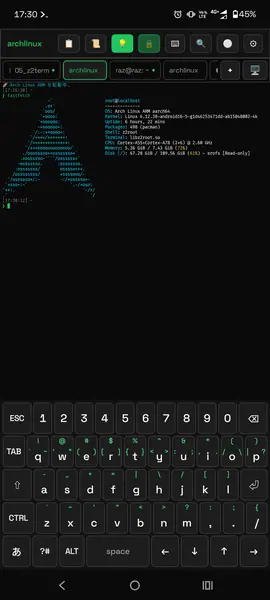
Z2Term is a terminal for Android that is also a way to drive Android.
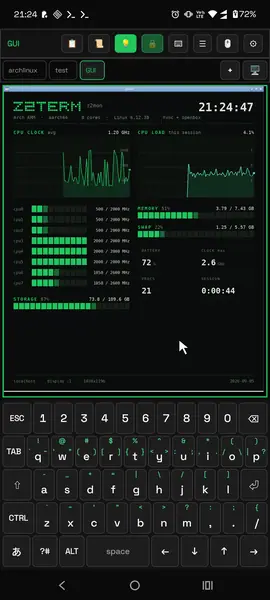
It runs Alpine, Ubuntu, Arch and Kali without root, opens a Linux desktop in a tab, and lets the shell reach the phone itself: read a notification, ask you a question in the notification shade, or run a script when the battery, the network or an incoming SMS changes.
- Linux distributions without root: z2root is a ptrace-based userspace implementation written for this app and built from source. A real chroot is optionally available on rooted devices.
- Terminal emulator: VT100/xterm, 256-colour and true colour, alternate screen, East Asian Width (CJK / emoji) rendered as 2 cells, OSC 4/7/8/10/11/12/52
- 9 built-in themes plus a custom theme editor, and custom font loading
- 5,000-line scrollback (configurable 500-50,000) with search
- Multi-tab sessions with independent emulators, drag to reorder
- Linux GUI: Xvnc + openbox with an RFB client built into the app, with audio and video. "z2gui" starts a desktop, "z2run " launches a GUI program. The same screen also connects to another machine over VNC or RDP.
- SSH client and SFTP built in (public-key auth, secrets encrypted by the Android Keystore), port forwarding in both directions that can outlive the tab, plus a built-in sshd that binds to localhost only by default
- Android bridge: around 40 "z2-*" helpers call host features from the shell (notifications, clipboard, battery, sensors, torch, intents, alarms, text-to-speech, and wireless adb to the device itself)
- It can ask you things: "z2-ask" puts a question in the notification shade and reads your reply into a shell variable
- Automation hub: "z2-when" runs scripts on device events (charging, battery level, time or cron, Wi-Fi, connectivity, boot, a share from another app, an incoming SMS, sensors, an arriving notification, a new file), narrowed by filters. Rules are plain text and survive reboots without opening the app.
- Resident servers: register any server as a start command and keep it running in the background without the app being open
- Edge panels: "z2-edge" builds a panel that floats over other apps. It holds commands, macros and app launches as buttons, plus notes and a mini terminal. Open it by swiping the bar at the screen edge; it can be edited on screen as well
- Screen actions: "z2-action" sends taps, swipes and gestures from the shell. Steps live in a plain text file with repeats, conditions and calls to other step files. They can also be edited on screen or recorded by tracing with a finger, and run from a tile, a widget or an edge panel
- QR tools: scan and create QR codes offline, with a history; "z2-qr" makes one from the terminal as well
- Screenshots of just what you want: "z2-shot" grabs the screen, you draw around the part to keep, then save or share it
- Read what you built: "z2-view" opens a page made on the terminal inside the app, with JavaScript and network loads switched off
- Japanese IME: kana-kanji conversion with prediction and learning, and a custom on-screen keyboard that can also be enabled as an OS-wide input method. Its key layout is editable on every face (kana, letters, symbols) and can be saved under a name
- Terminal log: record what a tab shows to a plain text file with one tap
- Home screen widgets: a status and macro launcher, and a live tail of any file
- Receive from other apps' share sheet (inserted into the input line, never executed)
- Backup and restore: settings, SSH connections, snippets, automation rules and macros in one file
- Built-in help ("z2help") and self-diagnosis ("z2doctor") that answers "why isn't it working?" with a next step on every NG line
- A foreground service keeps your session alive, physical keyboards work (Bluetooth, Chromebook), and there is long-press selection, copy/paste and pinch-to-zoom
100% local - no telemetry, no analytics. This build bundles no third-party prebuilts: the Linux distribution is downloaded from the official CDN on first launch and verified by S
Novità della versione 1.0.173
1.0.173
- Group tabs and show them together on one screen.
- Broadcast sends the same input to all ticked tabs.
- Long lines can stay unwrapped; swipe sideways to move.
- Import your own fonts.
- More predictive input candidates.
- z2-alarm accepts seconds, and macros can run without a time limit.
- Fixes, including SSH sessions that dropped after a while.
Informazioni sul file APK
| Nome del pacchetto | com.zerotoship.z2term |
|---|---|
| Versione | 1.0.173 (codice 871) |
| Android minimo | Android 10 · pensata per Android 15 |
| Architetture | arm64-v8a |
| SHA-256 | 3432bef2e15282f3c27951f798acd6caccef283b878f7febb1150d709211b887 |
| Firma | e52b23cf12bde3348fbaf84c65bca6ab815cb06b0fc66d899a08ee12809ab7ff |
| Licenza | GPL-3.0-only — licenza libera copyleft: il codice è pubblico e le versioni modificate devono restare libere |
| Codice sorgente | github.com/orgsonai/z2term |
| Sito ufficiale | orgsonai.github.io/z2term/ |
Autorizzazioni richieste
- Fotocamera sensibile
- Funzionare in background
- Accesso a Internet
- Vedere lo stato della rete
- Mostrare sopra altre app sensibile
- Microfono sensibile
- Mostrare notifiche
- Impedire lo standby
- Vedere lo stato del Wi-Fi
- Avviarsi all'accensione
- Vibrare
- Impronta / biometria
- Ricevere SMS sensibile
- Bluetooth
- Connettersi via Bluetooth
- Attività fisica sensibile
- Accesso a tutti i file sensibile
- Leggere l'archivio
- Scrivere nell'archivio
Altre 3 autorizzazioni tecniche
PACKAGE_USAGE_STATS REQUEST_IGNORE_BATTERY_OPTIMIZATIONS WRITE_SETTINGS
Versioni precedenti
- Z2Term 1.0.17323 novembre 2026 · 30,5 MB
- Z2Term 1.0.12620 novembre 2026 · 29,5 MB
- Z2Term 1.0.9417 novembre 2026 · 28,5 MB
Come installare Z2Term APK
- Tocca Scarica l'APK qui sopra, poi apri il file al termine del download.
- Se Android lo chiede, consenti al browser di installare app sconosciute.
- Tocca Installa. Z2Term comparirà insieme alle altre app.
→ Come installare un file APK su Android (passo passo)
→ «App non installata»: cause e soluzioni
Domande frequenti
Z2Term è gratis?
Sì. Z2Term è distribuita con licenza GPL-3.0-only: gratuita, senza abbonamento e con codice sorgente pubblico.
Questo file APK è sicuro?
Il file è quello compilato e pubblicato dal repository F-Droid a partire dal codice sorgente pubblico. L'impronta SHA-256 è indicata qui sopra: puoi confrontarla dopo il download. Un APK è pericoloso? Come verificare un file prima di installarlo
Z2Term funziona sul mio telefono?
Serve almeno Android 10. L'app funziona anche senza i servizi Google, quindi anche sui telefoni Huawei recenti.