
Z2Term APK
Rootless Linux terminal with a GUI, SSH, automation and a Japanese IME.
Descargar APK v1.0.173 · 30,5 MB- Versión1.0.173
- Tamaño30,5 MB
- RequiereAndroid 10
- Actualizada23/11/2026
- LicenciaGPL-3.0-only
- PrecioGratis
Acerca de Z2Term
Descripción del desarrollador (en inglés).
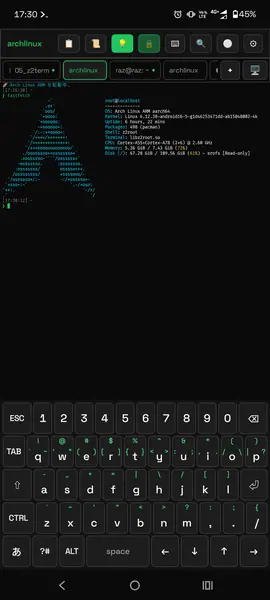
Z2Term is a terminal for Android that is also a way to drive Android.
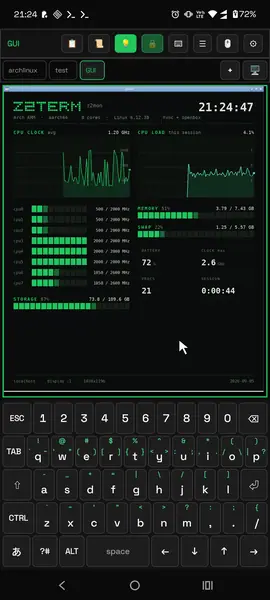
It runs Alpine, Ubuntu, Arch and Kali without root, opens a Linux desktop in a tab, and lets the shell reach the phone itself: read a notification, ask you a question in the notification shade, or run a script when the battery, the network or an incoming SMS changes.
- Linux distributions without root: z2root is a ptrace-based userspace implementation written for this app and built from source. A real chroot is optionally available on rooted devices.
- Terminal emulator: VT100/xterm, 256-colour and true colour, alternate screen, East Asian Width (CJK / emoji) rendered as 2 cells, OSC 4/7/8/10/11/12/52
- 9 built-in themes plus a custom theme editor, and custom font loading
- 5,000-line scrollback (configurable 500-50,000) with search
- Multi-tab sessions with independent emulators, drag to reorder
- Linux GUI: Xvnc + openbox with an RFB client built into the app, with audio and video. "z2gui" starts a desktop, "z2run " launches a GUI program. The same screen also connects to another machine over VNC or RDP.
- SSH client and SFTP built in (public-key auth, secrets encrypted by the Android Keystore), port forwarding in both directions that can outlive the tab, plus a built-in sshd that binds to localhost only by default
- Android bridge: around 40 "z2-*" helpers call host features from the shell (notifications, clipboard, battery, sensors, torch, intents, alarms, text-to-speech, and wireless adb to the device itself)
- It can ask you things: "z2-ask" puts a question in the notification shade and reads your reply into a shell variable
- Automation hub: "z2-when" runs scripts on device events (charging, battery level, time or cron, Wi-Fi, connectivity, boot, a share from another app, an incoming SMS, sensors, an arriving notification, a new file), narrowed by filters. Rules are plain text and survive reboots without opening the app.
- Resident servers: register any server as a start command and keep it running in the background without the app being open
- Edge panels: "z2-edge" builds a panel that floats over other apps. It holds commands, macros and app launches as buttons, plus notes and a mini terminal. Open it by swiping the bar at the screen edge; it can be edited on screen as well
- Screen actions: "z2-action" sends taps, swipes and gestures from the shell. Steps live in a plain text file with repeats, conditions and calls to other step files. They can also be edited on screen or recorded by tracing with a finger, and run from a tile, a widget or an edge panel
- QR tools: scan and create QR codes offline, with a history; "z2-qr" makes one from the terminal as well
- Screenshots of just what you want: "z2-shot" grabs the screen, you draw around the part to keep, then save or share it
- Read what you built: "z2-view" opens a page made on the terminal inside the app, with JavaScript and network loads switched off
- Japanese IME: kana-kanji conversion with prediction and learning, and a custom on-screen keyboard that can also be enabled as an OS-wide input method. Its key layout is editable on every face (kana, letters, symbols) and can be saved under a name
- Terminal log: record what a tab shows to a plain text file with one tap
- Home screen widgets: a status and macro launcher, and a live tail of any file
- Receive from other apps' share sheet (inserted into the input line, never executed)
- Backup and restore: settings, SSH connections, snippets, automation rules and macros in one file
- Built-in help ("z2help") and self-diagnosis ("z2doctor") that answers "why isn't it working?" with a next step on every NG line
- A foreground service keeps your session alive, physical keyboards work (Bluetooth, Chromebook), and there is long-press selection, copy/paste and pinch-to-zoom
100% local - no telemetry, no analytics. This build bundles no third-party prebuilts: the Linux distribution is downloaded from the official CDN on first launch and verified by S
Novedades de la versión 1.0.173
1.0.173
- Group tabs and show them together on one screen.
- Broadcast sends the same input to all ticked tabs.
- Long lines can stay unwrapped; swipe sideways to move.
- Import your own fonts.
- More predictive input candidates.
- z2-alarm accepts seconds, and macros can run without a time limit.
- Fixes, including SSH sessions that dropped after a while.
Información del archivo APK
| Nombre del paquete | com.zerotoship.z2term |
|---|---|
| Versión | 1.0.173 (código 871) |
| Android mínimo | Android 10 · diseñada para Android 15 |
| Arquitecturas | arm64-v8a |
| SHA-256 | 3432bef2e15282f3c27951f798acd6caccef283b878f7febb1150d709211b887 |
| Firma | e52b23cf12bde3348fbaf84c65bca6ab815cb06b0fc66d899a08ee12809ab7ff |
| Licencia | GPL-3.0-only — licencia libre copyleft: el código es público y las versiones modificadas deben seguir siendo libres |
| Código fuente | github.com/orgsonai/z2term |
| Sitio oficial | orgsonai.github.io/z2term/ |
Permisos solicitados
- Cámara sensible
- Funcionar en segundo plano
- Acceso a Internet
- Ver el estado de la red
- Mostrar sobre otras apps sensible
- Micrófono sensible
- Mostrar notificaciones
- Impedir la suspensión
- Ver el estado del Wi-Fi
- Iniciarse al arrancar
- Vibrar
- Huella / biometría
- Recibir SMS sensible
- Bluetooth
- Conectar por Bluetooth
- Actividad física sensible
- Acceso a todos los archivos sensible
- Leer el almacenamiento
- Escribir en el almacenamiento
3 permiso(s) técnico(s) más
PACKAGE_USAGE_STATS REQUEST_IGNORE_BATTERY_OPTIMIZATIONS WRITE_SETTINGS
Versiones anteriores
- Z2Term 1.0.17323 de noviembre de 2026 · 30,5 MB
- Z2Term 1.0.12620 de noviembre de 2026 · 29,5 MB
- Z2Term 1.0.9417 de noviembre de 2026 · 28,5 MB
Cómo instalar Z2Term APK
- Pulsa Descargar APK arriba y abre el archivo cuando termine la descarga.
- Si Android lo pide, permite que tu navegador instale apps desconocidas.
- Pulsa Instalar. Z2Term aparecerá junto a tus otras apps.
→ Cómo instalar un archivo APK en Android (paso a paso)
→ «La aplicación no está instalada»: causas y soluciones
Preguntas frecuentes
¿Z2Term es gratis?
Sí. Z2Term se distribuye con licencia GPL-3.0-only: gratis, sin suscripción y con el código fuente público.
¿Es seguro este archivo APK?
El archivo es el que compila y publica el repositorio F-Droid a partir del código fuente público. Su huella SHA-256 aparece arriba para que puedas compararla tras la descarga. ¿Un APK es peligroso? Cómo verificar un archivo antes de instalarlo
¿Funciona Z2Term en mi teléfono?
Necesitas como mínimo Android 10. La app también funciona sin los servicios de Google, así que funciona en los teléfonos Huawei recientes.