
OpenSetList APK
Setlists, ChordPro chords and key transposition for musicians, offline.
Descargar APK v1.2.0 · 2,6 MB- Versión1.2.0
- Tamaño2,6 MB
- RequiereAndroid 7.0
- Actualizada20/11/2026
- LicenciaMIT
- PrecioGratis
Acerca de OpenSetList
Descripción del desarrollador (en inglés).
Organize your repertoire, build gig setlists and practice with OpenSetList — the setlists and chords app for musicians, 100% offline.
Songs & chords
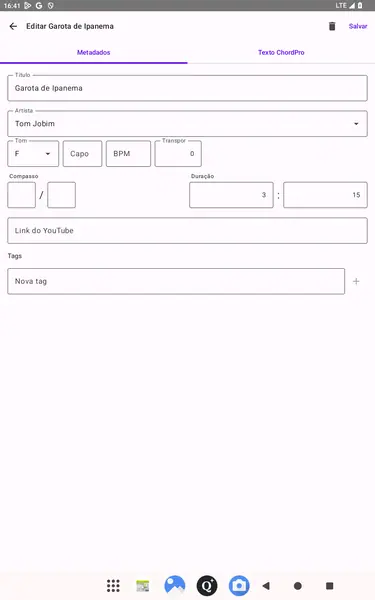
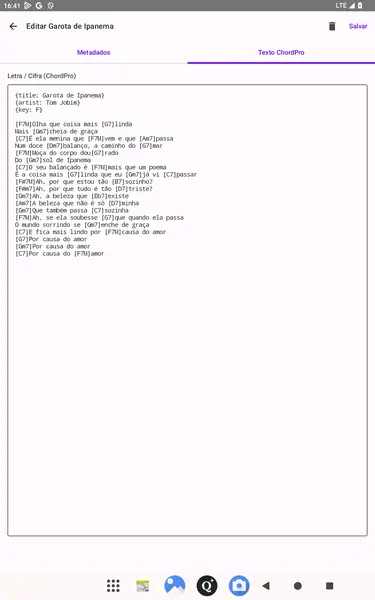
- Full ChordPro editor: lyrics, chords, key, BPM, capo, time signature, duration and a YouTube link.
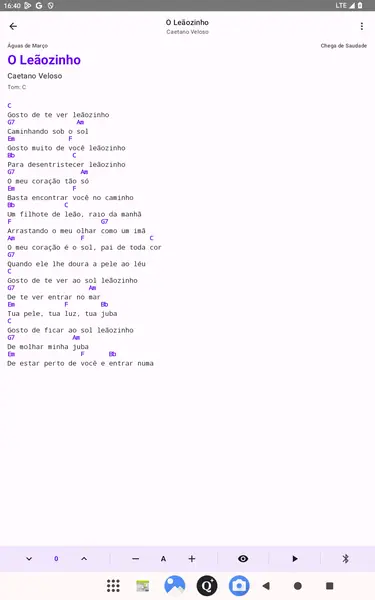
- One-tap key transposition: raise or lower the whole chart without rewriting it.
- Auto-scroll with speed control to practice at your own pace.
- Hide chords to sing along, resize the lyrics and search within the text.
- Bluetooth pedal support (next/previous/play-pause) so you can keep your instrument in hand.
Setlists for gigs
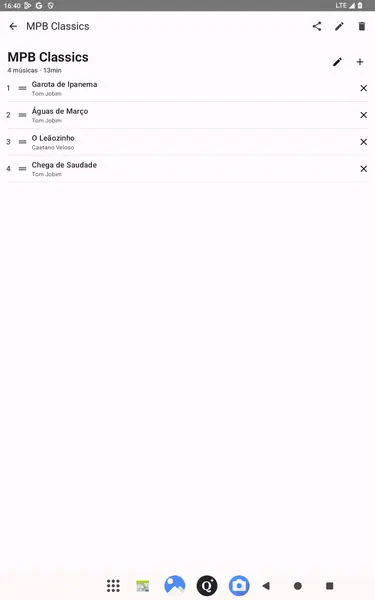
- Drag to reorder songs and swipe between them in the viewer.
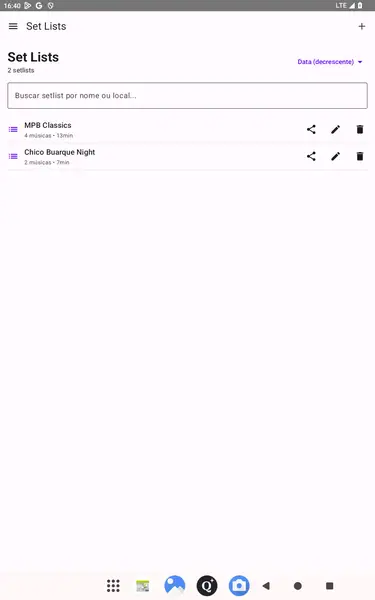
- Set date, venue and time for each gig; the app computes the total set duration.
- Share/export a setlist in OpenSetList (.osl) or JustChords (.chopro) format and import other musicians' setlists.
Organization & backup
- Artists and tags to keep your repertoire organized.
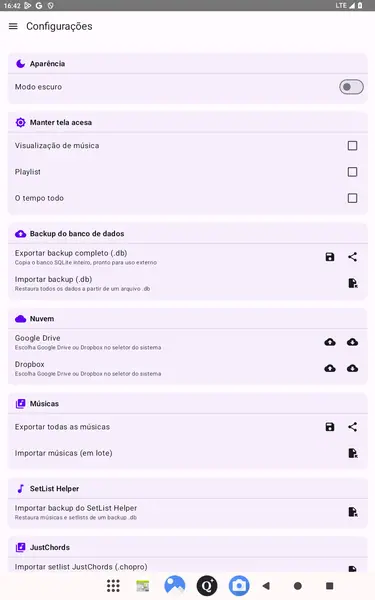
- Full database backup (.db), batch song export/import (JSON) and cloud through the system picker (Google Drive/Dropbox).
- Import from SetList Helper (.db) and JustChords (.chopro).
- Opens .osl/.chopro files received on Android.
Multiplatform & open
- Android, iOS and desktop (Windows/macOS/Linux), open source under the MIT license.
- No accounts, no ads, no data collection. Your data stays on your device.
Novedades de la versión 1.2.0
- JustChords compatibility: .jcarchive exports are now fully compatible and can be reopened in the JustChords app.
- Compressed .osl files: OpenSetList exports are now ZIP archives (smaller and more reliable to share); older plain-text .osl files are still imported normally.
- Resume where you left off: returning from a chart or setlist restores scroll position, search term and sort order.
Información del archivo APK
| Nombre del paquete | com.opensetlist.app |
|---|---|
| Versión | 1.2.0 (código 5) |
| Android mínimo | Android 7.0 · diseñada para Android 16 |
| Arquitecturas | Todas (universal) |
| SHA-256 | 322273da99befeee6df1c8c0e08ea8647858f7b9557a82b28a5512ced8debea9 |
| Firma | e7dbb3740f412252758ac7368028959d4744738de4f6b193613b27a9404047c5 |
| Licencia | MIT — licencia libre permisiva: el código fuente es público y reutilizable |
| Código fuente | github.com/OpenSetList/opensetlist-app |
Permisos solicitados
- Acceso a Internet
- Bluetooth
- Ubicación precisa (GPS) sensible
- Buscar dispositivos Bluetooth
- Conectar por Bluetooth
1 permiso(s) técnico(s) más
BLUETOOTH_ADMIN
Cómo instalar OpenSetList APK
- Pulsa Descargar APK arriba y abre el archivo cuando termine la descarga.
- Si Android lo pide, permite que tu navegador instale apps desconocidas.
- Pulsa Instalar. OpenSetList aparecerá junto a tus otras apps.
→ Cómo instalar un archivo APK en Android (paso a paso)
→ «La aplicación no está instalada»: causas y soluciones
Preguntas frecuentes
¿OpenSetList es gratis?
Sí. OpenSetList se distribuye con licencia MIT: gratis, sin suscripción y con el código fuente público.
¿Es seguro este archivo APK?
El archivo es el que compila y publica el repositorio F-Droid a partir del código fuente público. Su huella SHA-256 aparece arriba para que puedas compararla tras la descarga. ¿Un APK es peligroso? Cómo verificar un archivo antes de instalarlo
¿Funciona OpenSetList en mi teléfono?
Necesitas como mínimo Android 7.0. La app también funciona sin los servicios de Google, así que funciona en los teléfonos Huawei recientes.