
Rebooter APK
Reboot device on schedule or variety of conditions
Descargar APK v1.4.1 · 11,2 MB- Versión1.4.1
- Tamaño11,2 MB
- RequiereAndroid 14
- Actualizada4/8/2026
- LicenciaGPL-3.0-or-later
- PrecioGratis
Acerca de Rebooter
Descripción del desarrollador (en inglés).
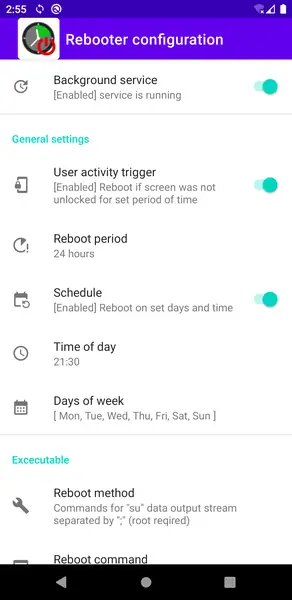
Regularly restarting device can solve some android system or app issues. This app mainly intended to help protect against few specific threats, because rebooting puts device into BFU (before first unlock) mode. Advanced users would be able to run any executable/script instead of reboot.
Features
- Reboot when screen was not unlocked for set period of time.
- Reboot over fixed period or at scheduled time and days of week.
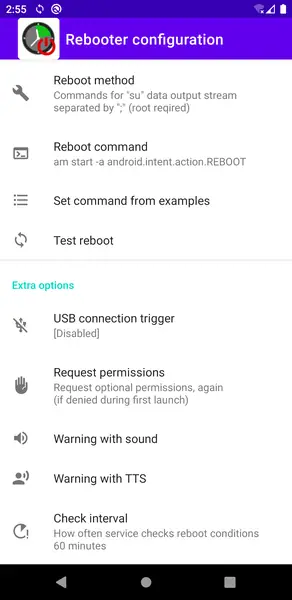
- Reboot when host USB connection detected.
- Customisable command line to fit different setups.
- Customisable sound and speach warnings upon reboot.
Permissions
- root (mandatory)
- set alarms & reminders (optional)
- run in background (optional)
- notifications (optional)
For app to function just enable background service. Changing any settings stops service, start it again manually. Service checks schedule only occasionally (1 hour by default), so it should not consume any noticeable resources. For exact timing please grant "set alarms & reminders" permission.
This app does not access network in any capacity. This app does not collect, send or recieve any data. This app able to use root permissions only executing user-defined command. All default commands are variations "/system/bin/su -c reboot" type.
Información del archivo APK
| Nombre del paquete | com.github.girator.rebooter |
|---|---|
| Versión | 1.4.1 (código 1411) |
| Android mínimo | Android 14 · diseñada para Android 16 |
| Arquitecturas | Todas (universal) |
| SHA-256 | 5306cdc7e55fc3fdab9ad30fc7db7f9adf3802a65c21cbd4a34e70a2172aed4e |
| Firma | 5a3c7dde1a0a0b204e0aaa9669fd5dfe2537b4a1b377e34c2ed15be9116696b2 |
| Licencia | GPL-3.0-or-later — licencia libre copyleft: el código es público y las versiones modificadas deben seguir siendo libres |
| Código fuente | github.com/GIRATOR/Rebooter |
Permisos solicitados
- Mostrar notificaciones
- Funcionar en segundo plano
- Iniciarse al arrancar
4 permiso(s) técnico(s) más
ACTION_USER_PRESENT SCHEDULE_EXACT_ALARM REQUEST_IGNORE_BATTERY_OPTIMIZATIONS REBOOT
Versiones anteriores
- Rebooter 1.4.14 de agosto de 2026 · 11,2 MB
- Rebooter 1.4.14 de agosto de 2026 · 5,4 MB
- Rebooter 1.419 de marzo de 2026 · 11,2 MB
- Rebooter 1.218 de diciembre de 2025 · 11,3 MB
Cómo instalar Rebooter APK
- Pulsa Descargar APK arriba y abre el archivo cuando termine la descarga.
- Si Android lo pide, permite que tu navegador instale apps desconocidas.
- Pulsa Instalar. Rebooter aparecerá junto a tus otras apps.
→ Cómo instalar un archivo APK en Android (paso a paso)
→ «La aplicación no está instalada»: causas y soluciones
Preguntas frecuentes
¿Rebooter es gratis?
Sí. Rebooter se distribuye con licencia GPL-3.0-or-later: gratis, sin suscripción y con el código fuente público.
¿Es seguro este archivo APK?
El archivo es el que compila y publica el repositorio F-Droid a partir del código fuente público. Su huella SHA-256 aparece arriba para que puedas compararla tras la descarga. ¿Un APK es peligroso? Cómo verificar un archivo antes de instalarlo
¿Funciona Rebooter en mi teléfono?
Necesitas como mínimo Android 14. La app también funciona sin los servicios de Google, así que funciona en los teléfonos Huawei recientes.





