
Rebooter APK
Reboot device on schedule or variety of conditions
Baixar APK v1.4.1 · 11,2 MB- Versão1.4.1
- Tamanho11,2 MB
- RequerAndroid 14
- Atualizado04/08/2026
- LicençaGPL-3.0-or-later
- PreçoGrátis
Sobre o Rebooter
Descrição fornecida pelo desenvolvedor (em inglês).
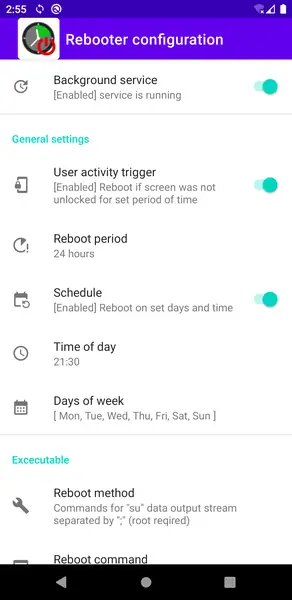
Regularly restarting device can solve some android system or app issues. This app mainly intended to help protect against few specific threats, because rebooting puts device into BFU (before first unlock) mode. Advanced users would be able to run any executable/script instead of reboot.
Features
- Reboot when screen was not unlocked for set period of time.
- Reboot over fixed period or at scheduled time and days of week.
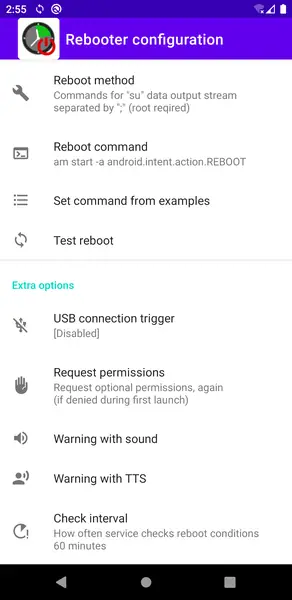
- Reboot when host USB connection detected.
- Customisable command line to fit different setups.
- Customisable sound and speach warnings upon reboot.
Permissions
- root (mandatory)
- set alarms & reminders (optional)
- run in background (optional)
- notifications (optional)
For app to function just enable background service. Changing any settings stops service, start it again manually. Service checks schedule only occasionally (1 hour by default), so it should not consume any noticeable resources. For exact timing please grant "set alarms & reminders" permission.
This app does not access network in any capacity. This app does not collect, send or recieve any data. This app able to use root permissions only executing user-defined command. All default commands are variations "/system/bin/su -c reboot" type.
Informações do arquivo APK
| Nome do pacote | com.github.girator.rebooter |
|---|---|
| Versão | 1.4.1 (código 1411) |
| Android mínimo | Android 14 · feito para Android 16 |
| Arquiteturas | Todas (universal) |
| SHA-256 | 5306cdc7e55fc3fdab9ad30fc7db7f9adf3802a65c21cbd4a34e70a2172aed4e |
| Assinatura | 5a3c7dde1a0a0b204e0aaa9669fd5dfe2537b4a1b377e34c2ed15be9116696b2 |
| Licença | GPL-3.0-or-later — licença livre copyleft: o código é público e versões modificadas devem continuar livres |
| Código-fonte | github.com/GIRATOR/Rebooter |
Permissões solicitadas
- Mostrar notificações
- Funcionar em segundo plano
- Iniciar com o sistema
Mais 4 permissão(ões) técnica(s)
ACTION_USER_PRESENT SCHEDULE_EXACT_ALARM REQUEST_IGNORE_BATTERY_OPTIMIZATIONS REBOOT
Versões anteriores
- Rebooter 1.4.14 de agosto de 2026 · 11,2 MB
- Rebooter 1.4.14 de agosto de 2026 · 5,4 MB
- Rebooter 1.419 de março de 2026 · 11,2 MB
- Rebooter 1.218 de dezembro de 2025 · 11,3 MB
Como instalar o Rebooter APK
- Toque em Baixar APK acima e abra o arquivo quando o download terminar.
- Se o Android pedir, permita que o navegador instale apps desconhecidos.
- Toque em Instalar. O Rebooter aparecerá junto aos seus outros apps.
→ Como instalar um arquivo APK no Android (passo a passo)
→ "App não instalado": causas e soluções
Perguntas frequentes
O Rebooter é grátis?
Sim. O Rebooter é distribuído sob a licença GPL-3.0-or-later: grátis, sem assinatura e com código-fonte público.
Este arquivo APK é seguro?
O arquivo é o compilado e publicado pelo repositório F-Droid a partir do código-fonte público. A impressão digital SHA-256 aparece acima para você comparar depois do download. APK é perigoso? Como verificar um arquivo antes de instalar
O Rebooter funciona no meu celular?
É preciso ter pelo menos Android 14. O app também funciona sem os serviços do Google, inclusive em celulares Huawei recentes.





