Rebooter APK
Reboot device on schedule or variety of conditions
Download APK v1.4.1 · 11.2 MB- Version1.4.1
- Size11.2 MB
- RequiresAndroid 14
- Updated8/4/2026
- LicenceGPL-3.0-or-later
- PriceFree
About Rebooter
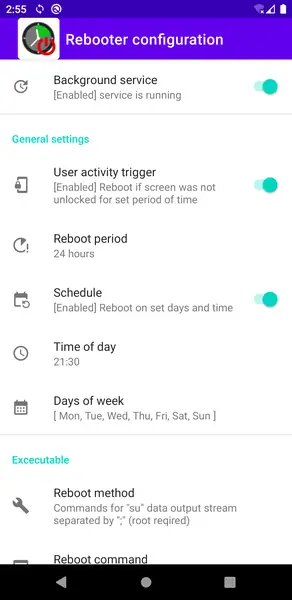
Regularly restarting device can solve some android system or app issues. This app mainly intended to help protect against few specific threats, because rebooting puts device into BFU (before first unlock) mode. Advanced users would be able to run any executable/script instead of reboot.
Features
- Reboot when screen was not unlocked for set period of time.
- Reboot over fixed period or at scheduled time and days of week.
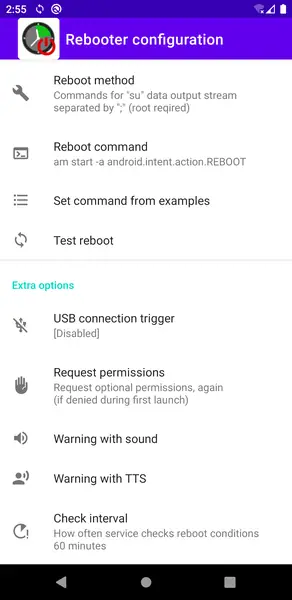
- Reboot when host USB connection detected.
- Customisable command line to fit different setups.
- Customisable sound and speach warnings upon reboot.
Permissions
- root (mandatory)
- set alarms & reminders (optional)
- run in background (optional)
- notifications (optional)
For app to function just enable background service. Changing any settings stops service, start it again manually. Service checks schedule only occasionally (1 hour by default), so it should not consume any noticeable resources. For exact timing please grant "set alarms & reminders" permission.
This app does not access network in any capacity. This app does not collect, send or recieve any data. This app able to use root permissions only executing user-defined command. All default commands are variations "/system/bin/su -c reboot" type.
APK file information
| Package name | com.github.girator.rebooter |
|---|---|
| Version | 1.4.1 (code 1411) |
| Minimum Android | Android 14 · targets Android 16 |
| Architectures | All (universal) |
| SHA-256 | 5306cdc7e55fc3fdab9ad30fc7db7f9adf3802a65c21cbd4a34e70a2172aed4e |
| Signature | 5a3c7dde1a0a0b204e0aaa9669fd5dfe2537b4a1b377e34c2ed15be9116696b2 |
| Licence | GPL-3.0-or-later — copyleft free licence: the code is public and modified versions must stay free |
| Source code | github.com/GIRATOR/Rebooter |
Permissions
- Show notifications
- Run in the background
- Start at boot
4 other technical permission(s)
ACTION_USER_PRESENT SCHEDULE_EXACT_ALARM REQUEST_IGNORE_BATTERY_OPTIMIZATIONS REBOOT
Older versions
- Rebooter 1.4.1August 4, 2026 · 11.2 MB
- Rebooter 1.4.1August 4, 2026 · 5.4 MB
- Rebooter 1.4March 19, 2026 · 11.2 MB
- Rebooter 1.2December 18, 2025 · 11.3 MB
How to install Rebooter APK
- Tap Download APK above, then open the file once the download has finished.
- If Android asks, allow your browser to install unknown apps.
- Tap Install. Rebooter then appears with your other apps.
Having trouble? Read our guides how to install an APK on Android and "App not installed": how to fix it.
Frequently asked questions
Is Rebooter free?
Yes. Rebooter is distributed under the GPL-3.0-or-later licence: free, no subscription, and its source code is public.
Is this APK file safe?
The file is the one built and published by the F-Droid repository from the public source code. Its SHA-256 fingerprint is shown above, so you can compare it after downloading. How to check an APK.
Will Rebooter work on my phone?
You need at least Android 14. The app also works without Google services, so it runs on recent Huawei phones too.





