
Rebooter APK
Reboot device on schedule or variety of conditions
Scarica l'APK v1.4.1 · 11,2 MB- Versione1.4.1
- Dimensione11,2 MB
- RichiedeAndroid 14
- Aggiornata04/08/2026
- LicenzaGPL-3.0-or-later
- PrezzoGratis
Informazioni su Rebooter
Descrizione fornita dallo sviluppatore (in inglese).
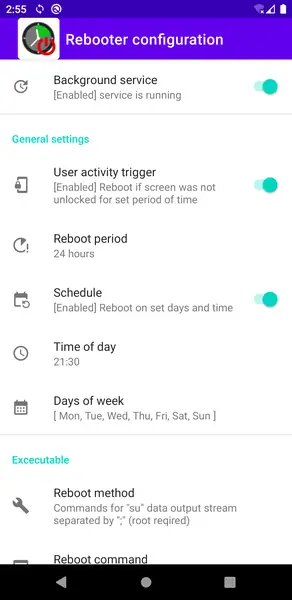
Regularly restarting device can solve some android system or app issues. This app mainly intended to help protect against few specific threats, because rebooting puts device into BFU (before first unlock) mode. Advanced users would be able to run any executable/script instead of reboot.
Features
- Reboot when screen was not unlocked for set period of time.
- Reboot over fixed period or at scheduled time and days of week.
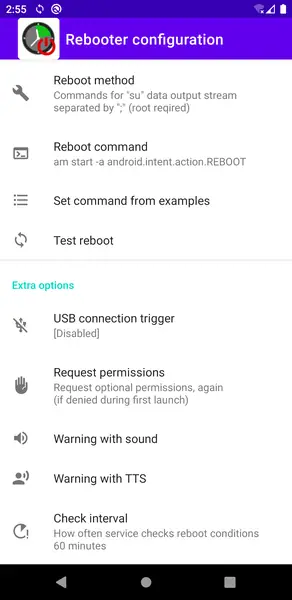
- Reboot when host USB connection detected.
- Customisable command line to fit different setups.
- Customisable sound and speach warnings upon reboot.
Permissions
- root (mandatory)
- set alarms & reminders (optional)
- run in background (optional)
- notifications (optional)
For app to function just enable background service. Changing any settings stops service, start it again manually. Service checks schedule only occasionally (1 hour by default), so it should not consume any noticeable resources. For exact timing please grant "set alarms & reminders" permission.
This app does not access network in any capacity. This app does not collect, send or recieve any data. This app able to use root permissions only executing user-defined command. All default commands are variations "/system/bin/su -c reboot" type.
Informazioni sul file APK
| Nome del pacchetto | com.github.girator.rebooter |
|---|---|
| Versione | 1.4.1 (codice 1411) |
| Android minimo | Android 14 · pensata per Android 16 |
| Architetture | Tutte (universale) |
| SHA-256 | 5306cdc7e55fc3fdab9ad30fc7db7f9adf3802a65c21cbd4a34e70a2172aed4e |
| Firma | 5a3c7dde1a0a0b204e0aaa9669fd5dfe2537b4a1b377e34c2ed15be9116696b2 |
| Licenza | GPL-3.0-or-later — licenza libera copyleft: il codice è pubblico e le versioni modificate devono restare libere |
| Codice sorgente | github.com/GIRATOR/Rebooter |
Autorizzazioni richieste
- Mostrare notifiche
- Funzionare in background
- Avviarsi all'accensione
Altre 4 autorizzazioni tecniche
ACTION_USER_PRESENT SCHEDULE_EXACT_ALARM REQUEST_IGNORE_BATTERY_OPTIMIZATIONS REBOOT
Versioni precedenti
- Rebooter 1.4.14 agosto 2026 · 11,2 MB
- Rebooter 1.4.14 agosto 2026 · 5,4 MB
- Rebooter 1.419 marzo 2026 · 11,2 MB
- Rebooter 1.218 dicembre 2025 · 11,3 MB
Come installare Rebooter APK
- Tocca Scarica l'APK qui sopra, poi apri il file al termine del download.
- Se Android lo chiede, consenti al browser di installare app sconosciute.
- Tocca Installa. Rebooter comparirà insieme alle altre app.
→ Come installare un file APK su Android (passo passo)
→ «App non installata»: cause e soluzioni
Domande frequenti
Rebooter è gratis?
Sì. Rebooter è distribuita con licenza GPL-3.0-or-later: gratuita, senza abbonamento e con codice sorgente pubblico.
Questo file APK è sicuro?
Il file è quello compilato e pubblicato dal repository F-Droid a partire dal codice sorgente pubblico. L'impronta SHA-256 è indicata qui sopra: puoi confrontarla dopo il download. Un APK è pericoloso? Come verificare un file prima di installarlo
Rebooter funziona sul mio telefono?
Serve almeno Android 14. L'app funziona anche senza i servizi Google, quindi anche sui telefoni Huawei recenti.





