UniPatcher APK
أداة لتطبيق التصحيحات على ROMs
تنزيل APK v0.19 · 7.9 م.ب- الإصدار0.19
- الحجم7.9 م.ب
- يتطلبAndroid 7.0
- آخر تحديث15/10/2026
- الترخيصGPL-3.0-or-later
- السعرمجاني
حول UniPatcher
وصف مقدَّم من المطوّر (بالإنجليزية).
UniPatcher allows you to apply patches to game ROMs.
What is a patch? A file with the modified data of the game. For example, a game translated from Japanese to English. You download the patch containing the translation. It must be applied to the Japanese version to make an English version of it.
This program will not help you hack native Android games, it was created for the old console games (SNES, PS1, GBA, N64, SMD\Genesis etc.)
Features:
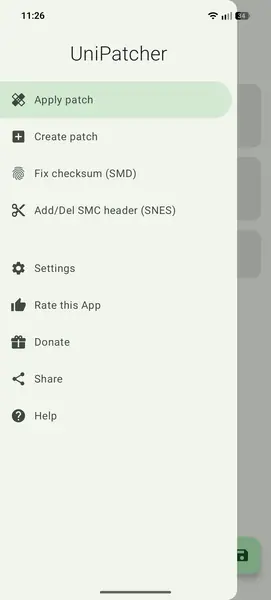
- Supported formats of patches: IPS, IPS32, UPS, BPS, APS (GBA), APS (N64), PPF, DPS, EBP, XDelta
- Create XDelta patches
- Fix the checksum in SMD\Genesis ROMs
- Remove the SMC header from SNES ROMs
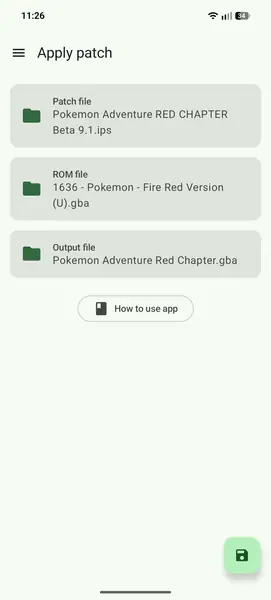
How to use? You have to select a ROM file, a patch and choose which file to save, then click on the button in the bottom. Files are selected through the standard Files application (or through one of the file managers you have installed). The application will show a message when the file is patched. Do not close the application until the file is patched.
Very important: If the game and patch is compressed (ZIP, RAR, 7z or other), they first need to be unzipped.
الجديد في الإصدار 0.19
- Added support for XDelta1 patches
- Fixed applying some XDelta3 patches with DJW compression that previously failed with an error
- Updated interface design based on Material 3, added dynamic color themes
معلومات ملف APK
| اسم الحزمة | org.emunix.unipatcher |
|---|---|
| الإصدار | 0.19 (الرمز 190000) |
| أدنى إصدار أندرويد | Android 7.0 · مخصّص لـ Android 16 |
| المعماريات | arm64-v8a, armeabi-v7a, x86_64 |
| SHA-256 | 12b83efacee7c522ac583e0894d1a2108bedb10e85a57d525784abc8b6956e89 |
| التوقيع | febcbed69a1f017f79a17a1c1fe30a46ba4f9f9e0a91d6b5be2e2c2cd8695bf6 |
| الترخيص | GPL-3.0-or-later — ترخيص حر من نوع copyleft: الشيفرة متاحة ويجب أن تبقى النسخ المعدّلة حرة |
| الشيفرة المصدرية | github.com/btimofeev/UniPatcher |
الأذونات
- عرض الإشعارات
إصدارات سابقة
- UniPatcher 0.1915 أكتوبر 2026 · 7.9 م.ب
- UniPatcher 0.1817 سبتمبر 2026 · 3.0 م.ب
- UniPatcher 0.17.316 نوفمبر 2024 · 2.8 م.ب
كيفية تثبيت UniPatcher APK
- اضغط على تنزيل APK أعلاه، ثم افتح الملف بعد اكتمال التنزيل.
- إذا طلب أندرويد ذلك، اسمح للمتصفح بتثبيت التطبيقات غير المعروفة.
- اضغط على تثبيت. سيظهر UniPatcher مع تطبيقاتك الأخرى.
→ كيفية تثبيت ملف APK على أندرويد (خطوة بخطوة)
→ «لم يتم تثبيت التطبيق»: الأسباب والحلول
أسئلة شائعة
هل UniPatcher مجاني؟
نعم. يُوزَّع UniPatcher بترخيص GPL-3.0-or-later: مجاني، بلا اشتراك، وشيفرته المصدرية متاحة للجميع.
هل ملف APK هذا آمن؟
الملف هو الذي بناه ونشره مستودع F-Droid من الشيفرة المصدرية العامة. بصمة SHA-256 الخاصة به معروضة أعلاه، ويمكنك مقارنتها بعد التنزيل. هل ملف APK خطير؟ كيف تفحص الملف قبل تثبيته
هل يعمل UniPatcher على هاتفي؟
تحتاج إلى Android 7.0 على الأقل. يعمل التطبيق أيضًا دون خدمات Google، لذا يعمل على هواتف هواوي الحديثة.