UniPatcher APK
Hulpprogramma om patches toe te passen op ROMs
APK downloaden v0.19 · 7,9 MB- Versie0.19
- Grootte7,9 MB
- VereistAndroid 7.0
- Bijgewerkt15-10-2026
- LicentieGPL-3.0-or-later
- PrijsGratis
Over UniPatcher
Beschrijving van de ontwikkelaar (in het Engels).
UniPatcher allows you to apply patches to game ROMs.
What is a patch? A file with the modified data of the game. For example, a game translated from Japanese to English. You download the patch containing the translation. It must be applied to the Japanese version to make an English version of it.
This program will not help you hack native Android games, it was created for the old console games (SNES, PS1, GBA, N64, SMD\Genesis etc.)
Features:
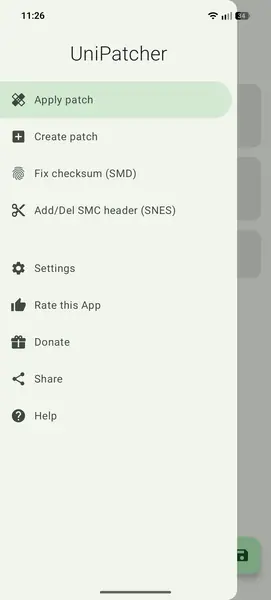
- Supported formats of patches: IPS, IPS32, UPS, BPS, APS (GBA), APS (N64), PPF, DPS, EBP, XDelta
- Create XDelta patches
- Fix the checksum in SMD\Genesis ROMs
- Remove the SMC header from SNES ROMs
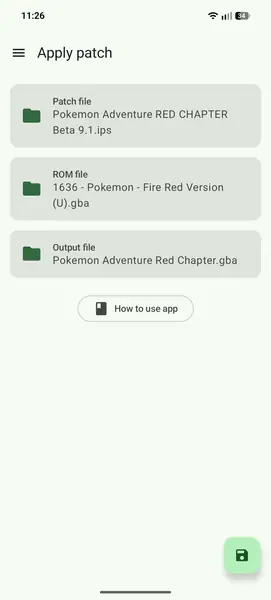
How to use? You have to select a ROM file, a patch and choose which file to save, then click on the button in the bottom. Files are selected through the standard Files application (or through one of the file managers you have installed). The application will show a message when the file is patched. Do not close the application until the file is patched.
Very important: If the game and patch is compressed (ZIP, RAR, 7z or other), they first need to be unzipped.
Nieuw in versie 0.19
- Added support for XDelta1 patches
- Fixed applying some XDelta3 patches with DJW compression that previously failed with an error
- Updated interface design based on Material 3, added dynamic color themes
Informatie over het APK-bestand
| Pakketnaam | org.emunix.unipatcher |
|---|---|
| Versie | 0.19 (code 190000) |
| Minimaal Android | Android 7.0 · bedoeld voor Android 16 |
| Architecturen | arm64-v8a, armeabi-v7a, x86_64 |
| SHA-256 | 12b83efacee7c522ac583e0894d1a2108bedb10e85a57d525784abc8b6956e89 |
| Handtekening | febcbed69a1f017f79a17a1c1fe30a46ba4f9f9e0a91d6b5be2e2c2cd8695bf6 |
| Licentie | GPL-3.0-or-later — vrije copyleftlicentie: de code is openbaar en aangepaste versies moeten vrij blijven |
| Broncode | github.com/btimofeev/UniPatcher |
Machtigingen
- Meldingen tonen
Oudere versies
- UniPatcher 0.1915 oktober 2026 · 7,9 MB
- UniPatcher 0.1817 september 2026 · 3,0 MB
- UniPatcher 0.17.316 november 2024 · 2,8 MB
UniPatcher APK installeren
- Tik hierboven op APK downloaden en open het bestand als de download klaar is.
- Als Android erom vraagt, sta je browser toe om onbekende apps te installeren.
- Tik op Installeren. UniPatcher verschijnt dan bij je andere apps.
→ Een APK-bestand installeren op Android (stap voor stap)
→ “App niet geïnstalleerd”: oorzaken en oplossingen
Veelgestelde vragen
Is UniPatcher gratis?
Ja. UniPatcher wordt verspreid onder de licentie GPL-3.0-or-later: gratis, zonder abonnement en met openbare broncode.
Is dit APK-bestand veilig?
Het bestand is gebouwd en gepubliceerd door de F-Droid-repository op basis van de openbare broncode. De SHA-256-vingerafdruk staat hierboven, zodat je die na het downloaden kunt vergelijken. Is een APK gevaarlijk? Zo controleer je een bestand vóór installatie
Werkt UniPatcher op mijn telefoon?
Je hebt minimaal Android 7.0 nodig. De app werkt ook zonder Google-diensten, dus ook op recente Huawei-telefoons.