UniPatcher APK
Utility to apply patches to ROMs
Download APK v0.19 · 7.9 MB- Version0.19
- Size7.9 MB
- RequiresAndroid 7.0
- Updated10/15/2026
- LicenceGPL-3.0-or-later
- PriceFree
About UniPatcher
UniPatcher allows you to apply patches to game ROMs.
What is a patch? A file with the modified data of the game. For example, a game translated from Japanese to English. You download the patch containing the translation. It must be applied to the Japanese version to make an English version of it.
This program will not help you hack native Android games, it was created for the old console games (SNES, PS1, GBA, N64, SMD\Genesis etc.)
Features:
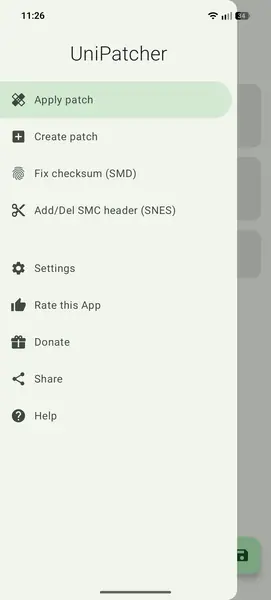
- Supported formats of patches: IPS, IPS32, UPS, BPS, APS (GBA), APS (N64), PPF, DPS, EBP, XDelta
- Create XDelta patches
- Fix the checksum in SMD\Genesis ROMs
- Remove the SMC header from SNES ROMs
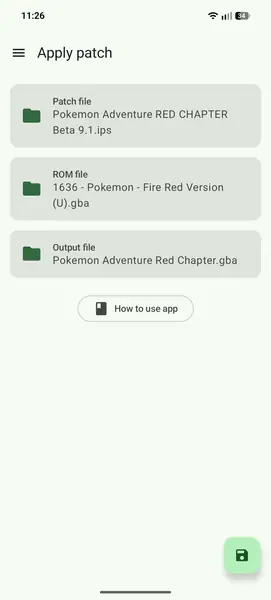
How to use? You have to select a ROM file, a patch and choose which file to save, then click on the button in the bottom. Files are selected through the standard Files application (or through one of the file managers you have installed). The application will show a message when the file is patched. Do not close the application until the file is patched.
Very important: If the game and patch is compressed (ZIP, RAR, 7z or other), they first need to be unzipped.
What's new in version 0.19
- Added support for XDelta1 patches
- Fixed applying some XDelta3 patches with DJW compression that previously failed with an error
- Updated interface design based on Material 3, added dynamic color themes
APK file information
| Package name | org.emunix.unipatcher |
|---|---|
| Version | 0.19 (code 190000) |
| Minimum Android | Android 7.0 · targets Android 16 |
| Architectures | arm64-v8a, armeabi-v7a, x86_64 |
| SHA-256 | 12b83efacee7c522ac583e0894d1a2108bedb10e85a57d525784abc8b6956e89 |
| Signature | febcbed69a1f017f79a17a1c1fe30a46ba4f9f9e0a91d6b5be2e2c2cd8695bf6 |
| Licence | GPL-3.0-or-later — copyleft free licence: the code is public and modified versions must stay free |
| Source code | github.com/btimofeev/UniPatcher |
Permissions
- Show notifications
Older versions
- UniPatcher 0.19October 15, 2026 · 7.9 MB
- UniPatcher 0.18September 17, 2026 · 3.0 MB
- UniPatcher 0.17.3November 16, 2024 · 2.8 MB
How to install UniPatcher APK
- Tap Download APK above, then open the file once the download has finished.
- If Android asks, allow your browser to install unknown apps.
- Tap Install. UniPatcher then appears with your other apps.
Having trouble? Read our guides how to install an APK on Android and "App not installed": how to fix it.
Frequently asked questions
Is UniPatcher free?
Yes. UniPatcher is distributed under the GPL-3.0-or-later licence: free, no subscription, and its source code is public.
Is this APK file safe?
The file is the one built and published by the F-Droid repository from the public source code. Its SHA-256 fingerprint is shown above, so you can compare it after downloading. How to check an APK.
Will UniPatcher work on my phone?
You need at least Android 7.0. The app also works without Google services, so it runs on recent Huawei phones too.