C2K APK
C2K — Couch to 5K & 10K
Offline Couch to 5K & 10K trainer with voice cues. No ads, no tracking.
Download APK v1.2.25 · 2.3 MB- Version1.2.25
- Size2.3 MB
- RequiresAndroid 8.0
- Updated11/23/2026
- LicenceGPL-3.0-only
- PriceFree
About C2K
C2K is an offline running trainer that guides you from the couch to running 5K, 10K, and beyond. Follow a clear plan, hear hands-free coaching, and keep your progress private — with no ads and no tracking.
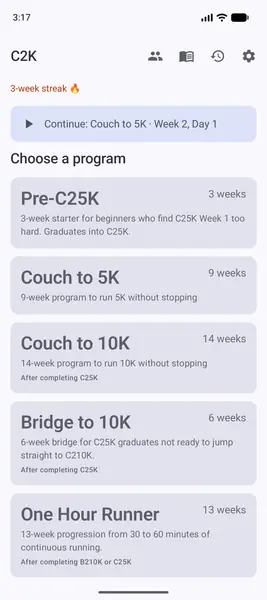
Programs:
- Pre-C25K — 3-week gentle starter for absolute beginners
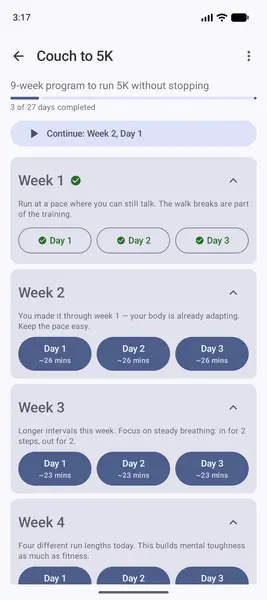
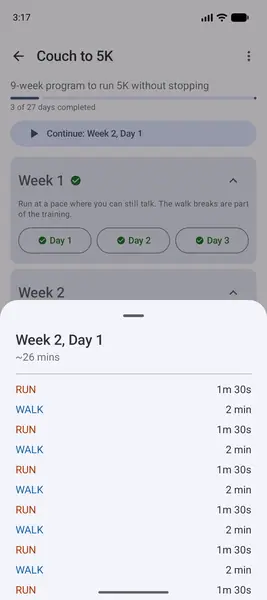
- Couch to 5K (C25K) — 9-week program, 3 runs per week
- Couch to 10K (C210K) — 14-week program, continues from C25K
- Bridge to 10K (B210K) — 6-week bridge for C25K graduates
- One Hour Runner — 13-week progression from 30 to 60 minutes continuous running
- 5K Improver — 8-week speed and stamina program for runners who can already complete 5K
Features:
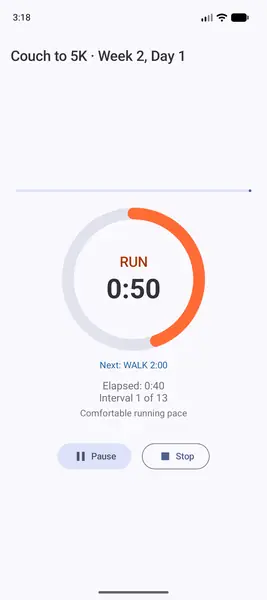
- Audible voice prompts — "Start running", "Walk for 90 seconds", countdown warnings
- Customizable coaching — adjust voice speed/volume, countdown warning timing, and mid-interval cues
- Test voice playback before a workout, with Android text-to-speech diagnostics
- Vibration cues as an alternative or addition to voice
- Smartwatch and fitness band alerts — interval changes arrive as notifications, so a paired Wear OS watch or Gadgetbridge band buzzes too. No watch app needed.
- Tones mode — short chimes instead of a voice for interval changes and countdowns
- Adjustable vibration strength and language selection
- Background workout timer — continues with screen off
- GPS tracking (optional) — records distance and pace; works without GPS too
- Treadmill mode — indoor runs without GPS
- Skip the warm-up or cool-down — in Settings, or with one tap during a workout
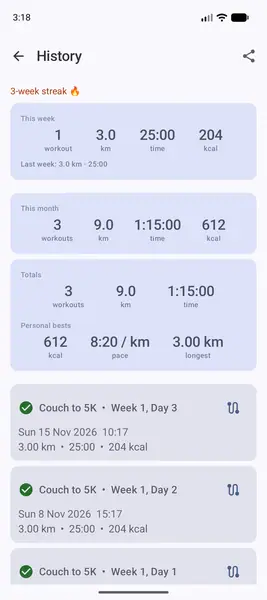
- Workout history — weekly streak, session log, totals, best pace, longest run and calorie estimates
- Progress tracking — remembers which weeks and days you've completed, with the option to reset
- Step back when it's tough — stop the same workout early twice and C2K suggests repeating the week before
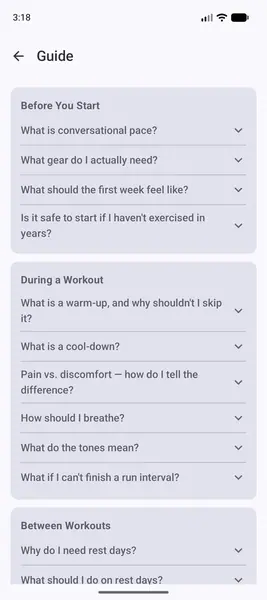
- In-app running guide — FAQ covering pacing, gear, and terminology
- Available in 8 languages — English, German, Spanish, French, Galician, Portuguese (Brazil), Russian, Turkish
- Works offline — no internet permission required
- No proprietary services required — compatible with GrapheneOS and privacy-focused devices
Permissions:
- FOREGROUND_SERVICE (health, location) — keeps the workout timer running with the screen off
- ACTIVITY_RECOGNITION — Android requires it for a fitness timer that runs in the background; C2K reads no sensor data, and workouts still start if you decline
- ACCESS_FINE_LOCATION / ACCESS_COARSE_LOCATION — optional GPS distance and pace, only asked for workouts that use GPS
- POST_NOTIFICATIONS — the workout notification with pause and stop, and smartwatch alerts
- REQUEST_IGNORE_BATTERY_OPTIMIZATIONS — offers to exempt C2K from battery saving so it can't end a workout mid-run
- WAKE_LOCK — prevents the CPU sleeping mid-workout
- VIBRATE — optional vibration cues during workouts
C2K is free software released under the GNU General Public License v3.
What's new in version 1.2.25
- Route export now sends a .gpx file that map apps such as OsmAnd and Organic Maps can open.
APK file information
| Package name | com.hackerapps.c2k |
|---|---|
| Version | 1.2.25 (code 32) |
| Minimum Android | Android 8.0 · targets Android 16 |
| Architectures | arm64-v8a, armeabi-v7a, x86, x86_64 |
| SHA-256 | 4b39e52c7171dbe83ffe0e4ed59616f1e8ad3bf9dbc455c7e3bcb260b4845bc9 |
| Signature | a4d8f51c09620c0bcbe2c3ed97958d1785c6c2ac7ab9fbf504650f6945407896 |
| Licence | GPL-3.0-only — copyleft free licence: the code is public and modified versions must stay free |
| Source code | github.com/AnalogGhost/c2k |
Permissions
- Run in the background
- Physical activity sensitive
- Show notifications
- Keep the device awake
- Precise location (GPS) sensitive
- Approximate location sensitive
- Vibrate
1 other technical permission(s)
REQUEST_IGNORE_BATTERY_OPTIMIZATIONS
Older versions
- C2K 1.2.25November 23, 2026 · 2.3 MB
- C2K 1.2.23November 4, 2026 · 2.3 MB
- C2K 1.2.22October 22, 2026 · 2.3 MB
How to install C2K APK
- Tap Download APK above, then open the file once the download has finished.
- If Android asks, allow your browser to install unknown apps.
- Tap Install. C2K then appears with your other apps.
Having trouble? Read our guides how to install an APK on Android and "App not installed": how to fix it.
Frequently asked questions
Is C2K free?
Yes. C2K is distributed under the GPL-3.0-only licence: free, no subscription, and its source code is public.
Is this APK file safe?
The file is the one built and published by the F-Droid repository from the public source code. Its SHA-256 fingerprint is shown above, so you can compare it after downloading. How to check an APK.
Will C2K work on my phone?
You need at least Android 8.0. The app also works without Google services, so it runs on recent Huawei phones too.