SecondsClock APK
Clock with seconds as widget or fullscreen
Download APK v2.7.1 · 2.8 MB- Version2.7.1
- Size2.8 MB
- RequiresAndroid 8.0
- Updated11/20/2026
- LicenceGPL-3.0-or-later
- PriceFree


About SecondsClock
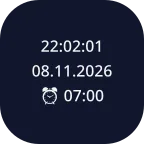
SecondsClock enables you to show a clock with seconds as a home screen widget or as a full screen night clock with dimming in low light.
Features:
- No Ads.
- No requests for donations or in-app purchases.
- Fully configurable.
- Adjusts text size to make use of available space.
What's new in version 2.7.1
- Align the full-screen clock menu buttons when text wraps.
APK file information
| Package name | uk.co.yahoo.p1rpp.secondsclock |
|---|---|
| Version | 2.7.1 (code 88) |
| Minimum Android | Android 8.0 · targets Android 8.0 |
| Architectures | All (universal) |
| SHA-256 | 2c105997fab862cce1aee6cc656002382220db60c8c78b123d15119fb40af028 |
| Signature | b03cc71b423d288b503075777c3a7500fce60e7faccea4ae8d2ba925070e1d2c |
| Licence | GPL-3.0-or-later — copyleft free licence: the code is public and modified versions must stay free |
| Source code | github.com/rparkins999/AndroidSecondsClock |
Permissions
No special permissions.
Older versions
- SecondsClock 2.7.1November 20, 2026 · 2.8 MB
- SecondsClock 2.3June 27, 2022 · 2.7 MB
- SecondsClock 2.2June 17, 2022 · 2.7 MB
How to install SecondsClock APK
- Tap Download APK above, then open the file once the download has finished.
- If Android asks, allow your browser to install unknown apps.
- Tap Install. SecondsClock then appears with your other apps.
Having trouble? Read our guides how to install an APK on Android and "App not installed": how to fix it.
Frequently asked questions
Is SecondsClock free?
Yes. SecondsClock is distributed under the GPL-3.0-or-later licence: free, no subscription, and its source code is public.
Is this APK file safe?
The file is the one built and published by the F-Droid repository from the public source code. Its SHA-256 fingerprint is shown above, so you can compare it after downloading. How to check an APK.
Will SecondsClock work on my phone?
You need at least Android 8.0. The app also works without Google services, so it runs on recent Huawei phones too.