
Odin APK
IPFS Lite Knoten mit moderner UI für Standard-Anwendungsfälle des IPFS
APK herunterladen v4.0.0 · 2,5 MB- Version4.0.0
- Größe2,5 MB
- BenötigtAndroid 10
- Aktualisiert25.4.2026
- LizenzApache-2.0
- PreisKostenlos
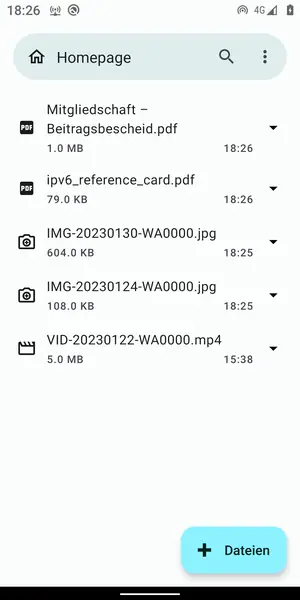
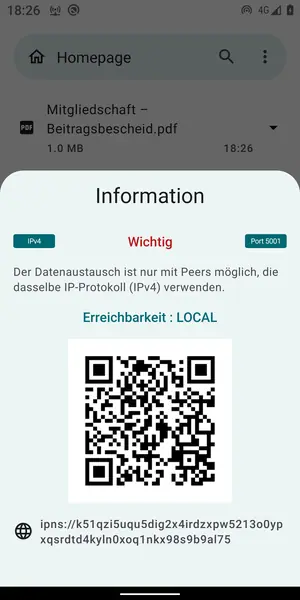
Über Odin
Beschreibung des Entwicklers (auf Englisch).
Odin
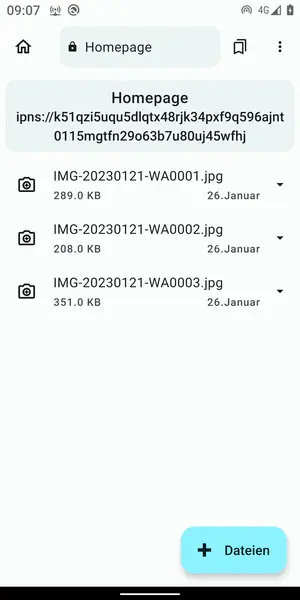
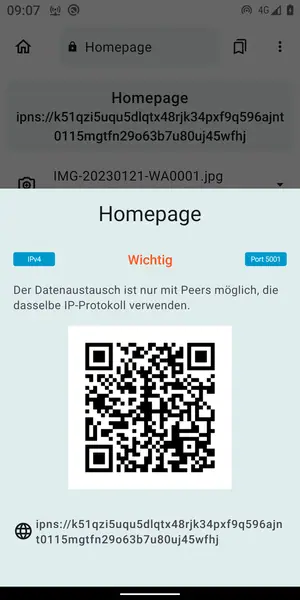
Odin is a decentralized peer-to-peer application via the BitTorrent network stack. For sharing data, a pns:// URI is provided, which consists basically of a peer id, which enables others to find your node on the network.
General
The basic characteristics of the app are decentralized, respect of personal data, open source, free of charge, transparent, free of advertising and legally impeccable.
Documentation
Odin is a client server implementation and based on the BitTorrent network.
The application itself requires the IPv6 protocol to function properly. When you are behind a router you might be able to switch to the IPv6 protocol and make the necessary settings, so that your service is globally reachable (Port Forwarding).
Port Forwarding
Port forwarding allows you to specify that all communications received on a certain port are forwarded directly to your device. You set port forwarding rules up on your router. The following list provides information which might be required for the port forwarding.
- Interface IPv6
Note: Only IPv6 is supported, because a direct connection between two peers can only be established when they use the same IP interface
- Port 5001
- Protocol TCP
Note: The protocol is TCP. The direct connection between two peers will be established via a secure TCP connection, protected by a self-signed certificate.
- Application Odin
Note: Usually can be any name
Concept
The application connect to BitTorrent network and publish its addresses, so that it can be found by other peers via a unique identifier (pid). This peer identifier (
) is also used for marking the content via the**pns://
/** URI. (Note: is a content identifier)
Links
Privacy Policy
Apache License
Neu in Version 4.0.0
- Fastlane corrections
- Android 17
Informationen zur APK-Datei
| Paketname | threads.server |
|---|---|
| Version | 4.0.0 (Code 400) |
| Mindestens | Android 10 · ausgelegt für API 37 |
| Architekturen | arm64-v8a, armeabi-v7a, x86, x86_64 |
| SHA-256 | 3910fbc903ae72f678915e464bd19767d664aa62495925febe317c6c8d1c1b58 |
| Signatur | 99f5ae78113394d4cde158d044ac19f6a6d5338fe685cfcb250be55fc464db19 |
| Lizenz | Apache-2.0 — freie, freizügige Lizenz: Der Quellcode ist öffentlich und wiederverwendbar |
| Quellcode | gitlab.com/lp2p/odin |
Berechtigungen
- Netzwerkstatus sehen
- Internetzugriff
Ältere Versionen
- Odin 4.0.025. April 2026 · 2,5 MB
- Odin 3.6.05. Oktober 2025 · 4,2 MB
- Odin 3.5.81. September 2025 · 4,1 MB
So installieren Sie Odin APK
- Tippen Sie oben auf APK herunterladen und öffnen Sie die Datei nach dem Download.
- Wenn Android fragt, erlauben Sie Ihrem Browser, unbekannte Apps zu installieren.
- Tippen Sie auf Installieren. Odin erscheint dann bei Ihren anderen Apps.
→ APK-Datei auf Android installieren (Schritt für Schritt)
→ „App nicht installiert“: Ursachen und Lösungen
Häufige Fragen
Ist Odin kostenlos?
Ja. Odin steht unter der Lizenz Apache-2.0: kostenlos, ohne Abo, und der Quellcode ist öffentlich.
Ist diese APK-Datei sicher?
Die Datei wurde vom F-Droid-Repository aus dem öffentlichen Quellcode erstellt und veröffentlicht. Ihr SHA-256-Fingerabdruck steht oben, Sie können ihn nach dem Download vergleichen. Ist eine APK gefährlich? So prüfen Sie eine Datei vor der Installation
Läuft Odin auf meinem Handy?
Sie benötigen mindestens Android 10. Die App funktioniert auch ohne Google-Dienste, also auch auf aktuellen Huawei-Handys.