
Odin APK
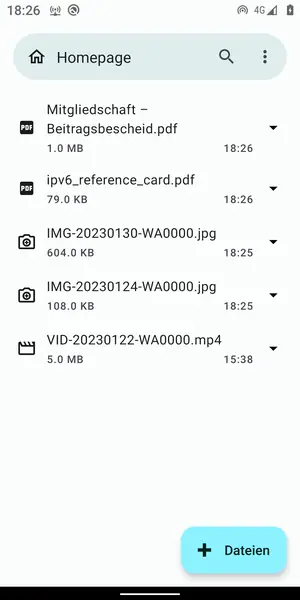
IPFS Lite knooppunt met moderne UI om standaard gebruik van IPFS te ondersteunen
APK downloaden v4.0.0 · 2,5 MB- Versie4.0.0
- Grootte2,5 MB
- VereistAndroid 10
- Bijgewerkt25-4-2026
- LicentieApache-2.0
- PrijsGratis
Over Odin
Beschrijving van de ontwikkelaar (in het Engels).
Odin
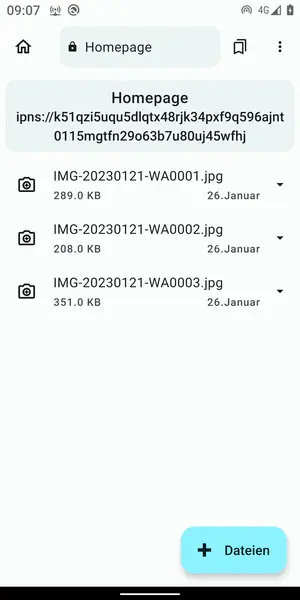
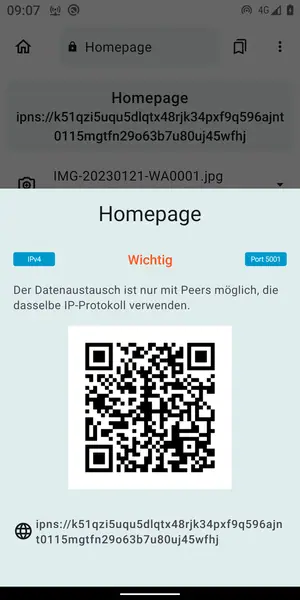
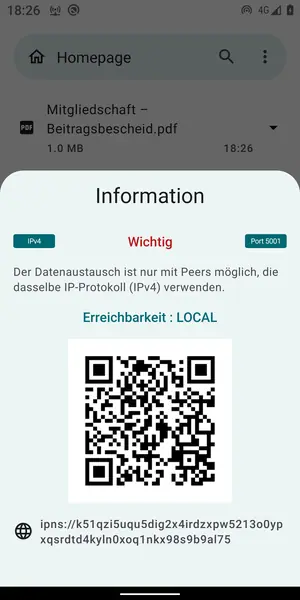
Odin is a decentralized peer-to-peer application via the BitTorrent network stack. For sharing data, a pns:// URI is provided, which consists basically of a peer id, which enables others to find your node on the network.
General
The basic characteristics of the app are decentralized, respect of personal data, open source, free of charge, transparent, free of advertising and legally impeccable.
Documentation
Odin is a client server implementation and based on the BitTorrent network.
The application itself requires the IPv6 protocol to function properly. When you are behind a router you might be able to switch to the IPv6 protocol and make the necessary settings, so that your service is globally reachable (Port Forwarding).
Port Forwarding
Port forwarding allows you to specify that all communications received on a certain port are forwarded directly to your device. You set port forwarding rules up on your router. The following list provides information which might be required for the port forwarding.
- Interface IPv6
Note: Only IPv6 is supported, because a direct connection between two peers can only be established when they use the same IP interface
- Port 5001
- Protocol TCP
Note: The protocol is TCP. The direct connection between two peers will be established via a secure TCP connection, protected by a self-signed certificate.
- Application Odin
Note: Usually can be any name
Concept
The application connect to BitTorrent network and publish its addresses, so that it can be found by other peers via a unique identifier (pid). This peer identifier (
) is also used for marking the content via the**pns://
/** URI. (Note: is a content identifier)
Links
Privacy Policy
Apache License
Nieuw in versie 4.0.0
- Fastlane corrections
- Android 17
Informatie over het APK-bestand
| Pakketnaam | threads.server |
|---|---|
| Versie | 4.0.0 (code 400) |
| Minimaal Android | Android 10 · bedoeld voor API 37 |
| Architecturen | arm64-v8a, armeabi-v7a, x86, x86_64 |
| SHA-256 | 3910fbc903ae72f678915e464bd19767d664aa62495925febe317c6c8d1c1b58 |
| Handtekening | 99f5ae78113394d4cde158d044ac19f6a6d5338fe685cfcb250be55fc464db19 |
| Licentie | Apache-2.0 — vrije, ruime licentie: de broncode is openbaar en herbruikbaar |
| Broncode | gitlab.com/lp2p/odin |
Machtigingen
- Netwerkstatus bekijken
- Internettoegang
Oudere versies
- Odin 4.0.025 april 2026 · 2,5 MB
- Odin 3.6.05 oktober 2025 · 4,2 MB
- Odin 3.5.81 september 2025 · 4,1 MB
Odin APK installeren
- Tik hierboven op APK downloaden en open het bestand als de download klaar is.
- Als Android erom vraagt, sta je browser toe om onbekende apps te installeren.
- Tik op Installeren. Odin verschijnt dan bij je andere apps.
→ Een APK-bestand installeren op Android (stap voor stap)
→ “App niet geïnstalleerd”: oorzaken en oplossingen
Veelgestelde vragen
Is Odin gratis?
Ja. Odin wordt verspreid onder de licentie Apache-2.0: gratis, zonder abonnement en met openbare broncode.
Is dit APK-bestand veilig?
Het bestand is gebouwd en gepubliceerd door de F-Droid-repository op basis van de openbare broncode. De SHA-256-vingerafdruk staat hierboven, zodat je die na het downloaden kunt vergelijken. Is een APK gevaarlijk? Zo controleer je een bestand vóór installatie
Werkt Odin op mijn telefoon?
Je hebt minimaal Android 10 nodig. De app werkt ook zonder Google-diensten, dus ook op recente Huawei-telefoons.





