Exif Thumbnail Adder APK
Add thumbnail in the EXIF tag of JPEG picture not having one (batch processing)
تنزيل APK v1.0.1 · 24.6 م.ب- الإصدار1.0.1
- الحجم24.6 م.ب
- يتطلبAndroid 8.0
- آخر تحديث24/5/2025
- الترخيصGPL-3.0-or-later
- السعرمجاني
حول Exif Thumbnail Adder
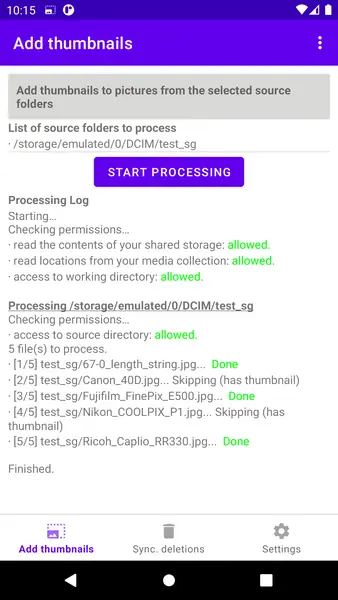
This application for android devices searches for pictures (JPEG) on your device and adds a thumbnail if they don't have one yet. Thumbnails are added to the EXIF metadata structure.
It is designed to work from android Oreo (android 8, SDK 26).
Please report issues here: https://github.com/tenzap/exif-thumbnail-adder/issues
For more information, some known facts and how you may contribute, refer to the [project homepage][1].
Rationale
On some smartphones, when wanting to import pictures to Windows (or any device/operating system supporting MTP or PTP protocols), I noticed the pictures may not display a thumbnail in the import wizard (whether through the Photos app, or through the Windows Explorer import feature).
There are two possible reasons for that behaviour. First, the thumbnail is not present in the picture, usually because the app that created the picture didn't add a thumbnail. Second, there is a thumbnail but it is ignored because some EXIF tags are missing.
Features
- Add thumbnail to pictures (JPEG) that don't yet have one
- Lanczos algorithm to downsample picture thanks to [FFmpeg's swscale library][2] for best results.
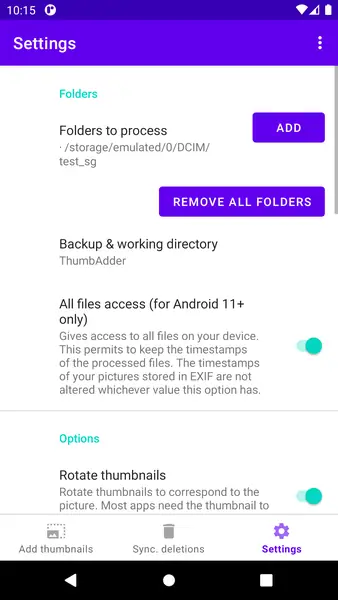
- Select one or more folders to scan from any storage (internal, SDCard...). For example DCIM, Pictures...
- Exclude one subdirectory from selected directories
- Preserve timestamps of the pictures
- Processing log
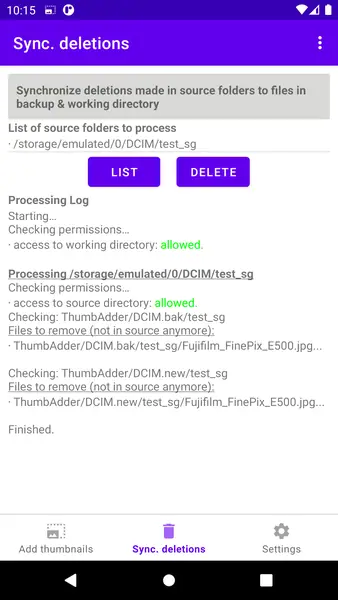
- Synchronize deleted files in the source directory to the backup and working directory (so that you don't keep in the backup folder pictures you don't have anymore in the source folder)
- Conservative default options (backup pictures, skip corrupt files)
- Install app on internal storage or external storage
- Default EXIF library: [Exiv2][3].
- Alternative libraries: Android-Exif-Extended, libexif, pixymeta-android. See known facts on project page to learn more on benefits and drawbacks of each library.
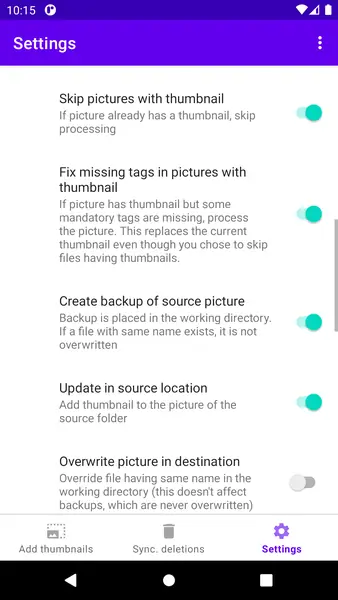
- Settings:
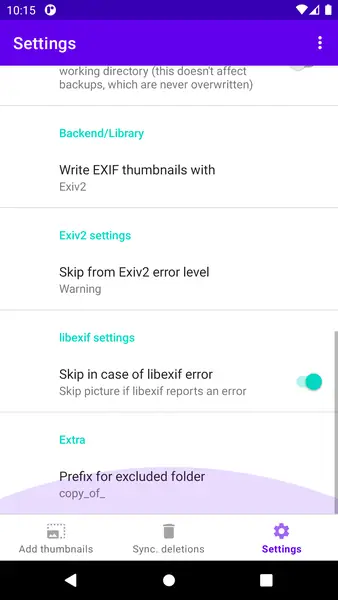
 - Rotate the thumbnail  - Replace existing thumbnail  - Backup of original pictures (backup is never overwritten by the app once created if you choose to add the thumbnail to the input file in its initial location)  - Skip pictures having malformed metadata (this can be disabled to process also files having corrupt tags)  - Replace picture in place or write new picture to another directory
Requested permissions
- WRITE_EXTERNAL_STORAGE, READ_EXTERNAL_STORAGE, READ_MEDIA_IMAGES
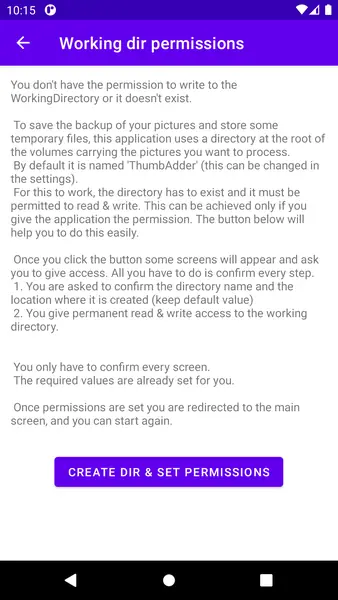
- MANAGE_EXTERNAL_STORAGE
- ACCESS_MEDIA_LOCATION
- POST_NOTIFICATIONS
- get more details on the project homepage
Installation
- Prerequisites: minimum android Oreo (android 8, SDK 26). App was tested up to Android 11.
- Download it through F-Droid app [here][4]
- Download the APK from the [release page][5]
License
GPL-3.0 (see "COPYING" file on project homepage)
URLs
- [1]: https://github.com/tenzap/exif-thumbnail-adder
- [2]: https://ffmpeg.org/libswscale.html
- [3]: https://www.exiv2.org
- [4]: https://f-droid.org/packages/com.exifthumbnailadder.app
- [5]: https://github.com/tenzap/exif-thumbnail-adder/releases
الجديد في الإصدار 1.0.1
1.0.1
- Add support for Android 15 (& set targetSdk to 35) & update toolchain
- exiv2: update to 0.28.5 & expat to 2.7.1
- libexif: update to 0.6.25
- update all gradle dependencies to latest version (except ExifInterface)
- Note: if you run on AOSP or on devices without Google apps, you may loose the GPS information inside your files (at least on emulator image for Android 13). See project homepage for more information.
معلومات ملف APK
| اسم الحزمة | com.exifthumbnailadder.app |
|---|---|
| الإصدار | 1.0.1 (الرمز 767) |
| أدنى إصدار أندرويد | Android 8.0 · مخصّص لـ Android 15 |
| المعماريات | arm64-v8a, armeabi-v7a, x86, x86_64 |
| SHA-256 | 6322a66590354b51404fe9d72216dc5f354f32bb35bfa3006d3eff43a35f4f03 |
| التوقيع | 3e91248f525c3a69717204154b7fe1daf79d264a0c17956fdde85d71623addc4 |
| الترخيص | GPL-3.0-or-later — ترخيص حر من نوع copyleft: الشيفرة متاحة ويجب أن تبقى النسخ المعدّلة حرة |
| الشيفرة المصدرية | github.com/tenzap/exif-thumbnail-adder |
الأذونات
- الكتابة في التخزين
- قراءة التخزين
- قراءة الصور
- الوصول إلى كل الملفات حسّاس
- العمل في الخلفية
- عرض الإشعارات
- منع وضع السكون
- عرض حالة الشبكة
- التشغيل عند بدء الجهاز
أذونات تقنية أخرى: 1
ACCESS_MEDIA_LOCATION
إصدارات سابقة
- Exif Thumbnail Adder 1.0.124 مايو 2025 · 24.6 م.ب
- Exif Thumbnail Adder 1.0.09 مايو 2024 · 24.8 م.ب
- Exif Thumbnail Adder 0.9.1913 أبريل 2023 · 21.4 م.ب
كيفية تثبيت Exif Thumbnail Adder APK
- اضغط على تنزيل APK أعلاه، ثم افتح الملف بعد اكتمال التنزيل.
- إذا طلب أندرويد ذلك، اسمح للمتصفح بتثبيت التطبيقات غير المعروفة.
- اضغط على تثبيت. سيظهر Exif Thumbnail Adder مع تطبيقاتك الأخرى.
→ كيفية تثبيت ملف APK على أندرويد (خطوة بخطوة)
→ «لم يتم تثبيت التطبيق»: الأسباب والحلول
أسئلة شائعة
هل Exif Thumbnail Adder مجاني؟
نعم. يُوزَّع Exif Thumbnail Adder بترخيص GPL-3.0-or-later: مجاني، بلا اشتراك، وشيفرته المصدرية متاحة للجميع.
هل ملف APK هذا آمن؟
الملف هو الذي بناه ونشره مستودع F-Droid من الشيفرة المصدرية العامة. بصمة SHA-256 الخاصة به معروضة أعلاه، ويمكنك مقارنتها بعد التنزيل. هل ملف APK خطير؟ كيف تفحص الملف قبل تثبيته
هل يعمل Exif Thumbnail Adder على هاتفي؟
تحتاج إلى Android 8.0 على الأقل. يعمل التطبيق أيضًا دون خدمات Google، لذا يعمل على هواتف هواوي الحديثة.