
Exif Thumbnail Adder APK
Aggiunge miniatura nel tag EXIF dell'immagine JPEG che non ha una (batch)
Scarica l'APK v1.0.1 · 24,6 MB- Versione1.0.1
- Dimensione24,6 MB
- RichiedeAndroid 8.0
- Aggiornata24/05/2025
- LicenzaGPL-3.0-or-later
- PrezzoGratis
Informazioni su Exif Thumbnail Adder
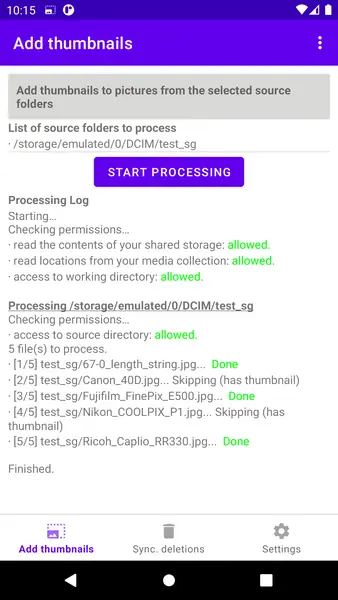
This application for android devices searches for pictures (JPEG) on your device and adds a thumbnail if they don't have one yet. Thumbnails are added to the EXIF metadata structure.
It is designed to work from android Oreo (android 8, SDK 26).
Please report issues here: https://github.com/tenzap/exif-thumbnail-adder/issues
For more information, some known facts and how you may contribute, refer to the [project homepage][1].
Rationale
On some smartphones, when wanting to import pictures to Windows (or any device/operating system supporting MTP or PTP protocols), I noticed the pictures may not display a thumbnail in the import wizard (whether through the Photos app, or through the Windows Explorer import feature).
There are two possible reasons for that behaviour. First, the thumbnail is not present in the picture, usually because the app that created the picture didn't add a thumbnail. Second, there is a thumbnail but it is ignored because some EXIF tags are missing.
Features
- Add thumbnail to pictures (JPEG) that don't yet have one
- Lanczos algorithm to downsample picture thanks to [FFmpeg's swscale library][2] for best results.
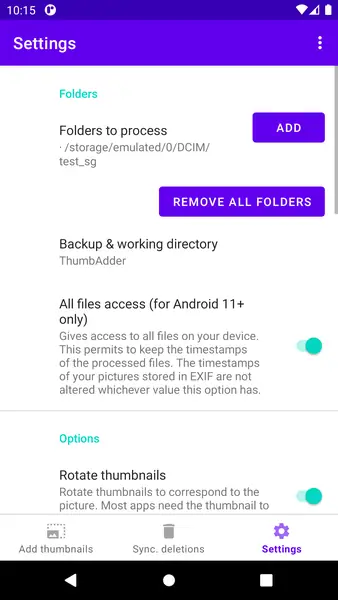
- Select one or more folders to scan from any storage (internal, SDCard...). For example DCIM, Pictures...
- Exclude one subdirectory from selected directories
- Preserve timestamps of the pictures
- Processing log
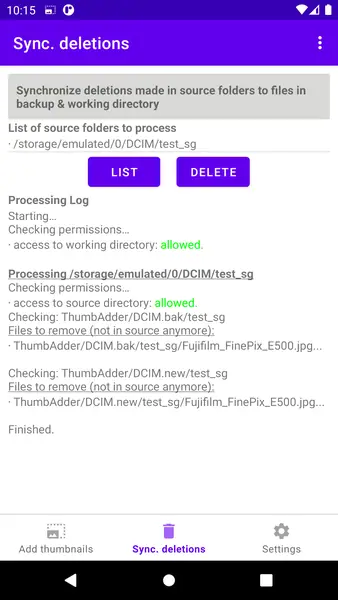
- Synchronize deleted files in the source directory to the backup and working directory (so that you don't keep in the backup folder pictures you don't have anymore in the source folder)
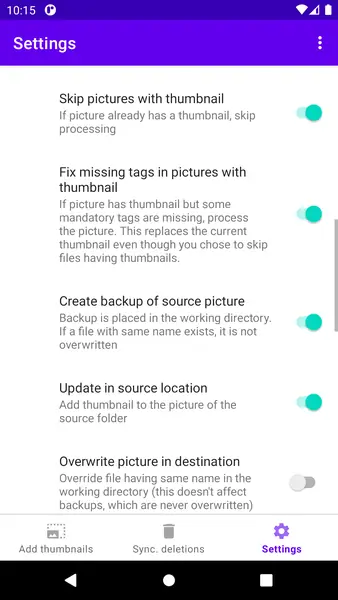
- Conservative default options (backup pictures, skip corrupt files)
- Install app on internal storage or external storage
- Default EXIF library: [Exiv2][3].
- Alternative libraries: Android-Exif-Extended, libexif, pixymeta-android. See known facts on project page to learn more on benefits and drawbacks of each library.
- Settings:
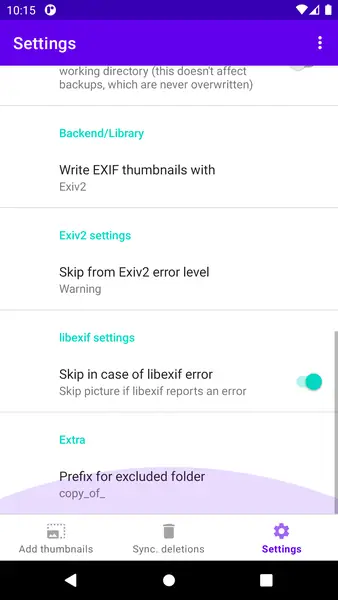
 - Rotate the thumbnail  - Replace existing thumbnail  - Backup of original pictures (backup is never overwritten by the app once created if you choose to add the thumbnail to the input file in its initial location)  - Skip pictures having malformed metadata (this can be disabled to process also files having corrupt tags)  - Replace picture in place or write new picture to another directory
Requested permissions
- WRITE_EXTERNAL_STORAGE, READ_EXTERNAL_STORAGE, READ_MEDIA_IMAGES
- MANAGE_EXTERNAL_STORAGE
- ACCESS_MEDIA_LOCATION
- POST_NOTIFICATIONS
- get more details on the project homepage
Installation
- Prerequisites: minimum android Oreo (android 8, SDK 26). App was tested up to Android 11.
- Download it through F-Droid app [here][4]
- Download the APK from the [release page][5]
License
GPL-3.0 (see "COPYING" file on project homepage)
URLs
- [1]: https://github.com/tenzap/exif-thumbnail-adder
- [2]: https://ffmpeg.org/libswscale.html
- [3]: https://www.exiv2.org
- [4]: https://f-droid.org/packages/com.exifthumbnailadder.app
- [5]: https://github.com/tenzap/exif-thumbnail-adder/releases
Novità della versione 1.0.1
1.0.1
- Add support for Android 15 (& set targetSdk to 35) & update toolchain
- exiv2: update to 0.28.5 & expat to 2.7.1
- libexif: update to 0.6.25
- update all gradle dependencies to latest version (except ExifInterface)
- Note: if you run on AOSP or on devices without Google apps, you may loose the GPS information inside your files (at least on emulator image for Android 13). See project homepage for more information.
Informazioni sul file APK
| Nome del pacchetto | com.exifthumbnailadder.app |
|---|---|
| Versione | 1.0.1 (codice 767) |
| Android minimo | Android 8.0 · pensata per Android 15 |
| Architetture | arm64-v8a, armeabi-v7a, x86, x86_64 |
| SHA-256 | 6322a66590354b51404fe9d72216dc5f354f32bb35bfa3006d3eff43a35f4f03 |
| Firma | 3e91248f525c3a69717204154b7fe1daf79d264a0c17956fdde85d71623addc4 |
| Licenza | GPL-3.0-or-later — licenza libera copyleft: il codice è pubblico e le versioni modificate devono restare libere |
| Codice sorgente | github.com/tenzap/exif-thumbnail-adder |
Autorizzazioni richieste
- Scrivere nell'archivio
- Leggere l'archivio
- Leggere le foto
- Accesso a tutti i file sensibile
- Funzionare in background
- Mostrare notifiche
- Impedire lo standby
- Vedere lo stato della rete
- Avviarsi all'accensione
Altre 1 autorizzazioni tecniche
ACCESS_MEDIA_LOCATION
Versioni precedenti
- Exif Thumbnail Adder 1.0.124 maggio 2025 · 24,6 MB
- Exif Thumbnail Adder 1.0.09 maggio 2024 · 24,8 MB
- Exif Thumbnail Adder 0.9.1913 aprile 2023 · 21,4 MB
Come installare Exif Thumbnail Adder APK
- Tocca Scarica l'APK qui sopra, poi apri il file al termine del download.
- Se Android lo chiede, consenti al browser di installare app sconosciute.
- Tocca Installa. Exif Thumbnail Adder comparirà insieme alle altre app.
→ Come installare un file APK su Android (passo passo)
→ «App non installata»: cause e soluzioni
Domande frequenti
Exif Thumbnail Adder è gratis?
Sì. Exif Thumbnail Adder è distribuita con licenza GPL-3.0-or-later: gratuita, senza abbonamento e con codice sorgente pubblico.
Questo file APK è sicuro?
Il file è quello compilato e pubblicato dal repository F-Droid a partire dal codice sorgente pubblico. L'impronta SHA-256 è indicata qui sopra: puoi confrontarla dopo il download. Un APK è pericoloso? Come verificare un file prima di installarlo
Exif Thumbnail Adder funziona sul mio telefono?
Serve almeno Android 8.0. L'app funziona anche senza i servizi Google, quindi anche sui telefoni Huawei recenti.





