Exif Thumbnail Adder APK
Add thumbnail in the EXIF tag of JPEG picture not having one (batch processing)
Завантажити APK v1.0.1 · 24,6 МБ- Версія1.0.1
- Розмір24,6 МБ
- ПотрібноAndroid 8.0
- Оновлено24.05.2025
- ЛіцензіяGPL-3.0-or-later
- ЦінаБезкоштовно
Про Exif Thumbnail Adder
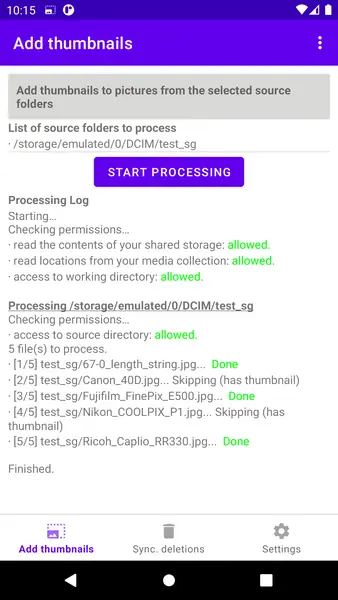
This application for android devices searches for pictures (JPEG) on your device and adds a thumbnail if they don't have one yet. Thumbnails are added to the EXIF metadata structure.
It is designed to work from android Oreo (android 8, SDK 26).
Please report issues here: https://github.com/tenzap/exif-thumbnail-adder/issues
For more information, some known facts and how you may contribute, refer to the [project homepage][1].
Rationale
On some smartphones, when wanting to import pictures to Windows (or any device/operating system supporting MTP or PTP protocols), I noticed the pictures may not display a thumbnail in the import wizard (whether through the Photos app, or through the Windows Explorer import feature).
There are two possible reasons for that behaviour. First, the thumbnail is not present in the picture, usually because the app that created the picture didn't add a thumbnail. Second, there is a thumbnail but it is ignored because some EXIF tags are missing.
Features
- Add thumbnail to pictures (JPEG) that don't yet have one
- Lanczos algorithm to downsample picture thanks to [FFmpeg's swscale library][2] for best results.
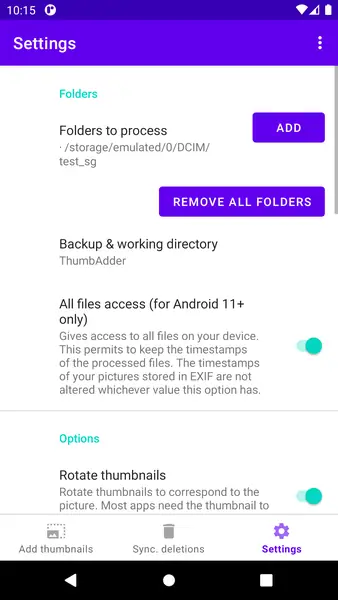
- Select one or more folders to scan from any storage (internal, SDCard...). For example DCIM, Pictures...
- Exclude one subdirectory from selected directories
- Preserve timestamps of the pictures
- Processing log
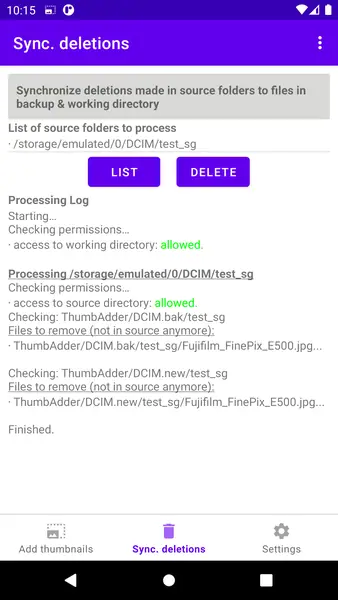
- Synchronize deleted files in the source directory to the backup and working directory (so that you don't keep in the backup folder pictures you don't have anymore in the source folder)
- Conservative default options (backup pictures, skip corrupt files)
- Install app on internal storage or external storage
- Default EXIF library: [Exiv2][3].
- Alternative libraries: Android-Exif-Extended, libexif, pixymeta-android. See known facts on project page to learn more on benefits and drawbacks of each library.
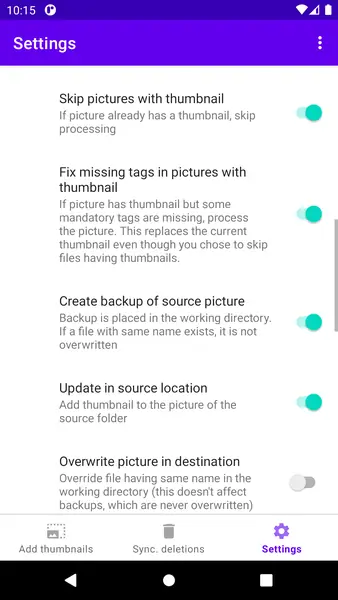
- Settings:
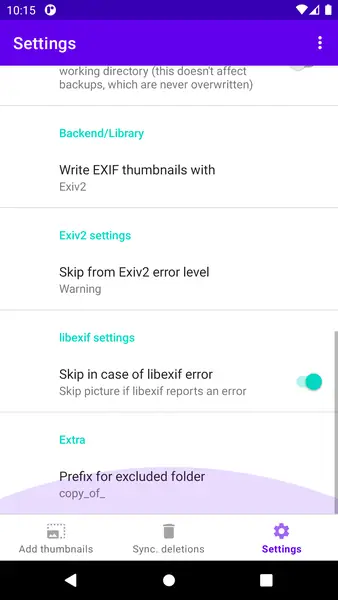
 - Rotate the thumbnail  - Replace existing thumbnail  - Backup of original pictures (backup is never overwritten by the app once created if you choose to add the thumbnail to the input file in its initial location)  - Skip pictures having malformed metadata (this can be disabled to process also files having corrupt tags)  - Replace picture in place or write new picture to another directory
Requested permissions
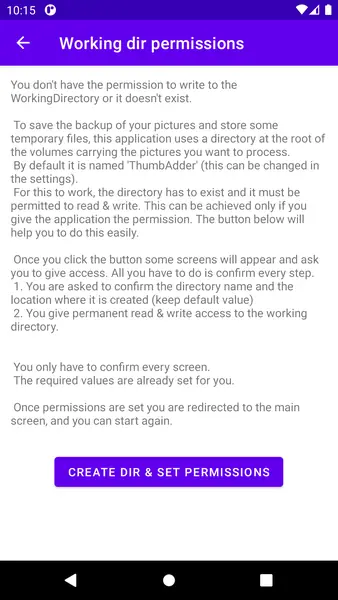
- WRITE_EXTERNAL_STORAGE, READ_EXTERNAL_STORAGE, READ_MEDIA_IMAGES
- MANAGE_EXTERNAL_STORAGE
- ACCESS_MEDIA_LOCATION
- POST_NOTIFICATIONS
- get more details on the project homepage
Installation
- Prerequisites: minimum android Oreo (android 8, SDK 26). App was tested up to Android 11.
- Download it through F-Droid app [here][4]
- Download the APK from the [release page][5]
License
GPL-3.0 (see "COPYING" file on project homepage)
URLs
- [1]: https://github.com/tenzap/exif-thumbnail-adder
- [2]: https://ffmpeg.org/libswscale.html
- [3]: https://www.exiv2.org
- [4]: https://f-droid.org/packages/com.exifthumbnailadder.app
- [5]: https://github.com/tenzap/exif-thumbnail-adder/releases
Що нового у версії 1.0.1
1.0.1
- Add support for Android 15 (& set targetSdk to 35) & update toolchain
- exiv2: update to 0.28.5 & expat to 2.7.1
- libexif: update to 0.6.25
- update all gradle dependencies to latest version (except ExifInterface)
- Note: if you run on AOSP or on devices without Google apps, you may loose the GPS information inside your files (at least on emulator image for Android 13). See project homepage for more information.
Інформація про APK-файл
| Назва пакета | com.exifthumbnailadder.app |
|---|---|
| Версія | 1.0.1 (код 767) |
| Мінімальна версія | Android 8.0 · цільова Android 15 |
| Архітектури | arm64-v8a, armeabi-v7a, x86, x86_64 |
| SHA-256 | 6322a66590354b51404fe9d72216dc5f354f32bb35bfa3006d3eff43a35f4f03 |
| Підпис | 3e91248f525c3a69717204154b7fe1daf79d264a0c17956fdde85d71623addc4 |
| Ліцензія | GPL-3.0-or-later — вільна копілефт-ліцензія: код відкритий, а змінені версії мають лишатися вільними |
| Вихідний код | github.com/tenzap/exif-thumbnail-adder |
Дозволи
- Запис у сховище
- Читання сховища
- Читання фото
- Доступ до всіх файлів важливий
- Робота у фоні
- Показ сповіщень
- Заборона сплячого режиму
- Перегляд стану мережі
- Запуск під час увімкнення
Ще технічних дозволів: 1
ACCESS_MEDIA_LOCATION
Попередні версії
- Exif Thumbnail Adder 1.0.124 травня 2025 р. · 24,6 МБ
- Exif Thumbnail Adder 1.0.09 травня 2024 р. · 24,8 МБ
- Exif Thumbnail Adder 0.9.1913 квітня 2023 р. · 21,4 МБ
Як встановити Exif Thumbnail Adder APK
- Натисніть Завантажити APK вище й відкрийте файл після завантаження.
- Якщо Android запитає, дозвольте браузеру встановлювати невідомі застосунки.
- Натисніть Встановити. Exif Thumbnail Adder з’явиться серед інших застосунків.
→ Як встановити APK-файл на Android (покроково)
→ «Застосунок не встановлено»: причини й рішення
Часті запитання
Exif Thumbnail Adder безкоштовний?
Так. Exif Thumbnail Adder поширюється за ліцензією GPL-3.0-or-later: безкоштовно, без підписки, вихідний код відкритий.
Чи безпечний цей APK-файл?
Файл зібраний і опублікований репозиторієм F-Droid із відкритого вихідного коду. Його відбиток SHA-256 указано вище — порівняйте його після завантаження. Чи небезпечний APK? Як перевірити файл перед встановленням
Чи працюватиме Exif Thumbnail Adder на моєму телефоні?
Потрібна версія не нижче Android 8.0. Застосунок працює і без сервісів Google, зокрема на нових телефонах Huawei.